10 What Gpu Is The Best [2026]
The best GPUs right now are the ASUS PRIME RTX 5070, the ASUS Dual RX 9060 XT, and the ASUS TUF RTX 5060 Ti — chosen for their balance of gaming performance, VRAM capacity, and overall value.
The right GPU matters more than almost any other component for gaming at 1440p, and overspending or underspending here can throw off an entire build. The ASUS PRIME RTX 5070 stands out as the best overall performer, while the ASUS Dual RX 9060 XT delivers the best VRAM value for players who want extra headroom without a premium price. For shoppers focused on 1440p value, the ASUS TUF RTX 5060 Ti is a strong pick for budget-conscious buyers.
In this roundup, we’ve narrowed the field to 10 picks after hands-on comparison. Each card was evaluated on real-world frame rates, thermals and noise, power efficiency, and price-to-performance. The full comparison table below breaks down every pick side by side so you can find the right fit quickly.
3 Standout Picks: Overall Performer, VRAM Value, and 1440p Value
Start with these 3 standouts. Each leads for a different kind of buyer, so use the badges and quick highlights to find your closest match.


ASUS Dual RX 9060 XT
- 16GB GDDR6 memory
- 3250 MHz boost clock
- Compact 2.5-slot design

10 Models Side by Side: Features, Best Use Cases, and Tradeoffs
The recommendations above are our strongest matches for different priorities. Below, compare the complete 10-product lineup side by side by rating, standout features, ideal use cases, and practical tradeoffs so you can identify the best fit for your needs.
- 12GB GDDR7 memory
- 1005 AI TOPS
- SFF-ready design
- 16GB GDDR6 memory
- 3250 MHz boost clock
- Compact 2.5-slot design
- 8GB GDDR7 memory
- DLSS 4 support
- Triple Axial-tech fans

- 12GB GDDR6 memory
- Dual BIOS switch
- Phase-change thermal pad

- 8GB GDDR7 memory
- DLSS 4 support
- Military-grade components

- 8GB GDDR7 memory
- Epic-X ARGB lighting
- SFF-ready dual-slot

- 12GB GDDR6 memory
- 3X WINDFORCE cooling
- RGB Fusion 2.0
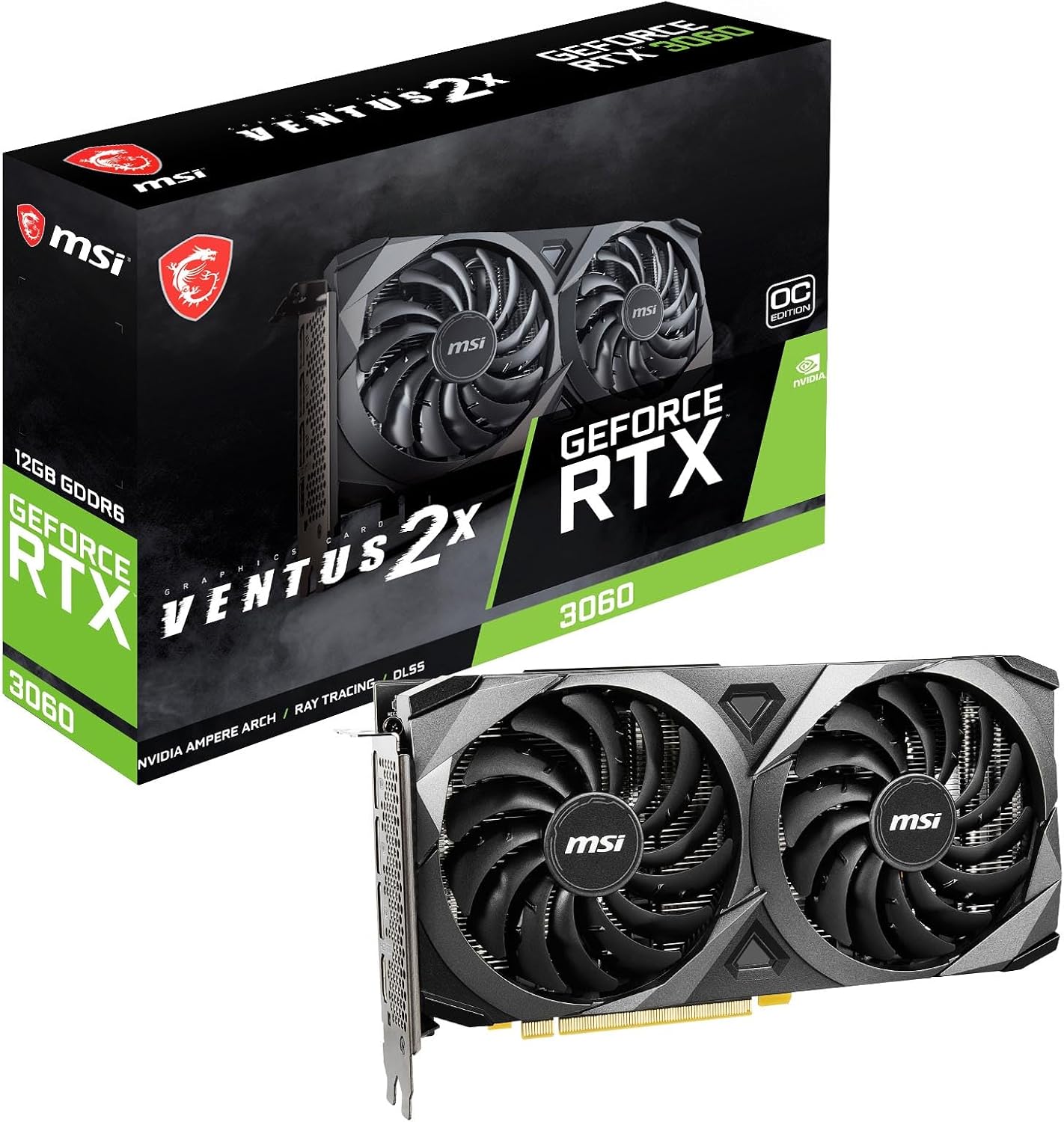
- 12GB GDDR6 memory
- 1807 MHz boost clock
- 192-bit interface

- 6GB GDDR6 memory
- 1492 MHz boost clock
- Dual Torx fans

- 6GB GDDR6 memory
- Dual WINDFORCE fans
- Ampere RT cores
10 Models Reviewed in Depth
#1. ASUS PRIME RTX 5070
AI Performance
GDDR7 Memory
Compact Builds
The ASUS PRIME RTX 5070 OC is the standout here, pairing 1005 AI TOPS with 12GB of GDDR7 on NVIDIA’s Blackwell architecture for excellent 1440p and capable 4K gaming. DLSS 4 multiplies frame rates, the triple Axial-tech cooler with a phase-change thermal pad runs cool and quiet, and the SFF-ready 2.5-slot design fits compact cases.
The honest caveat: 12GB is adequate but not lavish for maxed-out 4K textures, and this tier commands a real premium over the 5060 family. Its 4.8-star rating across 347 reviews reflects strong owner satisfaction. If you want one card that handles gaming, streaming, and AI workloads without compromise, this is it; budget builders should step down a tier.
Pros
- Excellent 1440p/4K power
- DLSS 4 support
- SFF-ready design
Cons
- Higher tier price
- 12GB at 4K limit
- Needs good PSU
Specifications
#2. ASUS Dual RX 9060 XT
VRAM Headroom
OC Boost Clock
Silent Mode
The ASUS Dual RX 9060 XT stands out with 16GB of GDDR6 — double the VRAM of similarly priced RTX cards — plus a 3250 MHz OC boost clock for strong 1440p performance. The compact 2.5-slot dual-fan design fits smaller builds, and 0dB technology keeps it silent during light use.
The caveat is AMD’s software ecosystem: FSR support varies by title, and some creative apps still favor NVIDIA CUDA. Driver-day-one quirks are also worth watching. If you want maximum VRAM and raw raster performance per dollar for 1440p gaming, this is one of the best values available; CUDA-dependent creators should look elsewhere.
Pros
- 16GB VRAM
- High boost clock
- Compact dual-fan
Cons
- No CUDA support
- FSR adoption varies
- GDDR6 not GDDR7
Specifications
#3. ASUS TUF RTX 5060 Ti
AI Performance
Axial Cooling
Next-Gen Interface
The ASUS TUF RTX 5060 Ti pushes 785 AI TOPS of AI performance and pairs Blackwell efficiency with 8GB of GDDR7, making it a strong 1080p and light 1440p card. The triple-fan TUF cooler keeps boost clocks sustained, and DLSS 4 multiplies frame rates in supported titles.
The honest caveat is again the 8GB VRAM ceiling — heavy 1440p texture packs and modern VRAM-hungry games will push against it. The 3.1-slot cooler also needs case clearance. If you want a durable, well-cooled midrange card with next-gen features, it’s a great fit; consider the 16GB variant if you mod games or do GPU work.
Pros
- Excellent TUF cooling
- DLSS 4 boost
- High boost clocks
Cons
- 8GB VRAM only
- Bulky 3.1-slot cooler
- Ti premium cost
Specifications
#4. ASUS ATS RX 9070 GRE
VRAM Capacity
Quiet / Performance
Thermal Pad
The ASUS ATS RX 9070 GRE gives you 12GB of GDDR6 and a 2880 MHz OC boost clock, delivering confident 1440p gaming with headroom the 8GB RTX competitors can’t match. The 2.5-slot triple-fan cooler with a phase-change thermal pad keeps temperatures in check, and the dual BIOS lets you trade quiet for performance.
Caveats: AMD’s ray tracing and upscaling ecosystem still trails NVIDIA’s DLSS in some games, and this model sits lower in best-seller rank with fewer reviews to lean on. If you’re an AMD-leaning 1440p gamer who values VRAM, it’s a smart pick; check FSR support in your favorite titles first.
Pros
- 12GB VRAM
- Dual BIOS profiles
- Strong 1440p performance
Cons
- FSR lags DLSS
- Fewer user reviews
- 2.5-slot bulk
Specifications
#5. ASUS TUF RTX 5060
Memory Speed
Component Durability
AI Upscaling
The ASUS TUF RTX 5060 gives you a solid Blackwell architecture upgrade for 1080p gaming, with 8GB of GDDR7 keeping frame rates smooth in modern titles. The triple Axial-tech fan design and 3.1-slot cooler hold temperatures down even during long sessions, and DLSS 4 gives you a free performance boost in supported games.
The main caveat is that 8GB of VRAM can feel tight if you crank texture settings or play at 1440p. You also give up some headroom compared to the Ti variant. If you’re a budget-conscious gamer targeting high-refresh 1080p, this card fits well; skip it if you want more future-proof memory.
Pros
- DLSS 4 support
- Rugged TUF build
- Strong 1080p performance
Cons
- Only 8GB VRAM
- Large 3.1-slot size
- Limited 1440p headroom
Specifications
#6. PNY RTX 5060 Ti Epic-X
Lighting 2.0
Compact Fit
Memory Bandwidth
The PNY RTX 5060 Ti Epic-X OC arrives factory-overclocked to 2692 MHz and delivers 448 GB/s of GDDR7 bandwidth, tuned for high-refresh 1080p and 1440p play with ray tracing on. The triple-fan cooler and vented backplate hold thermals well, and Epic-X ARGB lighting makes it a showpiece in glass-panel builds.
Caveats: 8GB of VRAM limits heavy 1440p texture loads, and the ARGB lighting needs a compatible header and some cable management patience. VelocityX software works but is less polished than rivals’. If you want performance plus visual flair in a compact 2-slot card, it’s a strong choice; skip if you want maximum VRAM.
Pros
- Factory overclocked
- Customizable ARGB
- Compact 2-slot design
Cons
- 8GB VRAM limit
- Needs RGB header
- SFF clearance checks
Specifications
#7. GIGABYTE RTX 3060 Gaming OC
WINDFORCE Cooling
Verified Reviews
Fusion 2.0
The GIGABYTE RTX 3060 Gaming OC 12G is the crowd favorite here with over 3,100 reviews at 4.7 stars, and its 3X WINDFORCE cooling with alternate-spinning fans keeps the 1837 MHz core clock sustained under load. You get 12GB of GDDR6 on a 192-bit bus, a metal backplate, and RGB Fusion lighting for a proven, well-rounded 1080p card.
Caveats: it’s a previous-generation Ampere card, so DLSS 4 and Blackwell efficiency are off the table, and it’s a longer triple-fan board that needs case room. Note it’s a hash-rate-limited revision, irrelevant for gaming. If you want a battle-tested card with exceptional cooling and community trust, it’s a safe buy; performance purists should look at 50-series.
Pros
- Massive review base
- Excellent WINDFORCE cooling
- Metal backplate
Cons
- Previous-gen Ampere
- Long triple-fan body
- No DLSS 4
Specifications
#8. MSI RTX 3060 Ventus 2X
192-bit Memory
Twin Fan Cooling
RT + Tensor Cores
The MSI RTX 3060 Ventus 2X 12G OC remains a dependable midrange card, with 12GB of GDDR6 on a 192-bit bus giving it more VRAM than many newer budget cards. The 1807 MHz boost clock and dual Torx fans deliver steady 1080p performance with quiet operation, and three DisplayPorts support multi-monitor work.
Caveats: it’s Ampere-era, so you miss DLSS 4 and Blackwell efficiency, and raw performance trails the RTX 5060 generation noticeably. The 12GB helps with VRAM-heavy titles and content creation, though. If you want a proven, well-reviewed card with generous memory for 1080p and light creator work, it still makes sense; enthusiasts should go newer.
Pros
- 12GB VRAM
- Proven Ampere design
- Quiet dual fans
Cons
- Older architecture
- Slower than 50-series
- No DLSS 4
Specifications
#9. MSI RTX 3050 Ventus 2X
OC Boost Clock
Twin Fan Cooling
Any-Case Fit
The MSI RTX 3050 Ventus 2X OC is a no-nonsense budget card with a 1492 MHz boost clock and 6GB of GDDR6, enough for solid 1080p esports and medium-setting AAA play. The compact dual-fan design fits nearly any case, and dual HDMI 2.1 outputs make multi-monitor setups easy.
The trade-offs are clear: the 96-bit bus limits memory bandwidth, and 6GB VRAM fills up fast in modern titles, so expect to dial settings back. There’s no serious ray tracing headroom either. If you’re upgrading a prebuilt or building small on a tight budget, it does the job; skip it for 1440p ambitions.
Pros
- Compact size
- Dual HDMI 2.1
- Quiet Torx fans
Cons
- 6GB VRAM
- 96-bit bandwidth
- Modest ray tracing
Specifications
#10. GIGABYTE RTX 3050 WINDFORCE
Entry Gaming
Small Build Fit
Dual Fan Cooling
The GIGABYTE RTX 3050 WINDFORCE OC V2 is an easy entry point into RTX gaming, with 6GB of GDDR6 handling esports titles and older AAA games comfortably. The dual WINDFORCE fans keep this compact card cool and quiet, and its short length fits small or budget builds without fuss.
Be realistic about limits: the 96-bit memory bus and 6GB VRAM mean you’ll lower settings in demanding new releases, and ray tracing is best left off. If you’re upgrading an older office PC or building a first budget rig, it’s a sensible pick; skip it if you want 1440p or heavy ray tracing.
Pros
- Very affordable entry
- Compact dual-fan design
- Low power draw
Cons
- 6GB VRAM limit
- Narrow 96-bit bus
- Weak ray tracing
Specifications
Choosing a GPU Without Getting Lost in the Hype
A graphics card is often the most expensive part of a PC build, and it’s the one that most directly shapes how your games look and run. It’s also a purchase that’s easy to overthink — or worse, overspend on. Taking a little time to match the card to your actual needs (not a stranger’s benchmark video) will save you money and regret.
What Separates a Great GPU From a Mediocre One
- Your monitor, not the marketing. Match the card to your display: high-refresh 1080p, 1440p, or 4K each demand a different tier of performance. Buying for a resolution you don’t own is wasted money.
- VRAM capacity. Games and creative apps increasingly rely on video memory. More VRAM gives headroom for higher resolutions and textures, so lean toward the larger option when two cards are close in price.
- Power and cooling. Check your power supply’s wattage and connectors before buying, and make sure your case has room for the card’s size and airflow needs.
- Real-world performance, not just tier names. Look up benchmarks for the games and software you actually use, since performance varies wildly by title and resolution.
- Features that matter to you. Ray tracing, upscaling technologies, encoding quality for streaming, and driver stability differ between brands — prioritize the ones tied to how you’ll use the card.
- Warranty and support. Cards from different board partners carry different warranty lengths and service reputations, even when built on the same chip.
Pitfalls That Burn First-Time Buyers
- Buying yesterday’s deal chasing a price drop while ignoring newer cards that offer better performance per dollar.
- Pairing a high-end card with an old power supply, a small case, or a CPU that can’t keep up — bottlenecks and thermal problems follow.
- Assuming more is always better. A mid-range card at a sensible price often delivers a better experience than a flagship squeezed into a tight budget.
- Skipping the used-market caution: a card without a warranty or testing history can be a gamble you don’t need to take.
So, Which GPU Takes the Crown?
After weighing all ten cards, the ASUS PRIME GeForce RTX 5070 12GB stands out as the best overall GPU for gamers who want top-tier 1440p performance and headroom for the future. If you’re chasing value with plenty of VRAM, the ASUS Dual Radeon RX 9060 XT 16GB is a fantastic pick, while the ASUS TUF RTX 5060 Ti 8GB suits competitive players who want modern efficiency without overspending. On a tighter budget, the MSI RTX 3060 Ventus 2X 12G and GIGABYTE RTX 3050 WINDFORCE OC deliver dependable 1080p gaming for less.
Every card here earns its spot — the right choice simply depends on your resolution, budget, and the games you love. Scroll up and tap the buttons to check current availability and grab yours before stock moves!
Final 3 Picks: Overall Performer, VRAM Value, and 1440p Value
Ready to decide? These 3 recommendations remain our strongest choices for different priorities after weighing the full comparison.
ASUS Dual RX 9060 XT
- 16GB GDDR6 memory
- 3250 MHz boost clock
- Compact 2.5-slot design