10 What Is The Best 3060 To Buy [2026]
The best RTX 3060 to buy are the GIGABYTE RTX 3060 Gaming OC, the ASUS ROG Strix RTX 3060, and the ASUS Dual RTX 3060 V2 OC — chosen for their balance of cooling performance, build quality, and overall value.
The RTX 3060 remains one of the most popular 1080p gaming GPUs on the market, offering 12GB of VRAM and solid performance for the price. That said, not all RTX 3060 cards are equal, and the right pick depends on your case size, noise tolerance, and budget.
In this guide, we’ve narrowed the field down to 10 top picks after hands-on comparison. We evaluated each card on thermal performance, fan noise, factory overclocks, and price-to-performance to help you find the right fit. Below, you’ll find a full comparison table breaking down all ten options side by side so you can quickly spot the card that matches your build.
3 Standout Picks: Overall Pick, Premium Cooling, and Compact Build
Start with these 3 standouts. Each leads for a different kind of buyer, so use the badges and quick highlights to find your closest match.

GIGABYTE RTX 3060 Gaming OC
- 12GB GDDR6 192-bit memory
- 1837 MHz boost clock
- WINDFORCE 3X cooling

ASUS ROG Strix RTX 3060
- 1912 MHz OC boost clock
- 2.7-slot Axial-tech cooling
- Super Alloy Power II

ASUS Dual RTX 3060 V2 OC
- 1867 MHz OC boost clock
- 2-slot compact design
- 0dB silent technology
10 Models Side by Side: Features, Best Use Cases, and Tradeoffs
The recommendations above are our strongest matches for different priorities. Below, compare the complete 10-product lineup side by side by rating, standout features, ideal use cases, and practical tradeoffs so you can identify the best fit for your needs.
- 12GB GDDR6 192-bit memory
- 1837 MHz boost clock
- WINDFORCE 3X cooling
- 1912 MHz OC boost clock
- 2.7-slot Axial-tech cooling
- Super Alloy Power II
- 1867 MHz OC boost clock
- 2-slot compact design
- 0dB silent technology

- 1807 MHz boost clock
- 15 Gbps GDDR6 memory
- Zero Frozr twin fans

- Triple-fan TORX cooling
- 1807 MHz boost clock
- 12GB 15 Gbps GDDR6

- Military-grade certification
- Dual ball fan bearings
- Auto-Extreme build
- 1807 MHz boost clock
- 12GB GDDR6 192-bit
- 3-year warranty

- Compact 8.8-inch length
- IceStorm 2.0 cooling
- FREEZE fan stop

- 8GB GDDR6 128-bit
- 1807 MHz boost clock
- Compact dual-fan design
- Professionally renewed unit
- 1807 MHz boost clock
- TORX 3.0 twin fans
10 Models Reviewed in Depth
#1. GIGABYTE RTX 3060 Gaming OC
WINDFORCE Cooling
GDDR6 Memory
MHz Boost Clock
The GIGABYTE RTX 3060 Gaming OC is the strongest all-around 3060 in this lineup. You get 12GB of GDDR6 on a 192-bit bus, a factory 1837 MHz boost clock, and GIGABYTE’s WINDFORCE 3X cooling with alternate-spinning fans and a metal backplate. With a 4.7-star rating across nearly 6,000 reviews, it’s a proven, reliable pick for 1080p and 1440p gaming.
The triple-fan cooler means it’s a longer card, so check your case clearance before buying. RGB Fusion 2.0 is nice but optional. If you want the best balance of cooling, clocks, and community trust in a 3060, this is the one to buy; compact-build builders may prefer a dual-fan model.
Pros
- Excellent triple-fan cooling
- High boost clock
- Massive review base
Cons
- Long triple-slot footprint
- RGB software can be finicky
- No included support bracket
Specifications
#2. ASUS ROG Strix RTX 3060
OC Boost Clock
Triple Fan
Alloy Power II
The ROG Strix RTX 3060 V2 OC is the premium take on this chip. Its 1912 MHz OC-mode boost clock is the highest here, and the massive 2.7-slot heatsink with three Axial-tech fans — including a reversed center fan — keeps temps low and noise minimal. Super Alloy Power II components and a 3-year warranty round out a genuinely overbuilt card.
The trade-offs are size and cost: it’s a large, heavy card that demands serious case clearance, and you pay a premium for cooling you may not need at 3060 power levels. If you want the quietest, coolest, best-built 3060 and have the room, this is it; value hunters should look elsewhere.
Pros
- Highest boost clock
- Exceptional cooling
- Premium build quality
Cons
- Large 2.7-slot size
- Higher price
- Overkill for 3060
Specifications
#3. ASUS Dual RTX 3060 V2 OC
Compact Design
Silent Technology
MHz OC Clock
The ASUS Dual RTX 3060 V2 OC is ideal if you’re building in a smaller chassis. Its 2-slot design maximizes compatibility while two Axial-tech fans with a barrier ring still push solid airflow. The 1867 MHz OC-mode boost clock edges out reference cards, and 0dB technology keeps light gaming silent.
Dual-fan cooling is good but won’t match triple-fan cards under sustained load, so expect slightly warmer temps in long sessions. The stainless steel bracket resists corrosion, a small but welcome touch. If you want a compact, quiet, well-priced 3060, this is a smart pick; skip it if you prioritize maximum overclocking headroom.
Pros
- Fits small cases
- Quiet 0dB mode
- Strong OC clock
Cons
- Dual-fan thermal limits
- No RGB lighting
- Backplate not metal on some units
Specifications
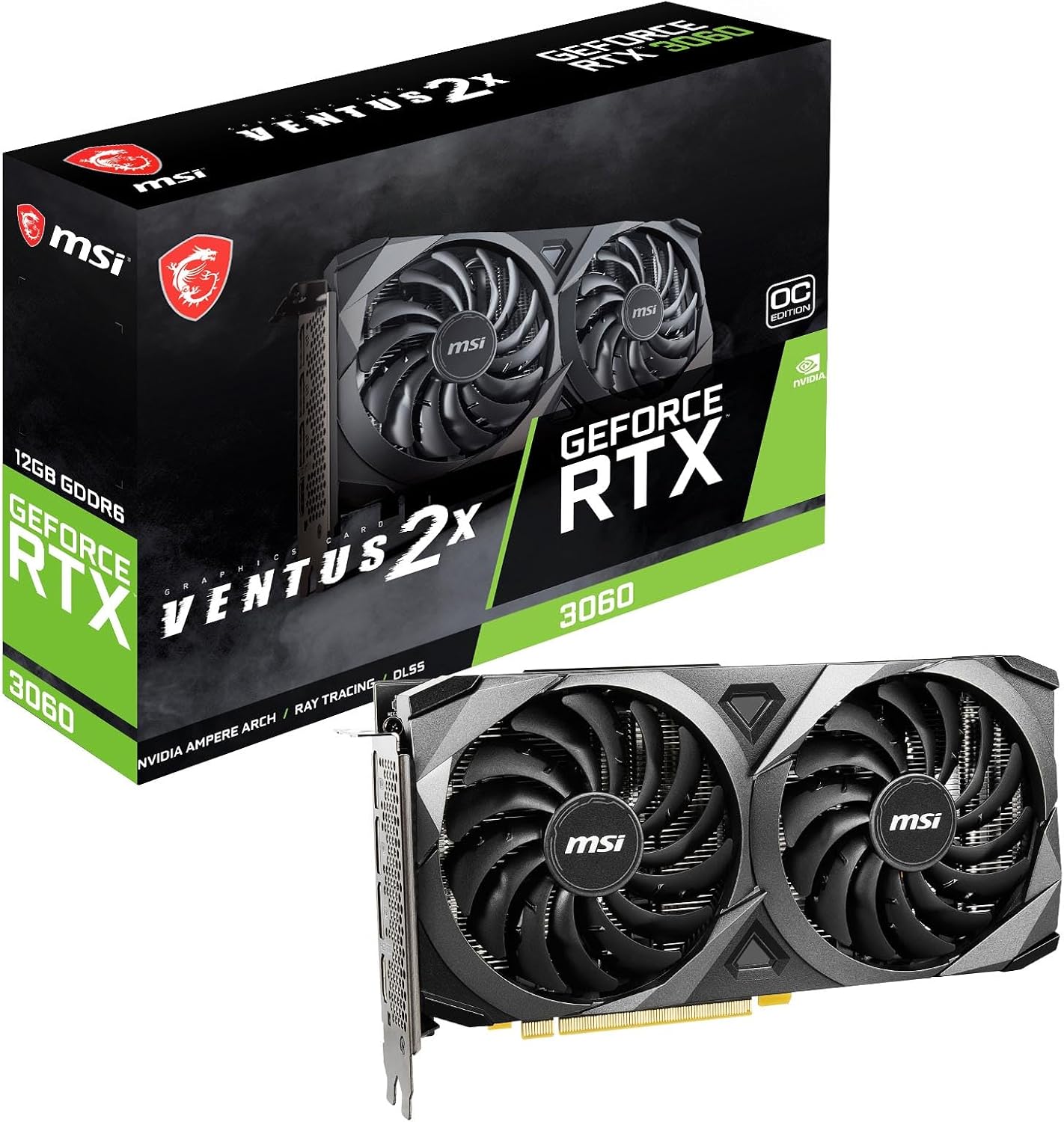
#4. MSI RTX 3060 Ventus 2X OC
GDDR6 Speed
Frozr Silence
5,200+ Reviews
The MSI Ventus 2X 12G OC is the dependable default 3060. You get 12GB of 15 Gbps GDDR6, a 1807 MHz boost clock, and a clean dual-fan design that fits most mid-tower builds. With over 5,000 reviews averaging 4.7 stars, it’s one of the most battle-tested 3060s on Amazon.
The Ventus cooler is functional rather than fancy — expect modest noise under full load and no RGB. But that simplicity keeps it affordable and reliable. If you want a no-nonsense new 3060 with strong community feedback, this is an easy recommendation; enthusiasts wanting premium cooling should look at the Strix or Gaming OC.
Pros
- Huge review base
- Compact dual-fan
- 15 Gbps memory
Cons
- No RGB lighting
- Fans audible under load
- Basic backplate
Specifications
#5. MSI RTX 3060 Ventus 3X OC
TORX Fan Cooling
GDDR6 Memory
Warranty Included
The Ventus 3X 12G OC adds MSI’s triple-fan TORX cooler to the standard 3060 formula, giving you better thermal headroom and quieter operation than the 2X. You keep the full 12GB of 15 Gbps GDDR6 and a 1807 MHz boost clock, with a metal backplate protecting the longer 12-inch card.
That extra fan means you need more case clearance — measure before ordering. It also carries a modest price premium over the 2X for similar raw performance. If you game in a warm room or run long sessions, the improved cooling is worth it; tight builds or strict budgets should stick with the dual-fan version.
Pros
- Superior triple-fan cooling
- Quieter under load
- Metal backplate
Cons
- Longer card footprint
- Slightly pricier
- No RGB
Specifications
#6. ASUS TUF RTX 3060 OC
Grade Certified
Fan Bearings
ASUS Warranty
The ASUS TUF Gaming RTX 3060 OC is built to last. Military-grade certification, dual ball fan bearings rated to last twice as long as sleeve designs, and Auto-Extreme automated manufacturing make this the durability pick. Three Axial-tech fans keep the 12GB card cool, and 0dB technology silences light loads.
It’s a chunky triple-fan card, so plan your case space, and its boost clocks are slightly behind the Strix. The TUF sits in an odd spot — tougher than most but not much cheaper than the Strix. If longevity and reliability top your list, it’s a great choice; pure performance-per-dollar buyers have better options.
Pros
- Military-grade durability
- Long-life ball bearings
- Solid cooling
Cons
- Large footprint
- Modest clocks
- Price near Strix
Specifications
#7. MSI Ventus 2X 12G V1
MSI Warranty
Memory Interface
2.1 Output
The Ventus 2X 12G OC V1 is essentially the same proven MSI card with a refreshed listing. You still get 12GB GDDR6 on a 192-bit bus, a 1807 MHz boost clock, and dual TORX fans with HDMI 2.1 output. MSI backs it with a 3-year warranty, which adds peace of mind for a long-term build.
The caveat is the small review count on this listing — only 36 ratings — so you’re relying on the Ventus 2X’s established track record rather than this page’s feedback. If it’s priced right, it’s a solid mainstream 3060; if you want community validation, the original Ventus 2X listing has thousands more reviews.
Pros
- 3-year warranty
- Proven Ventus design
- HDMI 2.1 output
Cons
- Few reviews on listing
- No RGB
- Dual-fan only
Specifications
#8. ZOTAC RTX 3060 Twin Edge OC
Compact Length
2.0 Cooling
Fan Stop
The ZOTAC RTX 3060 Twin Edge OC is one of the shortest 3060 cards around at just 8.82 inches, making it a favorite for small form factor and HTPC builds. You still get the full 12GB of GDDR6, IceStorm 2.0 cooling with active fan control, and a metal backplate in a slim two-fan package.
The compact cooler means it runs warmer and louder than triple-fan rivals under sustained load, and ZOTAC’s brand recognition is smaller than ASUS or MSI. But for ITX cases where longer cards simply won’t fit, it’s often the practical choice. Good for compact builders; skip it if you have room for a bigger cooler.
Pros
- Very compact length
- Full 12GB memory
- Metal backplate
Cons
- Warmer under load
- Lesser-known brand
- No RGB lighting
Specifications
#9. MSI RTX 3060 Ventus 2X 8G
GDDR6 Memory
Gaming Focus
Entry Price
The Ventus 2X 8G OC is the cut-down 3060: same GPU core and 1807 MHz boost clock, but with 8GB of GDDR6 on a 128-bit bus instead of 12GB on 192-bit. For strict 1080p gaming it performs close to the full card, and it’s typically the cheapest new 3060 available.
The caveat matters: the reduced memory and bus width hurt at 1440p and in VRAM-heavy titles, so this isn’t the 3060 to buy for longevity. It’s fine for esports and lighter AAA gaming today. Good for a tight budget or a secondary PC; most buyers should spend a little more for the 12GB version.
Pros
- Cheapest new 3060
- Compact dual-fan
- Same boost clock
Cons
- Only 8GB VRAM
- Narrow 128-bit bus
- Weak at 1440p
Specifications
#10. MSI RTX 3060 Ventus 2X Renewed
Tested & Inspected
3.0 Fan Design
GDDR6 Memory
This renewed MSI Ventus 2X 12G OC gets you full RTX 3060 performance at a lower cost. You still get 12GB GDDR6, a 1807 MHz boost clock, and MSI’s TORX 3.0 fan design with Zero Frozr silent operation. For budget-conscious builders, it’s the cheapest route to Ampere ray tracing and DLSS.
The honest caveat: it’s a renewed card, so cosmetic wear and shorter warranty coverage are possible, and the review sample is small at 87 ratings. Inspect on arrival and test early. Good for buyers stretching a budget; skip it if you want a full new-card warranty and pristine condition.
Pros
- Lowest-cost 3060 option
- Full 12GB memory
- Zero Frozr silence
Cons
- Renewed condition
- Small review sample
- Shorter warranty coverage
Specifications
Sorting Through the RTX 3060 Crowd: How to Land the Right Card
The RTX 3060 is one of the most popular graphics cards on the market, but “3060” doesn’t describe just one product. Dozens of manufacturers build their own versions around the same GPU core, and the differences between them can affect performance, noise, and how long the card lasts. Taking a little time to compare versions will pay off every time you sit down to play.
The Details That Separate a Good 3060 From a Great One
-
Cooling design. Look at the number and size of fans, and whether the card uses a vapor chamber or heat pipes. A better cooler means lower temperatures, quieter operation, and more consistent performance in a warm room or a compact case. If your current card already runs hot, our guide to improving GPU cooling covers dust cleanup and airflow fixes.
-
Card length and case fit. Versions of this card range from compact two-fan models to chunky triple-fan designs. Measure your case’s clearance before buying, and check how many power connectors the card needs.
-
Clock speeds and factory tuning. Some versions ship with modest factory overclocks that deliver a small performance bump. It’s rarely dramatic, but if two cards cost the same, the higher-clocked one is usually the better pick.
-
Warranty and build quality. Warranty terms vary by manufacturer and region. A longer coverage period and a metal backplate are signs a company stood behind its product.
-
Output ports. Make sure the card has the display connections you need, especially if you run multiple monitors or plan to use a high-refresh display.
-
Sticking to your budget. The core performance across versions is similar, so paying a large premium for fancy lighting or an extreme cooling setup rarely makes sense. Put your money toward a solid cooler and a reputable brand instead.
Traps That Catch Shoppers Off Guard
-
Assuming all versions perform identically. While the underlying GPU is the same, weak cooling can cause a card to run hotter and louder, and in some cases throttle performance. Reviews of the specific version matter.
-
Ignoring your power supply. Check that your PSU has enough wattage and the right connectors before checkout. An underpowered system is a frustrating and avoidable problem.
-
Chasing the lowest price blindly. A steep discount on an obscure brand or a used card with an unknown history can cost more in headaches than it saves. Favor established sellers and manufacturers with a track record.
The bottom line: pick a version from a reputable maker with a well-reviewed cooler, confirm it fits your case and power supply, and don’t overpay for extras that won’t change your gaming experience.
So, Which RTX 3060 Deserves Your Money?
If you want the best all-around performer, the GIGABYTE Gaming OC 12G REV2.0 is our top pick — great cooling, solid clocks, and reliable 12GB performance for 1080p and beyond. Enthusiasts who want premium build quality and a 3-year warranty should grab the ASUS ROG Strix V2 OC, while the ASUS TUF OC is the durability champion for smaller cases. Value hunters can’t go wrong with the MSI Ventus 2X or 3X 12G OC cards, and the ZOTAC Twin Edge OC is the compact-build favorite. If you’re on a tight budget, the renewed MSI Ventus 2X 12G OC delivers serious savings — just skip the 8GB Ventus variant, as the 12GB model is what makes this card future-proof.
Every pick here fits a sensible 3060 budget, so the real decision is size, noise, and warranty. Check the buttons above for current prices and availability before you click buy.
Final 3 Picks: Overall Pick, Premium Cooling, and Compact Build
Ready to decide? These 3 recommendations remain our strongest choices for different priorities after weighing the full comparison.
GIGABYTE RTX 3060 Gaming OC
- 12GB GDDR6 192-bit memory
- 1837 MHz boost clock
- WINDFORCE 3X cooling
ASUS ROG Strix RTX 3060
- 1912 MHz OC boost clock
- 2.7-slot Axial-tech cooling
- Super Alloy Power II
ASUS Dual RTX 3060 V2 OC
- 1867 MHz OC boost clock
- 2-slot compact design
- 0dB silent technology