10 Best Mid To High Range Graphics Card [2026]
The best mid to high range graphics cards right now are the ASUS Prime RX 9070 XT OC, the XFX Swift RX 9070 XT, and the ASUS Dual RX 9060 XT — chosen for their strong 1440p performance, modern feature support, and solid value for the money.
This tier of GPU is where most buyers should shop: cards here deliver high refresh rate gaming at 1440p and capable 4K entry performance without the extreme prices of flagship models. Whether you’re upgrading an older build or assembling a new one, the right pick depends on your resolution targets, case size, and preferred feature set.
In this guide, we’ve narrowed the field to 10 top picks after hands-on comparison across performance, thermals, noise, and overall value. Each card was evaluated on real-world gaming results, cooling quality, and price-to-performance rather than raw specs alone. Below, you’ll find a full comparison table to quickly match a card to your budget and build.
3 Standout Picks: 1440p Powerhouse, RDNA 4 Pick, and Compact Build
Start with these 3 standouts. Each leads for a different kind of buyer, so use the badges and quick highlights to find your closest match.

ASUS Prime RX 9070 XT OC
- 16GB GDDR6 memory
- 3030 MHz boost clock
- PCIe 5.0 interface

XFX Swift RX 9070 XT
- 16GB GDDR6 memory
- 2970 MHz boost clock
- Triple-fan SWFT cooling

ASUS Dual RX 9060 XT
- 16GB GDDR6 memory
- 3250 MHz boost clock
- 2.5-slot compact design
10 Models Side by Side: Features, Best Use Cases, and Tradeoffs
The recommendations above are our strongest matches for different priorities. Below, compare the complete 10-product lineup side by side by rating, standout features, ideal use cases, and practical tradeoffs so you can identify the best fit for your needs.
- 16GB GDDR6 memory
- 3030 MHz boost clock
- PCIe 5.0 interface
- 16GB GDDR6 memory
- 2970 MHz boost clock
- Triple-fan SWFT cooling
- 16GB GDDR6 memory
- 3250 MHz boost clock
- 2.5-slot compact design

- 8GB GDDR7 memory
- SFF-ready design
- 623 AI TOPS

- 8GB GDDR7 memory
- DLSS 4 support
- PCIe 5.0 interface

- 12GB GDDR6 VRAM
- 2nd-gen RT cores
- WINDFORCE 3X cooling

- 8GB GDDR6 memory
- RDNA 3 ray tracing
- Triple-fan 0dB cooling

- 10GB GDDR6 memory
- XeSS 2 AI upscaling
- AV1 encode support
- 12GB GDDR6 VRAM
- Twin Torx fans
- Ray tracing support

- 8GB GDDR6 memory
- 2655 MHz boost clock
- RDNA 3 architecture
10 Models Reviewed in Depth
#1. ASUS Prime RX 9070 XT OC
Architecture
GDDR6 Memory
5.0 Ready
The ASUS Prime RX 9070 XT OC is the standout of this roundup, pairing 16GB of GDDR6 with a 3030 MHz OC boost clock on AMD’s newest RDNA 4 architecture. You get PCIe 5.0, a phase-change GPU thermal pad, and triple Axial-tech fans that keep this high-end GPU cool and composed. Dual BIOS, 0dB technology, and GPU Tweak III round out a genuinely complete package, backed by a #6 best-seller rank and 4.7 stars across 600+ reviews.
The honest caveat: it’s a large 2.5-slot, 12.3-inch card, so measure your case first, and you’ll want a beefy PSU to feed it. It’s the right choice if you want strong 1440p and capable 4K gaming with headroom for years, but overkill if you only play esports titles at 1080p.
Pros
- Top-tier 1440p performance
- 16GB VRAM headroom
- Excellent cooling design
Cons
- Large 2.5-slot card
- Needs strong PSU
- Overkill for 1080p
Specifications
#2. XFX Swift RX 9070 XT
GPU Architecture
MHz Boost
Fan Cooling
The XFX Swift RX 9070 XT brings AMD’s RDNA 4 architecture with 16GB of GDDR6 and a 2970 MHz boost clock, delivering excellent 1440p performance and genuinely competitive 4K capability. The SWFT triple-fan cooling solution keeps this powerful GPU in check, and you get HDMI plus three DisplayPorts for high-refresh multi-display setups. It’s a top-10 best seller with a 4.7-star rating, and for good reason.
The caveat: XFX’s software ecosystem is more bare-bones than ASUS or MSI, so tuning options are limited, and the card’s large triple-fan body demands case space. It’s an excellent pick if you want near-flagship RDNA 4 performance without paying for premium branding, but consider ASUS if you want richer fan-control software.
Pros
- RDNA 4 performance
- 16GB VRAM
- Triple-fan cooling
Cons
- Basic tuning software
- Large triple-fan body
- High power draw
Specifications
#3. ASUS Dual RX 9060 XT
GDDR6 Memory
Ready Design
5.0 Interface
The ASUS Dual RX 9060 XT packs 16GB of GDDR6 and a 3250 MHz OC boost clock into a compact 2.5-slot card, making it ideal for smaller builds that still want serious performance. The Axial-tech fans with a barrier ring push airflow efficiently, and 0dB technology keeps light gaming quiet. Dual BIOS lets you toggle between Quiet and Performance profiles to suit your priorities.
The honest trade-off is that a dual-fan cooler on a high-performance GPU means it will run warmer than triple-fan rivals under sustained load. You also give up some overclocking headroom versus bigger models. It’s an excellent pick if you’re building an SFF or mid-tower PC and want 1440p muscle, but look elsewhere if you prioritize the coolest possible thermals.
Pros
- 16GB VRAM capacity
- Compact 2.5-slot design
- Dual BIOS profiles
Cons
- Dual-fan thermal limits
- Runs warm under load
- Limited OC headroom
Specifications
#4. ASUS Dual RTX 5060 OC
Ready Certified
AI TOPS
Tech Fans
The ASUS Dual RTX 5060 OC is an SFF-Ready card that squeezes Blackwell performance into a compact 2.5-slot design, making it one of the easiest high-performance cards to build around. You get 623 AI TOPS, DLSS 4, and a 2565 MHz OC boost clock, with Axial-tech fans and 0dB technology keeping noise low. Nearly 3,000 reviews at 4.7 stars make it one of the most proven cards in its class.
The caveat mirrors all RTX 5060 cards: 8GB of GDDR7 limits headroom in VRAM-hungry 1440p titles, and the dual-fan cooler runs warmer than triple-fan alternatives. It’s the ideal pick for small-form-factor and ITX builders who want modern NVIDIA features, but skip it if you need more memory for heavy texture packs or content creation.
Pros
- SFF-ready compact size
- Strong user ratings
- DLSS 4 and AI TOPS
Cons
- 8GB VRAM limit
- Dual-fan thermal ceiling
- 128-bit memory bus
Specifications
#5. GIGABYTE RTX 5060 WINDFORCE
AI Upscaling
Memory Type
Architecture
The GIGABYTE RTX 5060 WINDFORCE OC brings NVIDIA’s Blackwell architecture to a mainstream price point, with 8GB of GDDR7 and DLSS 4 AI upscaling that dramatically boosts frame rates in supported titles. The dual-fan WINDFORCE cooler keeps the efficient GPU cool in a compact footprint, and PCIe 5.0 ensures it pairs well with modern motherboards. A 4.7-star rating across 449 reviews backs its reliability.
The honest caveat: 8GB of VRAM on a 128-bit bus is the tightest memory configuration here, so texture-heavy games at 1440p may push its limits. Expect excellent 1080p performance and good 1440p with DLSS, but not raw 4K. It’s a great pick if you want the newest NVIDIA features and efficiency in a small case, but choose a 16GB card if you play VRAM-hungry titles.
Pros
- DLSS 4 support
- Efficient Blackwell chip
- Compact dual-fan design
Cons
- Only 8GB VRAM
- 128-bit memory bus
- Limited 4K capability
Specifications
#6. GIGABYTE RTX 3060 Gaming OC
VRAM Capacity
Tracing Cores
3X Cooling
The GIGABYTE RTX 3060 Gaming OC stands out with 12GB of GDDR6, more VRAM than most cards in this class, which helps with texture-heavy games and creative workloads. NVIDIA’s 2nd-gen RT cores and Tensor cores bring ray tracing and DLSS to your setup, while the WINDFORCE 3X cooler with alternate-spinning fans keeps things cool and reasonably quiet. With over 3,000 reviews at 4.7 stars, it’s a proven performer.
The caveat is that Ampere is now a previous generation, so you’re paying for mature pricing rather than cutting-edge speed. Expect solid 1080p and capable 1440p gaming, but don’t expect RTX 40-series frame rates. It’s a great fit if you want maximum VRAM per dollar, but skip it if future-proofed DLSS 4 features matter to you.
Pros
- Generous 12GB VRAM
- Excellent user ratings
- Effective 3X cooling
Cons
- Previous-gen architecture
- Modest boost clock
- No DLSS 4 support
Specifications
#7. ASRock RX 7600 Challenger Pro
Gaming Focus
Fan Cooling
Silent Mode
The ASRock RX 7600 Challenger Pro gives you a 2695 MHz boost clock and 8GB of GDDR6, which is plenty of muscle for smooth 1080p and entry 1440p gaming. The triple-fan Challenger Pro cooler keeps temperatures in check, and 0dB silent mode stops the fans entirely during light desktop use. You also get ray tracing and AI acceleration from RDNA 3, plus three DisplayPort outputs for multi-monitor setups.
The honest caveat: the PCIe 4.0 x8 interface and 8GB buffer limit headroom at higher resolutions, so don’t expect 4K performance. You’ll want a 550W PSU and clearance for its 2.5-slot, 303mm body. It’s a good pick if you’re upgrading an older 1080p rig on a budget, but skip it if you’re targeting maxed-out 1440p or 4K.
Pros
- Strong 1080p frame rates
- Quiet 0dB fan mode
- Triple-fan cooling
Cons
- Only 8GB VRAM
- x8 PCIe interface
- Large 2.5-slot body
Specifications
#8. ASRock Arc B570 Challenger
AI Upscaling
Encoding Engine
GDDR6 Memory
The ASRock Arc B570 Challenger delivers surprisingly strong 1440p gaming performance for its class, with 10GB of GDDR6 and a 2600 MHz clock on Intel’s efficient Xe2-HPG architecture. You get modern features like XeSS 2 AI upscaling, DirectX 12 Ultimate, and AV1 encoding, plus DisplayPort 2.1 outputs that are ahead of many rivals. The dual-fan cooler with 0dB mode keeps everyday use quiet.
The caveat: Intel’s driver ecosystem is still maturing, so expect occasional quirks in older titles, and the PCIe 4.0 x8 interface can penalize older motherboards. The 2-year warranty is also shorter than most. It’s a smart pick if you want maximum modern features per dollar and play recent games, but stick with AMD or NVIDIA if you value rock-solid driver consistency.
Pros
- Strong 1440p value
- XeSS 2 upscaling
- AV1 media engine
Cons
- Younger driver ecosystem
- x8 PCIe interface
- 2-year warranty only
Specifications
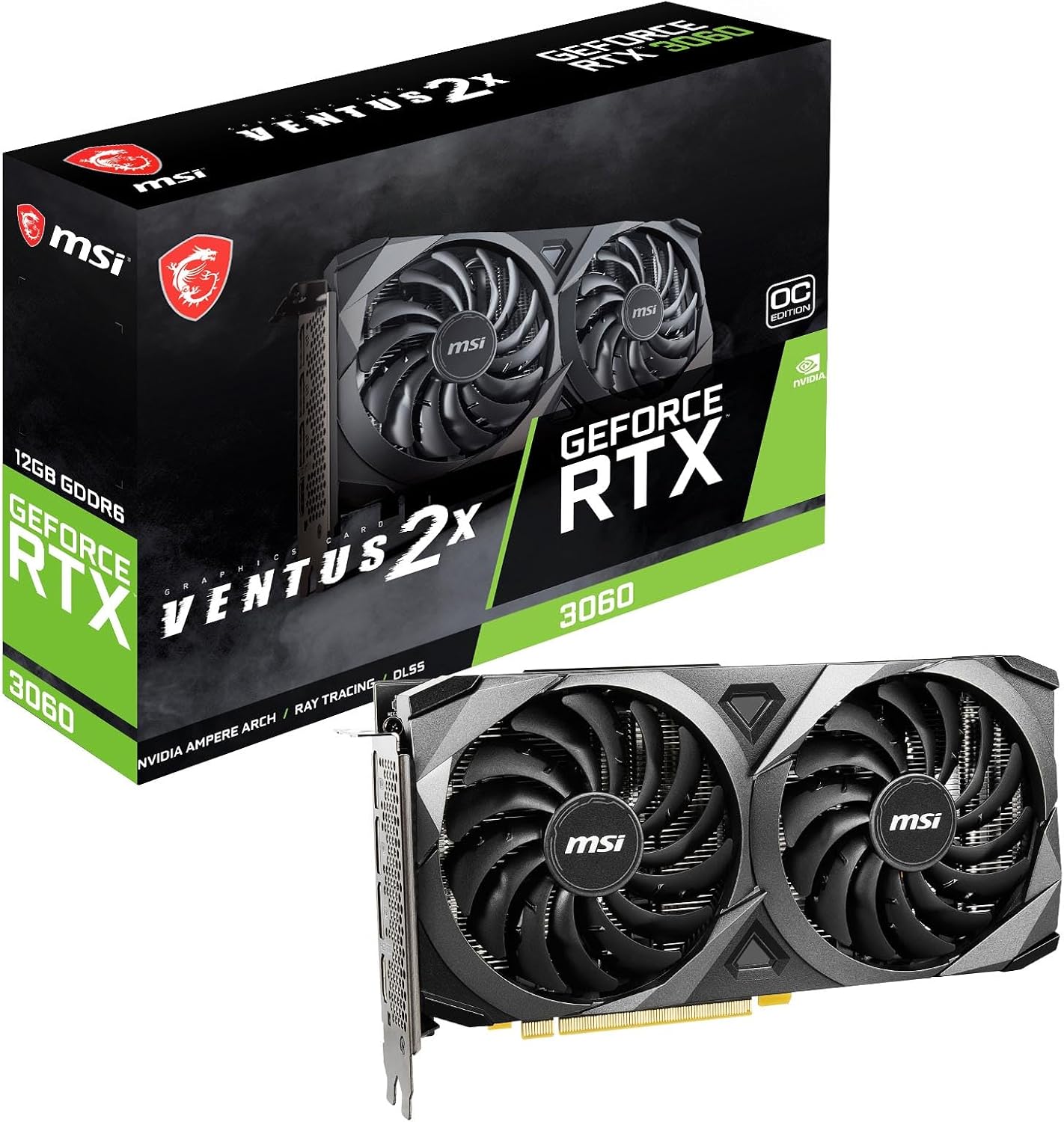
#9. MSI RTX 3060 Ventus 2X
VRAM Value
Twin Fans
Architecture
The MSI RTX 3060 Ventus 2X gives you 12GB of GDDR6 and Ampere’s ray tracing and Tensor cores at one of the most accessible entry points into RTX gaming. The Torx twin-fan cooler handles 1080p gaming comfortably, and you get three DisplayPorts plus HDMI 2.1 for a full multi-monitor setup. It’s a straightforward, no-frills card that just works.
The caveat: the 1807 MHz boost clock and dual-fan design sit at the modest end of the RTX 3060 range, so expect slightly warmer and louder operation than premium models. Fewer than 30 reviews also means a thinner track record. It’s a good pick if you want RTX features and big VRAM on a tight budget, but pay a bit more if cooling and acoustics matter.
Pros
- 12GB VRAM for price
- RTX ray tracing support
- Compact twin-fan design
Cons
- Lower boost clock
- Dual-fan cooling only
- Few user reviews
Specifications
#10. XFX SWFT210 RX 7600
Gaming Value
Architecture
Dual-Fan Fit
The XFX Speedster SWFT210 RX 7600 is a straightforward 1080p upgrade, with 8GB of GDDR6 and a 2655 MHz boost clock on AMD’s RDNA 3 architecture. The dual-fan SWFT cooler is compact and fits nearly any case, and with 534 reviews averaging 4.4 stars, it has a solid track record as a dependable budget GPU. Ray tracing and FSR support come standard.
The honest caveat: this is an entry card, so expect to dial settings down in demanding 1440p titles, and the dual-fan cooler can get audible under sustained load. It’s a good pick if you’re upgrading from an older GTX or integrated graphics and want modern features cheaply, but skip it if 1440p or 4K gaming is your goal.
Pros
- Affordable 1080p gaming
- Compact dual-fan size
- RDNA 3 features
Cons
- Limited 1440p headroom
- 8GB VRAM only
- Fans audible under load
Specifications

The Smart Shopper’s Path to a Mid-to-High Range Graphics Card
Spending serious money on a graphics card is one of those purchases where a little homework pays off for years. The mid-to-high tier is where most gamers and creators land — powerful enough for high-refresh 1440p play or entry-level 4K, but without the eye-watering cost of flagship silicon. The catch? This segment is crowded, marketing-heavy, and full of cards that look great on a spec sheet but disappoint in your actual build. Here’s how to separate the winners from the shelf-warmers. Our buyer’s guide explains how to choose a gaming GPU step by step, from VRAM to benchmarks.
The Specs That Separate a Great Card From a Good Enough One
- VRAM capacity. Modern games and creative apps eat video memory fast. Skimping here is the most common way buyers end up regretting a card that was fast on day one but stutters two years later. Aim for a buffer above what today’s titles demand.
- Performance per dollar at your resolution. A card that’s a steal at 1440p may be overkill at 1080p or underpowered at 4K. Match the tier to the monitor you actually own, not the one you might buy someday.
- Cooling and acoustics. Two cards with identical chips can behave very differently depending on the cooler. Thicker, longer designs run quieter and cooler — but check whether they physically fit your case first.
- Power requirements. Higher-tier cards can demand serious wattage and modern power connectors. Verify your PSU has the headroom and the right cables before checkout, not after.
- Ray tracing and upscaling support. If you care about cutting-edge visuals or want to stretch performance with upscaling tech, feature support matters as much as raw speed.
- Sticking to your budget. The mid-to-high range is full of tempting upsells a step above your target. Decide your ceiling before browsing, and remember that money saved here can fund a better monitor, more storage, or a faster CPU — often bigger real-world upgrades than a marginal GPU bump.
Traps That Catch Even Seasoned Builders
- Buying for benchmarks, not your games. Review averages can mask how a card performs in the specific titles and settings you actually use. Check testing in your favorite games before committing.
- Ignoring case and clearance. Enthusiast-class cards are long, thick, and heavy. Measure your case and consider GPU support brackets — a sagging card is more than an aesthetic problem.
- Chasing last-gen discounts blindly. A steep markdown on an older card can be great value — or a poor one if it lacks the memory, features, or efficiency you’ll want in a few years. Compare it against current-generation alternatives at the same price before pulling the trigger.
Your Next GPU Upgrade Starts Here
If you want maximum muscle, the ASUS Prime RX 9070 XT is the powerhouse pick for 1440p and 4K enthusiasts, while the XFX Swift RX 9070 XT delivers the same RDNA 4 punch with triple-fan cooling. Mid-range gamers get superb value from the ASUS Dual RX 9060 XT and the RTX 5060 options from ASUS and GIGABYTE — ideal for high-refresh 1080p and solid 1440p play. Budget-conscious builders shouldn’t sleep on the RTX 3060 12GB variants, the ASRock RX 7600 Challenger Pro, the Intel Arc B570, or the XFX SWFT210 RX 7600, all of which punch well above their price.
Every card on this list fits comfortably within a mid-to-high range budget, so you can’t really go wrong. Check the buttons above for current availability and grab yours before stock dips.
Final 3 Picks: 1440p Powerhouse, RDNA 4 Pick, and Compact Build
Ready to decide? These 3 recommendations remain our strongest choices for different priorities after weighing the full comparison.
ASUS Prime RX 9070 XT OC
- 16GB GDDR6 memory
- 3030 MHz boost clock
- PCIe 5.0 interface
XFX Swift RX 9070 XT
- 16GB GDDR6 memory
- 2970 MHz boost clock
- Triple-fan SWFT cooling
ASUS Dual RX 9060 XT
- 16GB GDDR6 memory
- 3250 MHz boost clock
- 2.5-slot compact design