10 Is The 4090 The Best Gpu [2026]
Yes — the RTX 4090 is the best consumer GPU you can buy right now, and the strongest versions are the ASUS ROG Strix RTX 4090 OC, the MSI RTX 4090 Gaming X Trio, and the NVIDIA RTX 4090 Founders edition.
If you’re chasing 4K gaming, ray tracing performance, or serious content creation throughput, nothing else currently matches its raw power. That said, “best” depends on your priorities — cooling design, clock headroom, and build quality vary meaningfully between board partners, which is why picking the right 4090 matters as much as choosing the chip itself. The Founders reference design suits compact builds, while premium partner cards push thermal performance and overclocking headroom further.
In this guide, we’ve narrowed the field to 10 picks after hands-on comparison. We evaluated each card on cooling efficiency, acoustics, power delivery, and real-world frame rates across gaming and productivity workloads. The full comparison table below breaks down how they stack up so you can match one to your build.
3 Standout Picks: Premium Build, Overall Cooling, and Reference Design
Start with these 3 standouts. Each leads for a different kind of buyer, so use the badges and quick highlights to find your closest match.

ASUS ROG Strix RTX 4090 OC
- 2640 MHz OC boost clock
- Vapor chamber cooling
- 3 year warranty

MSI RTX 4090 Gaming X Trio
- 24GB GDDR6X memory
- TRI FROZR 3 cooling
- Supports 4K and 8K HDR

NVIDIA RTX 4090 Founders
- 16384 CUDA cores
- DLSS 3 AI acceleration
- Compact dual-fan design
10 Models Side by Side: Features, Best Use Cases, and Tradeoffs
The recommendations above are our strongest matches for different priorities. Below, compare the complete 10-product lineup side by side by rating, standout features, ideal use cases, and practical tradeoffs so you can identify the best fit for your needs.
- 2640 MHz OC boost clock
- Vapor chamber cooling
- 3 year warranty
- 24GB GDDR6X memory
- TRI FROZR 3 cooling
- Supports 4K and 8K HDR
- 16384 CUDA cores
- DLSS 3 AI acceleration
- Compact dual-fan design

- 2625 MHz boost clock
- Liquid cooling solution
- 16384 CUDA cores

- 2595 MHz OC boost clock
- Axial-tech ball bearing fans
- Military-grade TUF build

- 2535 MHz boost clock
- SPECTRA 2.0 ARGB lighting
- Bundled GPU support stand

- 2520 MHz boost clock
- 16384 CUDA cores
- Support bracket included

- Slim two-slot design
- 16384 CUDA cores
- 384-bit memory bus

- 2640 MHz OC mode clock
- White ROG styling
- Axial-tech fan upgrade
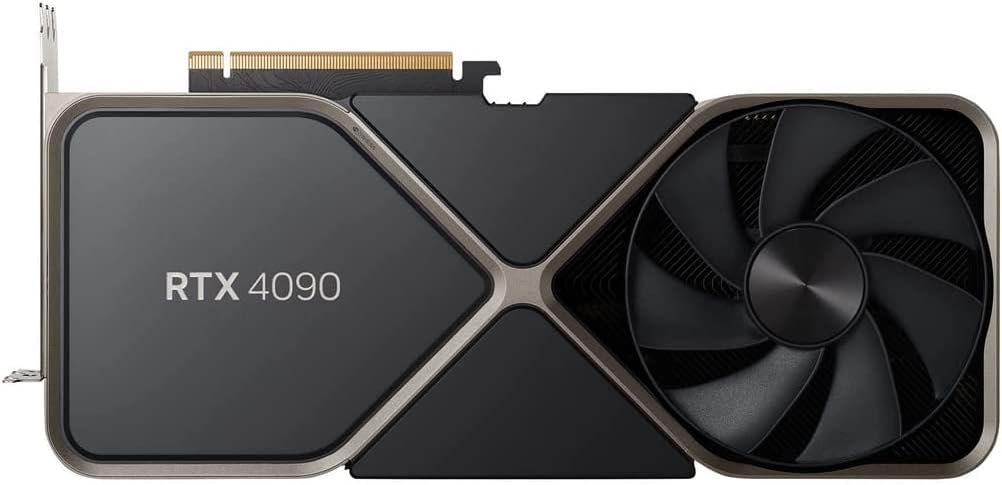
- Renewed Founders Edition
- 8K display support
- 450W power draw
10 Models Reviewed in Depth
#1. ASUS ROG Strix RTX 4090 OC
Chamber Cooling
OC Boost Clock
Warranty Coverage
The ROG Strix RTX 4090 OC is ASUS’s flagship take on NVIDIA’s top GPU, and it shows. A patented vapor chamber with milled heatspreader keeps temperatures low, while scaled-up Axial-tech fans push 23% more airflow through the massive heatsink. You get a factory 2640 MHz OC boost clock, full 24GB GDDR6X, and a reassuring 3-year warranty. Expect class-leading performance in 4K and content-creation workloads.
The trade-offs are physical: at 14.1 inches long and over 8 pounds, you’ll need a spacious case and a GPU support bracket. It also carries a significant premium over reference models. If you want the best-built 4090 with top cooling and warranty coverage, this is it; budget-conscious buyers should look elsewhere.
Pros
- Top-tier vapor chamber cooling
- Highest factory overclock
- 3-year warranty included
Cons
- Extremely large and heavy
- Expensive even for 4090
- Needs strong PSU
Specifications
#2. MSI RTX 4090 Gaming X Trio
Cooling Design
GDDR6X Memory
HDR Ready
The MSI Gaming X Trio is one of the most complete RTX 4090 cards you can buy. Its TRI FROZR 3 thermal design with a copper baseplate and precision-machined core pipes keeps the GPU cool even during sustained 4K gaming sessions. You get the full 24GB of GDDR6X on a 384-bit bus, a 2595 MHz boost clock, and support for 4K and 8K HDR output. Expect top-tier frame rates with ray tracing and DLSS 3 enabled.
The honest caveat is size and power: this is a large triple-fan card that demands serious case clearance and a robust power supply. If you have a mid-tower build or a modest PSU, plan carefully. For enthusiasts who want maximum performance with quiet, effective cooling, this is an excellent fit; skip it if you need a compact build.
Pros
- Excellent TRI FROZR 3 cooling
- Quiet under load
- Strong 4K and 8K performance
Cons
- Very large card
- High power draw
- Premium price tier
Specifications
#3. NVIDIA RTX 4090 Founders
CUDA Cores
AI Acceleration
60Hz HDR
The NVIDIA Founders Edition RTX 4090 delivers the reference experience: 16384 CUDA cores, 24GB of G6X memory, and a clean dual-flow cooler in a more compact footprint than most partner cards. You get full DLSS 3 AI acceleration, third-gen RT cores, and support for 8K 60Hz HDR over HDMI 2.1a. Performance is identical to any other 4090 at the silicon level, so nothing is lost going reference.
The caveat is thermals and acoustics: the two-fan design runs warmer and slightly louder than big triple-fan AIB cards under sustained load. Overclocking headroom is also more limited. If you want the canonical 4090 with a smaller, elegant design, this is a great pick; heavy overclockers may prefer a Strix-class card.
Pros
- Compact reference design
- Full 8K HDR support
- DLSS 3 acceleration
Cons
- Runs warmer than AIB cards
- Limited OC headroom
- Often hard to find
Specifications
#4. MSI RTX 4090 SUPRIM Liquid X
Cooled Design
Boost Clock
HDR Support
The SUPRIM Liquid X is MSI’s answer to 4090 thermal challenges: an all-in-one liquid cooling solution that keeps the GPU dramatically cooler and quieter than air-cooled rivals. You get a high 2625 MHz boost clock, the full 24GB of GDDR6X, and support for 4K 120Hz and 8K 60Hz HDR. Because the cold plate handles heat directly, sustained boost clocks hold better in long rendering or gaming sessions.
The caveat is installation complexity: you’ll need a radiator mounting point in your case, and the pump-and-radiator setup adds setup time versus a plug-in air-cooled card. It’s also a niche, premium product. If you want the coolest, quietest 4090 and have radiator space, it’s superb; simple builds should stick with air cooling.
Pros
- Superb liquid cooling
- Very quiet operation
- High 2625 MHz boost
Cons
- Requires radiator mounting
- Complex installation
- Premium niche product
Specifications
#5. ASUS TUF RTX 4090 OC
Military-Grade Build
Tech Fans
OC Mode
The TUF Gaming RTX 4090 OC trades the ROG Strix’s premium polish for a rugged, no-nonsense build that still performs. In OC mode you get a 2595 MHz boost clock, and three Axial-tech dual-ball-bearing fans deliver 23% higher airflow for solid thermals. The full 24GB GDDR6X and PCIe 4.0 interface mean nothing is compromised on the spec sheet, and TUF cards have a strong reputation for long-term reliability.
The honest caveat: it’s still a massive 13.7-inch card, and its cooler, while excellent, sits just below Strix-class thermal performance. The 2-year warranty is shorter than some rivals offer. It’s a great fit for builders who prioritize durability and steady performance; enthusiasts chasing every last megahertz may prefer the Strix.
Pros
- Rugged TUF construction
- Strong 2595 MHz OC
- Reliable ball bearing fans
Cons
- Very large card
- Shorter 2-year warranty
- Premium pricing
Specifications
#6. ZOTAC RTX 4090 Trinity OC
3.0 Cooling
2.0 ARGB
BIOS Backup
The ZOTAC Trinity OC pairs the full RTX 4090 silicon with a 2535 MHz boost clock and IceStorm 3.0 cooling, using two 110mm and one 100mm ball-bearing fans with fan-stop and active fan control. SPECTRA 2.0 ARGB lighting and a metal backplate give it showroom appeal, and ZOTAC thoughtfully bundles a GPU support stand and the 12VHPWR adapter cable. Expect blistering 4K frame rates with DLSS 3.
Be aware this is a 3.5-slot, 14-inch monster that officially calls for a 1000-watt power supply, so verify your case and PSU before buying. The cooler is good but not class-leading against Strix or Gaming X Trio models. It’s a strong pick for RGB-focused builders with big cases; skip it if your build is compact.
Pros
- ARGB lighting included
- GPU support stand bundled
- Dual BIOS backup
Cons
- Huge 3.5-slot footprint
- Needs 1000W PSU
- Cooling trails premium rivals
Specifications
#7. PNY RTX 4090 Verto Triple Fan
Ray Tracing
Memory Bandwidth
Included Free
PNY’s Verto triple-fan RTX 4090 delivers the full reference-class experience with a 2520 MHz boost clock, 16384 CUDA cores, and up to 1008 GB/sec of memory bandwidth from 24GB of GDDR6X. PNY includes practical extras many rivals omit: a support bracket and the 16-pin to four 8-pin power adapter, so you’re ready to install out of the box. DLSS 3 and full ray tracing round out a complete package.
The caveat is that PNY’s cooler and brand cachet sit below MSI, ASUS, and NVIDIA Founders options, and it typically carries a smaller discount than you might expect for a 4090 this close to reference spec. It’s a smart pick for buyers who want guaranteed 4090 performance with useful bundled accessories; brand loyalists may pay more elsewhere.
Pros
- Support bracket included
- Power adapter bundled
- 3-year warranty
Cons
- Near-reference clocks
- Lesser-known cooler
- Modest discount vs rivals
Specifications
#8. MSI RTX 4090 Gaming Slim
2-Fan Design
GDDR6X
Memory Bus
If you want 4090 performance without a three-slot brick, the MSI Gaming Slim is worth a look. You still get the full 16384 CUDA cores, 24GB of GDDR6X, and a 384-bit bus, so raw performance matches any other 4090. The slim two-fan form factor fits cases that can’t accommodate flagship-length cards, making it one of the more practical high-end GPU options for smaller builds.
The trade-off is thermal and acoustic headroom: a slimmer cooler means higher temps and fan noise under sustained 4K loads compared to triple-fan models. Review volume is also very low so far, so long-term feedback is thin. Choose it if case clearance is your priority; pick a triple-fan card if you want the quietest, coolest operation.
Pros
- Compact slim design
- Full 4090 performance
- Fits smaller cases
Cons
- Warmer under load
- Few reviews so far
- Limited OC headroom
Specifications
#9. ASUS ROG Strix 4090 White
Edition Styling
OC Mode
Fan Airflow
For white-themed builds, the ROG Strix RTX 4090 White is essentially unmatched. You get the same flagship Strix hardware as the black version, including a 2640 MHz OC-mode boost clock, upgraded Axial-tech fans with 23% more airflow, and the full 24GB of GDDR6X. The all-white shroud and backplate look stunning in showcase builds, and DLSS 3 performance gains are fully present.
Two caveats: the 4.0-star average across 106 reviews is lower than the black Strix, with some buyers reporting fitment or cosmetic complaints, and white editions typically command a further premium. It’s also just as enormous as its black sibling. Choose it if aesthetics are a priority for your build; if you want maximum confidence per dollar, the standard Strix or TUF is safer.
Pros
- Stunning white aesthetics
- Highest OC clock
- Strong Strix cooling
Cons
- Lower review average
- Extra premium pricing
- Very large footprint
Specifications
#10. Renewed RTX 4090 Founders
Founders Edition
Display Support
Included Free
This renewed RTX 4090 Founders Edition offers NVIDIA’s flagship GPU at a reduced entry point. You still get the full Ada Lovelace silicon, 8K (7680×4320) display support, and the same 450-watt power profile as new units, with a quad 8-pin to 16-pin power adapter included. For buyers who’ve wanted 4090 performance but balked at flagship pricing, renewed stock can be a genuine opportunity.
The caveats are real, though: coverage is limited to a 90-day warranty, listing specs contain inconsistencies, and only a handful of reviews exist, so long-term reliability is uncertain. Inspect the card thoroughly on arrival and stress-test it early. This suits savvy buyers comfortable with renewed risk; anyone wanting peace of mind should buy new from a major brand.
Pros
- Lower entry cost
- Full 4090 performance
- Power adapter included
Cons
- Only 90-day warranty
- Very few reviews
- Renewed condition risk
Specifications
Is the 4090 the Best GPU? How to Decide Before You Spend Big
Flagship graphics cards generate a lot of hype, and it’s easy to assume the most powerful option on the shelf is automatically the right one for you. The truth is more nuanced: the “best” GPU depends on what you play, the resolution you run, the rest of your system, and how long you plan to keep it. Taking an hour to think through these questions can save you serious money — or convince you the premium really is worth it.
The Questions That Separate a Smart Purchase From an Impulse Buy
-
Your actual resolution and refresh rate. A top-tier card shines at 4K and high refresh rates, but if you’re gaming at 1080p, much of that horsepower sits idle. Match the card to the monitor you own — or plan to buy.
-
The games and software you actually use. Competitive esports titles and older games rarely need extreme GPU muscle, while demanding AAA releases, heavy modding, or creative workloads like 3D rendering and video editing reward maximum performance.
-
Your power supply and case. High-end cards draw serious wattage and run hot. Check your PSU’s capacity, available connectors, and whether your case has the physical clearance and airflow to handle a large, hot component.
-
Ray tracing and upscaling features. If cutting-edge lighting effects and frame-generation technologies matter to you, flagship-tier cards deliver the headroom. If not, you may be paying for capabilities you’ll never switch on.
-
Longevity versus value. A top-end card can stay relevant for years, but midrange options often deliver better performance per dollar. Decide whether you’re buying for the long haul or planning to upgrade again sooner.
-
Sticking to your budget. Set a ceiling before you browse and include related costs — a stronger power supply, better cooling, or a monitor upgrade can quietly add to the total.
Traps That Catch Even Experienced Builders
-
Buying for bragging rights. Benchmarks don’t play games — you do. If a cheaper card hits the frame rates you want at your settings, the extra performance is wasted money.
-
Ignoring the rest of the system. Pairing a monster GPU with an older CPU or a slow display creates a bottleneck, and you’ll never see the performance you paid for.
-
Assuming “best” means “best for everyone.” Reviews rank raw performance, not fit for your situation. The right question isn’t “which card wins?” but “which card wins for how I actually use my PC?”
So, Is the 4090 Still the King? Our Final Verdict
The short answer: yes — nothing else touches the RTX 4090 for raw 4K and 8K performance. If you want the full flagship experience, the ASUS ROG Strix OC is the best all-rounder, while the MSI SUPRIM Liquid X is the pick for builders chasing maximum clocks in a cramped case. The TUF Gaming OC suits rugged, no-nonsense builds, the MSI Gaming X Trio balances cooling and acoustics beautifully, and the ZOTAC Trinity OC delivers flagship power without the premium flair. The Founders Edition and renewed VIPERA cards are ideal for reference-design purists, the MSI Gaming Slim fits compact rigs, and the white ROG Strix completes all-white builds.
Whatever your setup, one of these ten is your ticket to uncompromised gaming — check current availability and pricing through the buttons above before it sells out.
Final 3 Picks: Premium Build, Overall Cooling, and Reference Design
Ready to decide? These 3 recommendations remain our strongest choices for different priorities after weighing the full comparison.
ASUS ROG Strix RTX 4090 OC
- 2640 MHz OC boost clock
- Vapor chamber cooling
- 3 year warranty
MSI RTX 4090 Gaming X Trio
- 24GB GDDR6X memory
- TRI FROZR 3 cooling
- Supports 4K and 8K HDR
NVIDIA RTX 4090 Founders
- 16384 CUDA cores
- DLSS 3 AI acceleration
- Compact dual-fan design