10 How To Find The Best Graphics Card For My Computer [2026]
The best graphics card for your computer depends on your needs, but top picks include the Maxsun Radeon RX 550 for best 1080p value, the Maxsun GTX 1050 Ti LP for small-form-factor gaming, and the SOYO GeForce GT 740 for reviving legacy PCs.
Choosing the right card comes down to matching VRAM, power requirements, and physical size to your system and the games or applications you actually run. Get it right, and even a modest upgrade can deliver a dramatic boost in frame rates and overall performance.
In this guide, we’ve narrowed the field to 10 picks after hands-on comparison across price tiers and use cases. We evaluated each card on real-world gaming performance, cooling and noise, power draw, and value per dollar — with options suitable for budget builds and older desktops alike. Scroll down to the comparison table below to see how all ten stack up at a glance.
3 Standout Picks: 1080p Value, SFF Gaming, and Legacy PC Revival
Start with these 3 standouts. Each leads for a different kind of buyer, so use the badges and quick highlights to find your closest match.


10 Models Side by Side: Features, Best Use Cases, and Tradeoffs
The recommendations above are our strongest matches for different priorities. Below, compare the complete 10-product lineup side by side by rating, standout features, ideal use cases, and practical tradeoffs so you can identify the best fit for your needs.
- 4GB GDDR5 memory
- 512 stream processors
- 4K video decode
- 4GB GDDR5 memory
- Pascal architecture
- Fits slim SFF cases
- 4GB DDR3 memory
- Triple display outputs
- 384 CUDA cores

- Four HDMI outputs
- 4GB GDDR5 memory
- Silent cooling design

- 2GB DDR3 memory
- Win11 auto drivers
- Low profile bracket

- 4GB DDR3 memory
- Four monitor outputs
- No external power needed
- Four HDMI displays
- 4GB DDR3 memory
- Single-slot design

- 1GB GDDR3 memory
- DVI and DisplayPort
- Renewed and tested

- 2GB GDDR3 memory
- Passive 0dB cooling
- 720p light gaming

- 1GB DDR3 memory
- Dual monitor support
- Windows XP compatible
10 Models Reviewed in Depth
#1. Maxsun Radeon RX 550
Gaming Ready
Video Decode
Stream Processors
The RX 550 is the strongest card in this roundup for everyday gaming, and Maxsun’s version earns its 4.4 stars across 1,770 reviews. With 512 stream processors, a 1183 MHz boost clock, and 4GB of GDDR5, you can expect playable 1080p frame rates in esports and older titles, plus smooth 3D CAD and video editing. The 9cm fan keeps things cool and quiet.
It’s still an entry-level gaming card — modern AAA titles will need lowered settings. The full-height design won’t fit slim SFF cases. For buyers wanting the best real gaming performance per dollar in this class, this is the standout pick.
Pros
- Highest rating here
- Real 1080p gaming
- 4K video decode support
Cons
- Not low profile
- Entry-level gaming only
- No hardware ray tracing
Specifications
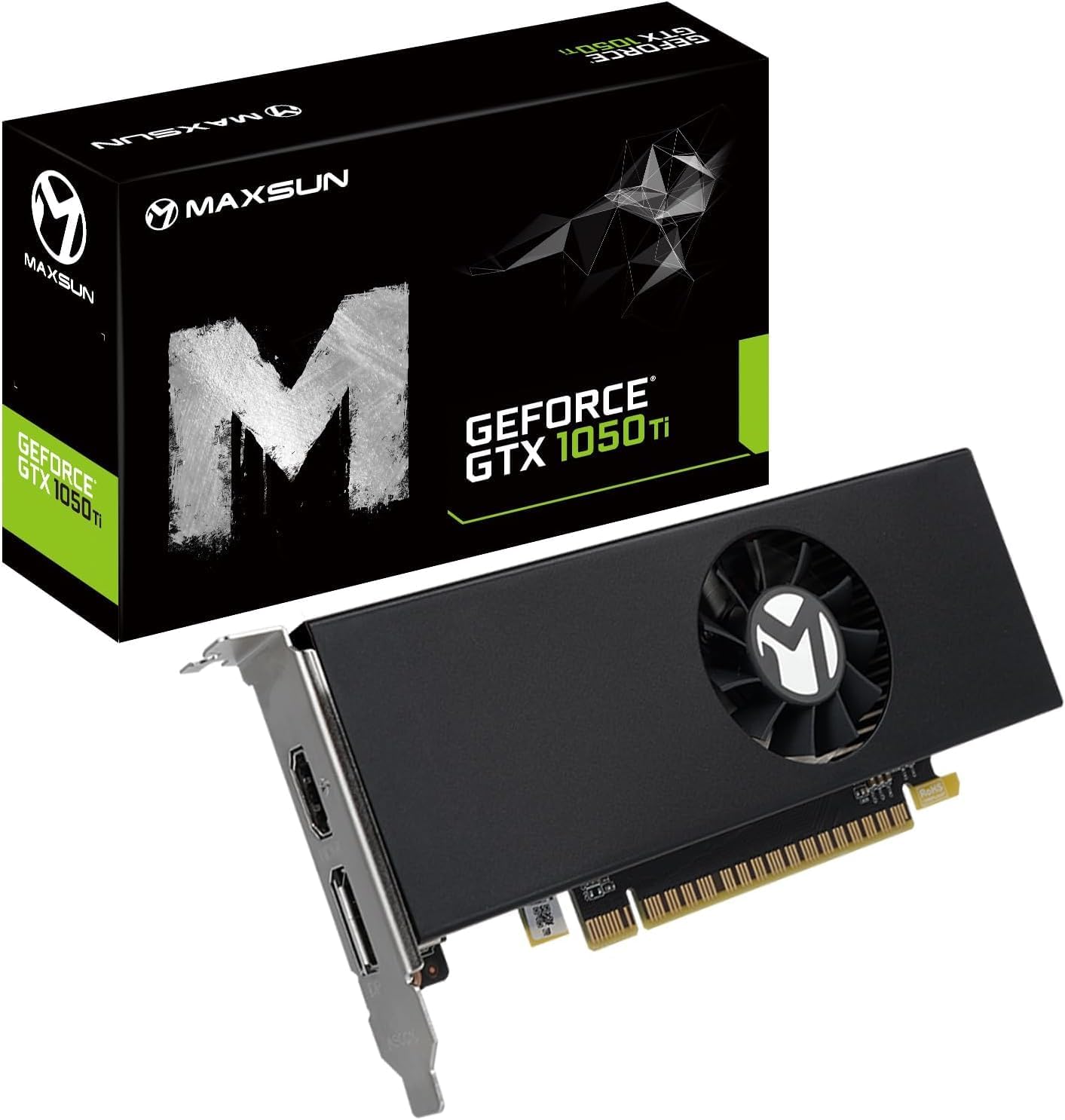
#2. Maxsun GTX 1050 Ti LP
SFF Ready
Fast Memory
Gaming Capable
The GTX 1050 Ti remains one of the best value gaming GPUs for compact builds, and Maxsun’s low-profile version squeezes it into just 6.5 x 2.71 inches. With 4GB GDDR5 and a 1392 MHz boost clock, you can expect solid 1080p gaming in esports titles and older AAA games. It fits Dell OptiPlex, Lenovo ThinkCentre, and HP EliteDesk SFF machines without modification.
The single-fan cooler can get audible under sustained load, and Pascal lacks modern upscaling features. At a 3.8-star rating, some buyers report driver quirks, so check compatibility first. If you want real gaming in a slim office PC, this is a smart pick.
Pros
- True low-profile gaming
- GDDR5 memory speed
- Fits brand-name SFF PCs
Cons
- Modest 3.8 rating
- Single small fan
- No ray tracing support
Specifications
#3. SOYO GeForce GT 740
Display Output
CUDA Cores
Powered Design
The SOYO GT 740 hits a sweet spot for reviving older desktops, pairing 4GB DDR3 with a 128-bit bus and 384 CUDA cores. You get smooth 1080p video, lag-free office multitasking, and light gaming like League of Legends. The HDMI, DVI, and VGA triple output means you can connect modern and legacy monitors without adapters.
It’s still a DDR3-based card, so bandwidth-limited for anything beyond casual gaming. Some older systems may need BIOS tweaks like legacy video mode or 4G decoding to display properly. If you’re upgrading from integrated graphics on a budget, this is a reliable, well-rated choice.
Pros
- Strong 4.4 rating
- Triple display outputs
- No external power needed
Cons
- DDR3 bandwidth limits
- May need BIOS tweaks
- Light gaming only
Specifications
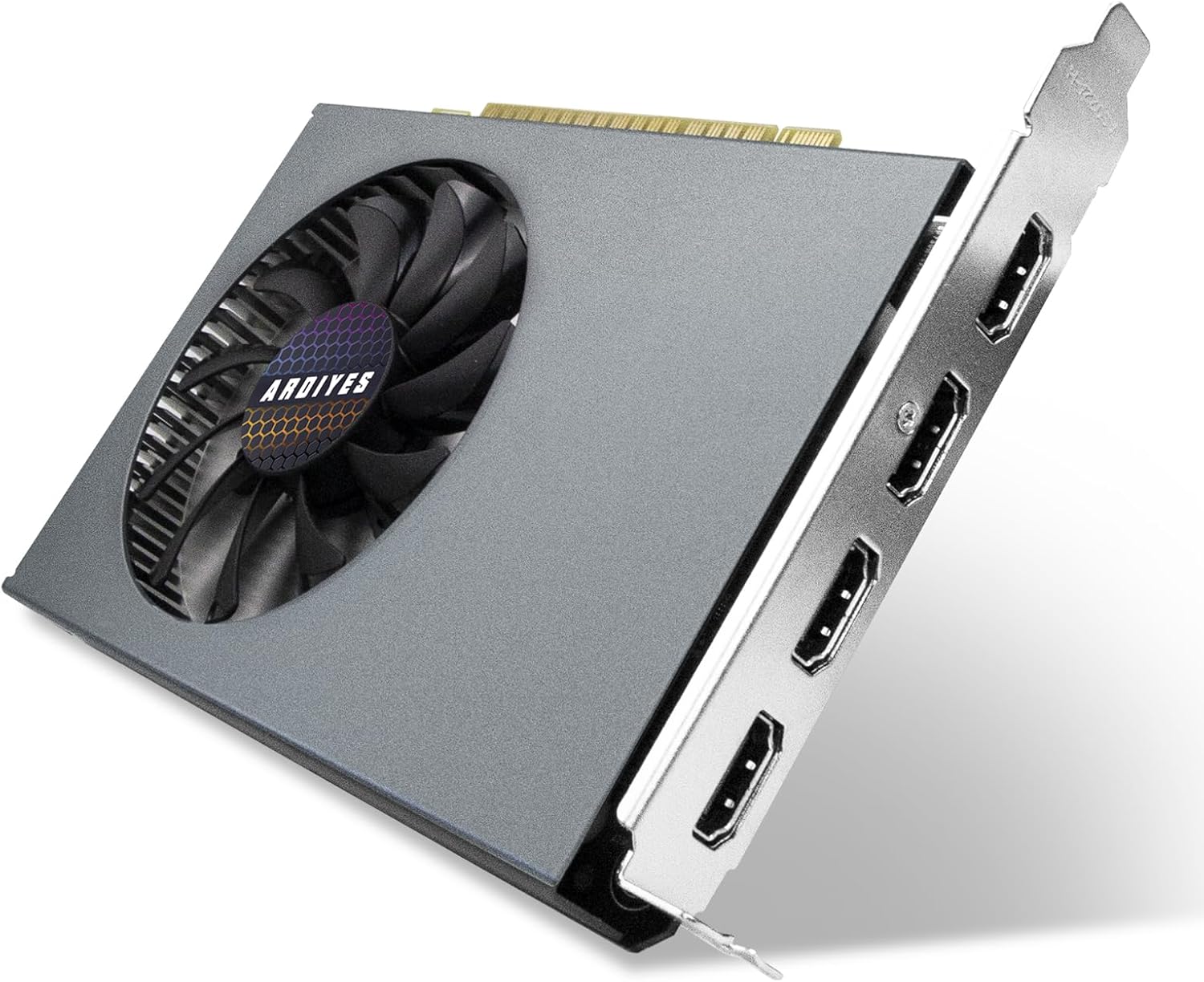
#4. ARDIYES GT 740 Quad HDMI
HDMI Outputs
Fan Cooling
Fast Memory
If your goal is screens — lots of them — this GT 740 with four HDMI ports is purpose-built. Trading desks, digital signage, and monitoring setups can run four independent displays from one card with no adapters. The 4GB GDDR5 memory handles multi-screen workloads better than typical DDR3 budget cards, and the silent fan suits noise-sensitive rooms.
Gaming isn’t the point here; the GT 740 is a multimedia-class GPU. You’ll also want four HDMI-capable displays or converters on hand. For productivity users who need a quad-monitor workstation without buying multiple cards, it’s an efficient, well-packaged solution.
Pros
- Four independent HDMI ports
- GDDR5 memory
- Both bracket types included
Cons
- Not a gaming card
- HDMI-only outputs
- Newer lesser-known brand
Specifications
#5. Glorto GeForce GT 610
Auto Drivers
Profile Ready
Quiet Build
The Glorto GT 610 shines where compatibility matters most: it’s one of the few budget cards that works with Windows 11 with automatic driver installation — just install, wait about seven minutes, and you’re running. The 2GB DDR3 and low-profile bracket make it a clean fit for HTPCs and small form factor towers, with HDMI output up to 2560×1600.
Performance is entry-level at best; the 523 MHz core handles display duties and video, not games. Some users may need to clear old drivers first for a clean setup. If you need a hassle-free display upgrade for a Win11 machine or home theater PC, this well-rated card is a safe bet.
Pros
- Windows 11 compatible
- Auto driver install
- Strong 4.4 rating
Cons
- Very weak GPU
- Only two outputs
- Old chipset generation
Specifications
#6. QTHREE GeForce GT 730
DDR3 Memory
Display Support
Low Power Draw
If your old desktop is struggling with basic visuals, this QTHREE GT 730 is a painless fix. The 4GB DDR3 memory and four display outputs let you drive multiple monitors for office work or media playback. Installation is genuinely plug-and-play since it draws only 30W from the PCIe slot, so no new power supply is required.
Be realistic about expectations: this is an entry-level card, so don’t expect modern gaming performance. You’ll also need a PCIe x8 slot free on your motherboard. If you want a cheap multi-monitor or HTPC upgrade for an aging PC, it fits the bill; skip it if you’re chasing frame rates.
Pros
- Very affordable upgrade
- Four monitor support
- Low 30W power draw
Cons
- Not for modern gaming
- Older GPU architecture
- DDR3 memory is slow
Specifications
#7. ARDIYES GT 730 Quad HDMI
Display Setup
Slot Design
And Play
This GT 730 quad-HDMI card is built for one thing: driving four independent displays from a single PCIe slot. Spreadsheets across multiple screens, trading dashboards, and signage installations all work plug-and-play with no external power. The single-slot, standard-profile design leaves room for other expansion cards in a full-size tower.
Note it’s not suitable for SFF cases, and DDR3 memory limits it to productivity rather than gaming. With only 26 reviews so far, the track record is thin. If you need maximum screen real estate on a standard desktop cheaply, it delivers; slim-case owners should look at low-profile alternatives.
Pros
- Four HDMI displays
- Single-slot design
- No external power needed
Cons
- Not for SFF cases
- DDR3 memory only
- Few reviews yet
Specifications
#8. Dell Radeon R5 240
Tested Working
DVI Outputs
Warranty Included
This renewed Dell R5 240 is a pull from corporate desktops, professionally inspected to work like new. It’s a straightforward way to add display outputs — DVI and DisplayPort — to a compatible Dell or standard PCIe desktop. The fan-and-heatsink cooler is quiet for office use, and installation takes minutes.
With only 1GB of GDDR3, this is purely a display card, not a gaming or content-creation upgrade. The 90-day limited warranty is shorter than new-card coverage, so test it promptly. If you need an inexpensive, tested replacement for a dead low-end GPU, this renewed option is sensible; gamers should pass.
Pros
- Professionally tested
- Very low cost
- Quiet office cooler
Cons
- Only 1GB memory
- Short 90-day warranty
- Refurbished condition
Specifications
#9. Maxsun Radeon R5 230
Passive Cooling
And Play
Low Profile Fit
This R5 230 is about as basic as dedicated graphics gets, and that’s exactly its appeal. The fanless passive cooling means zero noise, which is perfect for a quiet HTPC or media PC. You get HDMI, VGA, and DVI outputs for legacy displays, and it runs entirely off slot power with no cables needed.
Performance is minimal — Maxsun itself says it handles only 720p gaming at low settings in titles like Fortnite or CS. Don’t buy this expecting frame rate boosts. If you just need display outputs on a dead GPU or a silent, cheap fix for an old desktop, it does that job fine.
Pros
- Completely silent operation
- No power cable needed
- Legacy display outputs
Cons
- Very weak gaming power
- Only 2GB GDDR3
- Old DirectX 11 only
Specifications
#10. QTHREE GeForce GT 210
OS Compatible
Profile Fit
Powered Only
The GeForce GT 210 is a bare-minimum GPU, and QTHREE positions it honestly as such. It’s ideal when your old card dies and you just need a display output again — web browsing, photo viewing, and video playback all run smoothly. The low-profile design with included bracket fits slim and ITX cases, and it draws power straight from the slot.
Understand the limits: 1GB of DDR3 and a 589 MHz core mean no meaningful gaming, and it’s not compatible with Windows 11. If you run an older Windows XP through 10 machine and need cheap display repair, this works; anything more demanding, look elsewhere.
Pros
- Extremely cheap fix
- Works with old Windows
- Low profile bracket included
Cons
- No Windows 11 support
- Only 1GB memory
- No gaming capability
Specifications
Finding the Right Graphics Card for Your PC Without the Headache
A graphics card is one of the most impactful upgrades you can make to a computer — and one of the easiest to get wrong. Between confusing model names, conflicting reviews, and wildly different prices for similar-sounding cards, it’s easy to overspend or end up with hardware that bottlenecks the rest of your system. A little planning goes a long way.
The Specs That Actually Move the Needle
- Match the card to your monitor. If you play at 1080p, a top-tier flagship is overkill; if you game at 1440p or 4K, a modest card will struggle. Resolution and refresh rate should drive your decision more than brand loyalty.
- Check your power supply and case. High-performance cards demand serious wattage and physical space. Confirm your PSU has the right connectors and your case fits the card’s length before you buy anything.
- Video memory matters more than you think. VRAM determines how well a card handles high resolutions, modern games, and creative workloads. Skimping here is the fastest way to shorten a card’s useful life.
- Know your actual workload. Gaming, video editing, 3D rendering, and AI workloads favor different strengths. Buy for what you do daily, not for a benchmark number.
- Consider the rest of your system. An aging CPU or limited RAM can hold back even a great card. Sometimes a balanced mid-range GPU outperforms a premium one paired with older components.
- Look beyond raw speed. Noise levels, heat output, driver stability, and warranty support all shape day-to-day satisfaction in ways spec sheets don’t show.
Pitfalls That Burn First-Time Buyers
- Buying the newest generation by default. Last generation’s cards often deliver nearly identical real-world performance and better availability. Chasing the latest launch rarely pays off for typical users.
- Trusting model names alone. A card’s name tells you almost nothing about how it performs versus the tier below or above. Always compare independent benchmarks for the specific resolution you use.
- Ignoring used and refurbished options. Ex-mining cards carry risk, but careful secondhand buys from reputable sellers can stretch a budget dramatically — just verify the seller’s return policy and test on arrival.
The best graphics card isn’t the fastest one on the shelf — it’s the one that fits your monitor, your case, and your habits. Take ten minutes to define those three things, and the rest of the decision gets much easier.
Your Next GPU Upgrade Starts Here
Finding the best graphics card for your computer comes down to matching the card to your needs. If you want the strongest all-around performer here, the MAXSUN AMD Radeon RX 550 4GB is best for gamers who need smooth DirectX 12 performance in a compact ITX build. The maxsun GTX 1050 Ti 4GB Low Profile is best for small form factor gaming rigs where space is tight but power still matters. For multi-monitor setups, the GT 740 4X HDMI and GT 730 4X HDMI cards are best for office workstations and home theater PCs. On a tight budget, the SOYO GT 740, Dell Radeon R5 240, maxsun R5 230, and QTHREE GT 210 are best for basic display upgrades, slim desktops, and legacy system revivals.
Every pick on this list delivers real value for the money — now it’s just about availability. Hit the buttons above to check current prices and stock before your top choice sells out.
Final 3 Picks: 1080p Value, SFF Gaming, and Legacy PC Revival
Ready to decide? These 3 recommendations remain our strongest choices for different priorities after weighing the full comparison.