10 Is The 4090 The Best Graphics Card [2026]
Yes — the RTX 4090 is the best graphics card you can buy right now, and the strongest versions are the ASUS ROG Strix RTX 4090, the NVIDIA RTX 4090 Founders, and the MSI RTX 4090 Suprim Liquid X.
These picks stand out for 4K gaming performance, ray tracing power, and thermal design. Choosing the right 4090 matters because card makers differ in cooling solutions, board size, and clock speeds, even though the core GPU is the same. Whether you’re a content creator or a hardcore gamer, the right variant can mean quieter operation and better longevity.
In this guide, we’ve narrowed the field to 10 top picks after hands-on comparison and research. We evaluated each card on cooling performance, noise levels, build quality, and overall value to help you find the right fit. Below, you’ll find a full comparison table breaking down every pick at a glance — so you can zero in on the best 4090 for your build.
3 Standout Picks: Overall Pick, Reference Design, and Liquid-Cooled Pick
Start with these 3 standouts. Each leads for a different kind of buyer, so use the badges and quick highlights to find your closest match.

ASUS ROG Strix RTX 4090
- 24GB GDDR6X memory
- 2640 MHz OC boost clock
- Vapor chamber cooling

NVIDIA RTX 4090 Founders
- 16,384 CUDA cores
- DLSS 3 AI acceleration
- 8K HDR gaming support

MSI RTX 4090 Suprim Liquid X
- Liquid cooling design
- 2625 MHz boost clock
- 24GB GDDR6X memory
10 Models Side by Side: Features, Best Use Cases, and Tradeoffs
The recommendations above are our strongest matches for different priorities. Below, compare the complete 10-product lineup side by side by rating, standout features, ideal use cases, and practical tradeoffs so you can identify the best fit for your needs.
- 24GB GDDR6X memory
- 2640 MHz OC boost clock
- Vapor chamber cooling
- 16,384 CUDA cores
- DLSS 3 AI acceleration
- 8K HDR gaming support
- Liquid cooling design
- 2625 MHz boost clock
- 24GB GDDR6X memory

- TRI FROZR 3 cooling
- 2595 MHz boost clock
- Copper baseplate heat transfer

- 2595 MHz OC mode
- Axial-tech fan airflow
- Military-grade TUF build

- 2520 MHz boost clock
- 16384 CUDA cores
- DLSS 3 support

- IceStorm 3.0 cooling
- SPECTRA 2.0 ARGB
- 2535 MHz boost clock

- White ROG styling
- 2640 MHz OC clock
- Axial-tech fan airflow

- Slim 2-fan design
- 16384 CUDA cores
- 384-bit memory bus
- Renewed Founders Edition
- 8K display support
- 450W power draw
10 Models Reviewed in Depth
#1. ASUS ROG Strix RTX 4090
GDDR6X Memory
Chamber Cooling
Warranty Included
The ASUS ROG Strix RTX 4090 is about as close to a no-compromise card as you’ll find. With 24GB of GDDR6X and a 2640 MHz OC boost clock, you’ll crush 4K gaming and heavy creator workloads without breaking a sweat. The upgraded vapor chamber and milled heatspreader keep thermals in check even during sustained loads, while the scaled-up Axial-tech fans push 23% more airflow than prior designs.
The honest caveat is size and power: this is a 3-slot, 14-inch monster that demands serious case clearance and a robust PSU. You’ll also pay a premium over reference designs. If you want the best-balanced 4090 for gaming and content creation and have the chassis for it, this is the one to buy. Skip it if you’re building a compact rig.
Pros
- Top-tier cooling performance
- Highest OC clock speeds
- 3-year warranty coverage
Cons
- Very large 3-slot card
- Premium pricing
- Demands strong PSU
Specifications
#2. NVIDIA RTX 4090 Founders
Edition Design
AI Acceleration
HDR Gaming
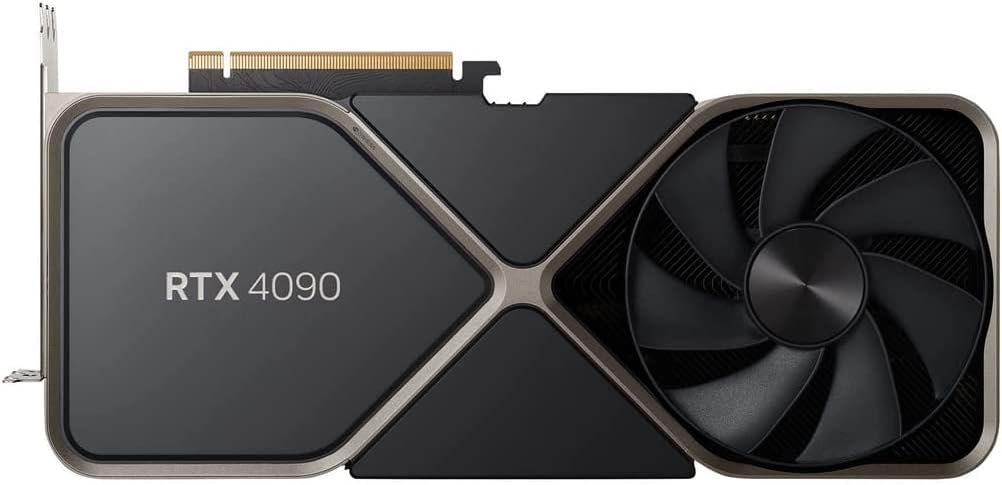
NVIDIA’s own Founders Edition remains the cleanest expression of the RTX 4090. You get the full 16,384 CUDA cores, a 2520 MHz boost clock, and the signature dual-flow cooler in a more compact two-slot-friendly frame than most AIB cards. Support for 8K 60Hz HDR and DLSS 3 means you’re future-proofed for years of high-resolution gaming and AI-accelerated creative work.
The caveat is cooling headroom: the Founders cooler is excellent but doesn’t match the sustained thermal performance of big triple-fan cards under long loads. Availability can also be spotty, so you may wait to buy at list. If you want the definitive reference 4090 in a cleaner, smaller package, this is your card. Skip it if you chase maximum factory overclocks.
Pros
- Compact reference design
- Full 16,384 CUDA cores
- Excellent stock efficiency
Cons
- Limited retail availability
- No factory overclock
- Cooling trails AIB cards
Specifications
#3. MSI RTX 4090 Suprim Liquid X
Cooled Design
MHz Boost
Quiet Operation
If thermals and noise are your obsession, the Suprim Liquid X is hard to beat. The all-in-one liquid cooling solution keeps the GPU dramatically cooler and quieter than any air-cooled 4090, letting the 2625 MHz boost clock sustain at maximum for long rendering or gaming sessions. The slim card body also frees slot space and fits cases where triple-fan monsters won’t.
The caveat is installation complexity: you’ll need a 240mm+ radiator mount and patience for tubing routing, and the pump adds a new potential failure point. It also costs more than air-cooled equivalents. If you have a compatible case and want the quietest, coolest 4090 available, this is the pick. Skip it if you want a simple drop-in install.
Pros
- Superb liquid cooling
- Whisper-quiet operation
- Compact card body
Cons
- Complex radiator install
- Pump failure risk
- Higher cost
Specifications
#4. MSI RTX 4090 Gaming X Trio
3 Cooling
Pipe Heat Transfer
MHz Boost Clock
MSI’s Gaming X Trio leans hard into thermal engineering. The TRI FROZR 3 design pairs linked TORX 5.0 fan blades with a copper baseplate and Core Pipes that spread heat across the full heatsink, so you’ll see low temps and quiet operation even in long 4K sessions. The 2595 MHz boost clock delivers strong out-of-box performance for gaming and content creation alike.
The trade-off is physical bulk: it’s a long, heavy triple-fan card that will test mid-tower clearance and may need a support bracket. Airflow-control fins keep noise down, but you’ll want a roomy case. If quiet, cool sustained performance is your priority, this is a superb pick. Skip it if your build is space-constrained.
Pros
- Excellent TRI FROZR 3 cooling
- Quiet under load
- Strong factory clock
Cons
- Very large card
- Heavy, needs support
- Premium cost
Specifications
#5. ASUS TUF RTX 4090 OC
Military-Grade Build
MHz OC Mode
Axial Fans
The TUF Gaming RTX 4090 OC is ASUS’s toughness-first take on the flagship. You get a 2595 MHz OC-mode boost clock, 24GB of GDDR6X, and dual ball-bearing Axial-tech fans that move up to 23% more airflow, all wrapped in the TUF series’ reinforced shroud and metal backplate. It’s a card built to run hard for years in warm cases without drama.
The honest caveat is that TUF cards favor function over flash: expect a utilitarian look and a slightly louder acoustic profile than the ROG Strix line. It’s also a large card requiring case clearance. If you prioritize long-term reliability and steady thermals over RGB showmanship, this is a great match. Skip it if aesthetics top your list.
Pros
- Rugged TUF construction
- High OC-mode clock
- Strong axial airflow
Cons
- Plain aesthetics
- Runs slightly loud
- Large physical footprint
Specifications
#6. PNY RTX 4090 Verto
GB/s Bandwidth
Enabled
Fan Verto
PNY’s Verto Triple Fan is the pragmatic way into the 4090 tier. You still get the full GPU: 16,384 CUDA cores, a 2520 MHz boost clock, and 24GB of GDDR6X with up to 1008 GB/s of bandwidth, so gaming and rendering performance matches pricier cards almost exactly. The triple-fan cooler handles the 450W-class load fine, and PNY includes a support bracket and power adapter cable in the box.
The caveat is refinement: the cooler is louder and thermals run a few degrees warmer than premium models, and there’s no RGB to speak of. But if your goal is maximum frames per dollar at the top of the stack, this card makes sense. Skip it if you want showcase aesthetics or whisper-quiet operation.
Pros
- Lower price than rivals
- Full 4090 specs
- Support bracket included
Cons
- Louder cooler
- No RGB lighting
- Higher load temps
Specifications
#7. ZOTAC RTX 4090 Trinity OC
2.0 ARGB
3.0 Cooling
BIOS Switch
The ZOTAC Trinity OC pairs full 4090 performance with showpiece styling. You get a 2535 MHz boost clock, 24GB of GDDR6X at 21 Gbps, and IceStorm 3.0 cooling with dual ball-bearing fans and FREEZE fan-stop for silent idle. The SPECTRA 2.0 ARGB lighting and metal backplate make it a centerpiece build card, and the bundled GPU support stand is a thoughtful touch.
On the caveat side, it’s a 3.5-slot, 14-inch card, so measure your case before buying, and ZOTAC’s software ecosystem is less polished than some rivals. Dual BIOS gives you a quiet profile if fan noise worries you. Good for builders who want flagship performance with strong RGB flair; skip it if you prefer understated, compact cards.
Pros
- Striking ARGB lighting
- Bundled support stand
- Dual BIOS flexibility
Cons
- Massive 3.5-slot footprint
- Bland bundled software
- Noisy under full load
Specifications
#8. ASUS ROG Strix 4090 White
Edition Styling
MHz OC Clock
Fan Airflow
For white-themed builds, this is the 4090 to beat. You get the same ROG Strix hardware as the standard model, a 2640 MHz OC-mode clock, 24GB of GDDR6X, and Axial-tech fans pushing 23% more airflow, all finished in a clean white shroud and backplate that looks stunning with matching boards and cases. DLSS 3 support keeps frame rates high at 4K.
The caveats: it carries a price premium over the identical black card, and some owners report the white finish showing wear or yellowing concerns over time. It’s also an enormous card requiring serious clearance. If you’re building a showcase white rig and the budget allows, it’s worth it. Skip it if color doesn’t matter to you.
Pros
- Stunning white aesthetic
- Top OC clock speed
- Strong ROG cooling
Cons
- Premium over black model
- White finish upkeep
- Huge 3-slot size
Specifications
#9. MSI RTX 4090 Gaming Slim
Compact Design
CUDA Cores
Memory Bus
The Gaming Slim exists for one reason: fitting a full RTX 4090 with 16,384 CUDA cores into builds that can’t swallow a 14-inch triple-fan card. You keep the complete 4090 spec sheet, 24GB GDDR6X on a 384-bit bus and 8K output, in a shorter, two-fan body that opens up small-form-factor and mid-tower options.
The trade-off is thermal headroom: a slimmer heatsink means higher temps and more fan noise under sustained load than MSI’s own Trio or Suprim models. The listing is also new with few reviews, so long-term reliability data is thin. If case clearance is your binding constraint, this is one of the few slim 4090s available. Skip it if you have room for a bigger, cooler card.
Pros
- Fits compact cases
- Full 4090 performance
- Shorter card length
Cons
- Higher thermals
- Fewer reviews so far
- Louder under load
Specifications
#10. Renewed RTX 4090 Founders
Inspected Unit
Display Ready
Limited Warranty
A renewed Founders Edition 4090 gets you flagship performance, the full 24GB GDDR6X and 8K 7680×4320 output, at a meaningfully lower outlay than new stock. Functionally you’re getting the same 16,384-core Ada Lovelace GPU, and renewed units are inspected before resale, so most buyers report cards that perform like new.
The caveats are real, though: you’re covered by only a 90-day limited warranty, cosmetic wear is possible, and the listing’s spec details are inconsistent, so verify memory and condition on arrival. There’s also no way to know the card’s prior mining or workload history. Good for budget-focused builders comfortable with refurb risk; skip it if long warranty peace of mind matters most.
Pros
- Significant cost savings
- Full flagship performance
- Adapter cable included
Cons
- Only 90-day warranty
- Possible cosmetic wear
- Unknown usage history
Specifications
The RTX 4090 Question: Is Nvidia’s Flagship Really the Right Card for You?
The RTX 4090 sits at the very top of the graphics card ladder, and it earns that spot with raw performance few cards can touch. But “best” and “best for you” are not the same thing. Before you commit to a flagship purchase, it’s worth asking whether its strengths actually match how you play, work, and spend.
Where the 4090 Shines — and Where It Might Not
- Your actual workload. If you’re chasing maximum frame rates at 4K, heavy ray tracing, or content creation workloads like 3D rendering and video editing, a flagship card makes sense. If you mostly play esports titles or older games at 1080p, you’d be paying for performance you may never use.
- Your monitor and resolution. A top-tier GPU is only as useful as the display it feeds. Pairing an ultra-high-end card with a 1080p, 60Hz monitor wastes most of its potential — while a 4K high-refresh display lets it stretch its legs.
- Your power supply and case. Flagship cards demand serious wattage, robust connectors, and physical space. Check your PSU capacity, case clearance, and airflow before buying, not after.
- The rest of your system. A powerful GPU can be bottlenecked by an older CPU or limited RAM. Make sure your platform can keep up, or you’ll be leaving performance on the table.
- Price-to-performance reality. The top of the stack always carries a steep premium over the tier just below it. Midrange and upper-midrange cards often deliver 80–90% of the experience for a fraction of the cost.
- Availability and alternatives. The high-end market shifts with each generation. Compare the current landscape — including AMD and Intel offerings — rather than assuming last generation’s rankings still hold.
Traps That Catch Even Experienced Builders
- Buying for bragging rights. Future-proofing sounds appealing, but paying flagship prices for headroom you won’t use in the next few years rarely pays off. Buy for the games and resolutions you actually play today.
- Ignoring total system cost. The card is only part of the bill. A GPU that requires a new power supply, a bigger case, or a CPU upgrade can quietly double your real-world spend.
- Assuming “best” means “best value.” Reviews crown the fastest card; they don’t crown the smartest purchase for your budget. Read benchmarks at your resolution and compare frame rates per dollar before deciding.
The 4090 Verdict: Raw Power, No Contest
So, is the 4090 the best graphics card? If pure performance is the question, the answer is yes — nothing else touches it right now. For most gamers, the ASUS ROG Strix or MSI Gaming X Trio deliver the best all-around package. If you want maximum cooling headroom, the MSI SUPRIM Liquid X is the one to beat. Builders in tighter cases should grab the MSI Gaming Slim, while value hunters can’t go wrong with the PNY Verto or ZOTAC Trinity OC. Prefer a clean aesthetic? The white ROG Strix is stunning, and the VIPERA Founders Edition — or its renewed variant — nails the reference look. Whichever you pick, hit the buttons above to check current availability before it sells out.
Final 3 Picks: Overall Pick, Reference Design, and Liquid-Cooled Pick
Ready to decide? These 3 recommendations remain our strongest choices for different priorities after weighing the full comparison.
ASUS ROG Strix RTX 4090
- 24GB GDDR6X memory
- 2640 MHz OC boost clock
- Vapor chamber cooling
NVIDIA RTX 4090 Founders
- 16,384 CUDA cores
- DLSS 3 AI acceleration
- 8K HDR gaming support
MSI RTX 4090 Suprim Liquid X
- Liquid cooling design
- 2625 MHz boost clock
- 24GB GDDR6X memory