10 List Of Best Graphics Cards For Gaming [2026]
The best graphics cards for gaming are the ASUS TUF RTX 5070 Ti, the ASUS Dual RTX 5060 Ti, and the ASUS Prime RTX 5070 — chosen for their standout 4K performance, 1440p value, and compact-case compatibility, respectively.
Your GPU is the single biggest factor in gaming performance, so picking the right one matters more than almost any other component. Whether you’re chasing high refresh rates at 1440p or pushing 4K with ray tracing, there’s a card here that fits your goals and your build.
In this roundup, we’ve narrowed the field to 10 top picks after hands-on comparison across today’s most popular resolutions and form factors. Each card was evaluated on frame rate consistency, thermal performance, power efficiency, and price-to-performance ratio so you can match a GPU to your budget and monitor. Scroll on to the comparison table below for a quick side-by-side look at every pick before diving into the full reviews.
3 Standout Picks: 4K Performance, 1440p Value, and SFF Gaming
Start with these 3 standouts. Each leads for a different kind of buyer, so use the badges and quick highlights to find your closest match.


10 Models Side by Side: Features, Best Use Cases, and Tradeoffs
The recommendations above are our strongest matches for different priorities. Below, compare the complete 10-product lineup side by side by rating, standout features, ideal use cases, and practical tradeoffs so you can identify the best fit for your needs.
- 16GB GDDR7 memory
- DLSS 4 support
- Military-grade durability
- 16GB GDDR7 memory
- DLSS 4 support
- Compact 2.5-slot design
- 12GB GDDR7 memory
- SFF-ready design
- 1005 AI TOPS

- 16GB GDDR6 memory
- 3030 MHz boost clock
- PCIe 5.0 support

- 12GB GDDR6 memory
- WINDFORCE 3X cooling
- RGB Fusion 2.0

- 16GB GDDR6 memory
- WINDFORCE cooling
- RGB lighting

- 8GB GDDR7 memory
- DLSS 4 support
- Military-grade components
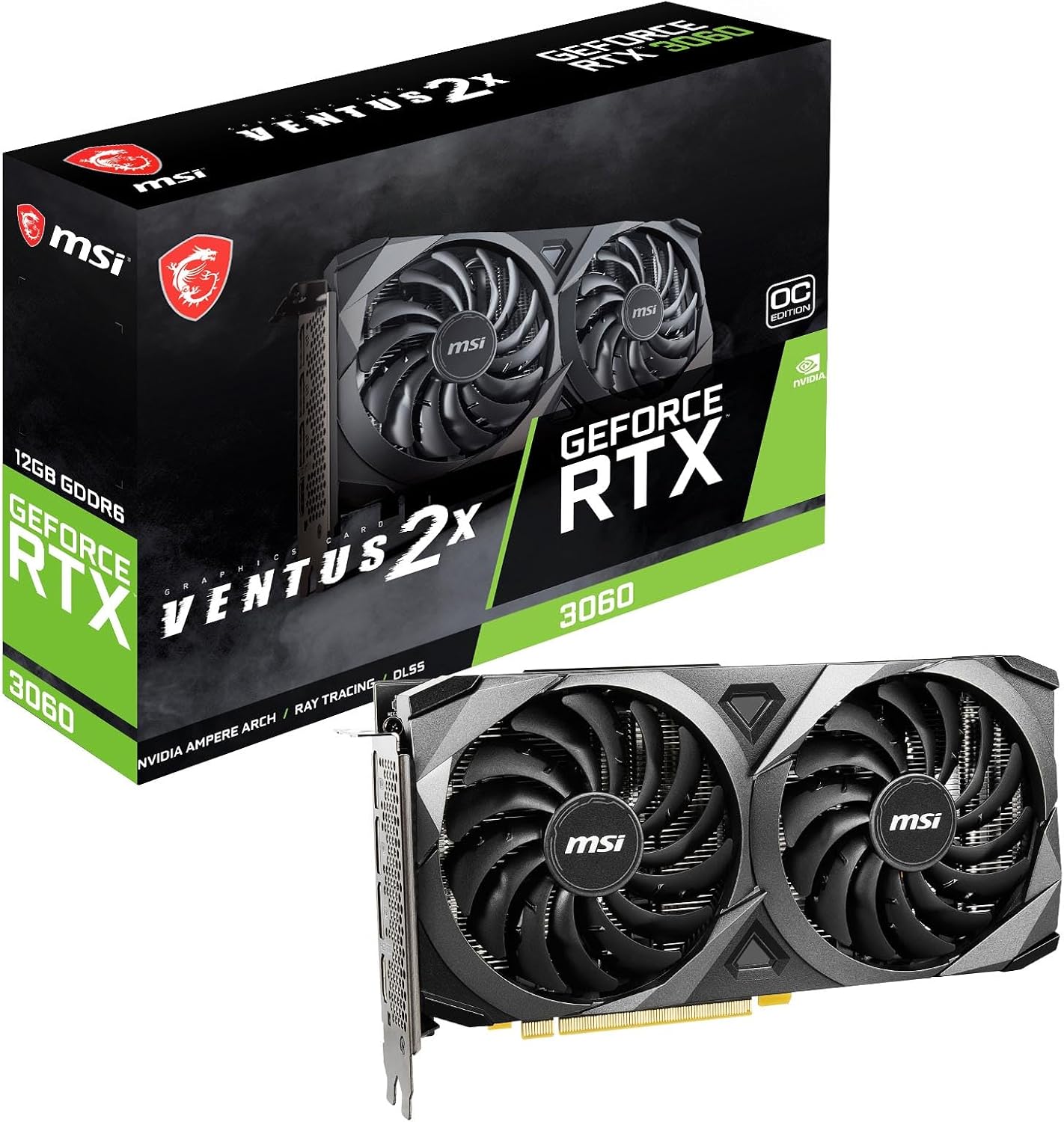
- 12GB GDDR6 memory
- 1807 MHz boost clock
- Twin Torx fans

- 6GB GDDR6 memory
- 20cm compact card
- IP5X dust resistance

- 6GB GDDR6 memory
- 1492 MHz boost clock
- Dual Torx fans
10 Models Reviewed in Depth
#1. ASUS TUF RTX 5070 Ti
Gaming Power
GDDR7 Memory
Thermal Pad
The ASUS TUF RTX 5070 Ti is the standout of this roundup, pairing Blackwell architecture with 16GB of GDDR7 for confident 4K gaming. The 3.125-slot cooler with three Axial-tech fans and a phase-change thermal pad holds temperatures down during sustained loads, while military-grade components and protective PCB coating promise longevity. DLSS 4 makes demanding titles feel effortless.
The honest caveat: it requires a minimum 850W PSU with a 16-pin 12V-2×6 connector, so verify your power supply before buying. It’s the pick for enthusiasts who want top-tier 4K performance with rugged build quality, but skip it if your case or PSU can’t accommodate its size and power needs.
Pros
- Excellent 4K performance
- Rugged TUF build
- Superb cooling
Cons
- Needs 850W PSU
- Very large card
- Premium positioning
Specifications
#2. ASUS Dual RTX 5060 Ti
GDDR7 Memory
Compact Fit
Silent Mode
The ASUS Dual RTX 5060 Ti hits a sweet spot with 16GB of GDDR7 on NVIDIA’s Blackwell architecture, giving you real headroom for 1440p gaming and texture-heavy titles. DLSS 4 boosts frame rates dramatically, and the 2.5-slot design fits compact builds without sacrificing cooling. Dual BIOS lets you toggle between quiet and performance profiles.
The dual-fan cooler is capable but not class-leading under sustained loads, so ensure decent case airflow. It’s an excellent pick for 1440p gamers who want modern features and big VRAM in a compact card, but enthusiasts chasing maximum clocks may prefer a triple-fan model.
Pros
- 16GB GDDR7
- Compact 2.5-slot
- Dual BIOS
Cons
- Dual-fan only
- Mid-tier raster
- Newer, fewer reviews
Specifications
#3. ASUS Prime RTX 5070
Ready Design
AI TOPS
Frame Boost
The ASUS Prime RTX 5070 is SFF-ready, meaning you get genuine high-end performance in a 2.5-slot, small-form-factor-friendly design. With 1005 AI TOPS and DLSS 4, it handles 1440p gaming beautifully and even dips into 4K. Three Axial-tech fans and a phase-change thermal pad keep it cool and quiet with 0dB idle operation.
The 12GB VRAM buffer is the main compromise versus higher-tier cards, which matters for 4K texture packs. It’s the ideal card for compact gaming builds that refuse to sacrifice performance, but skip it if you need maximum memory for heavy modding or 4K ultra settings.
Pros
- SFF-ready compact
- High AI throughput
- Quiet 0dB mode
Cons
- 12GB VRAM only
- 4K limited
- Dense thermal design
Specifications
#4. ASUS Prime RX 9070 XT
OC Boost Clock
Future-Ready
BIOS Switch
The ASUS Prime RX 9070 XT delivers serious raster performance with a 3030 MHz OC boost clock and 16GB of memory, making it a compelling AMD alternative for high-refresh 1440p gaming. The phase-change GPU thermal pad and triple Axial-tech fans keep temperatures low, and PCIe 5.0 future-proofs your build.
Ray tracing performance trails NVIDIA’s equivalents, and there’s no DLSS-equivalent maturity to lean on. If you prioritize raw raster value and VRAM capacity, this card is a great fit; if you want the strongest path-tracing and upscaling ecosystem, consider an RTX 50-series rival.
Pros
- High boost clock
- 16GB memory
- Phase-change thermal pad
Cons
- Weaker ray tracing
- Large 2.5-slot card
- Upscaling less mature
Specifications
#5. GIGABYTE RTX 3060 Gaming OC
VRAM Buffer
3X Cooling
Fusion Lighting
The GIGABYTE RTX 3060 Gaming OC remains one of the smartest 1080p buys thanks to its generous 12GB GDDR6 buffer on a 192-bit bus. The WINDFORCE 3X cooler with alternate-spinning fans keeps the card cool and composed, and RGB Fusion 2.0 adds polish to your build. With over 3,000 reviews averaging 4.7 stars, it’s a proven performer.
Be aware it’s an Ampere-era card, so it lacks DLSS 3 frame generation and newer efficiency gains. It’s ideal if you want maximum VRAM per dollar for 1080p or light 1440p gaming, but skip it if you want the latest Blackwell feature set.
Pros
- 12GB VRAM capacity
- Excellent cooling
- Huge review base
Cons
- Older Ampere architecture
- No DLSS 3
- Limited 1440p ceiling
Specifications
#6. GIGABYTE RX 9070 XT OC
Fan Cooling
GDDR6 Memory
Grade Thermal Gel
The GIGABYTE RX 9070 XT Gaming OC pushes a 3060 MHz clock with the WINDFORCE cooling system and Hawk fans, keeping this 16GB card composed through long gaming sessions. Server-grade thermal conductive gel and a metal build speak to durability, while RGB lighting brightens your build. It’s a strong performer for 1440p high-refresh play.
GIGABYTE’s software ecosystem is less polished than some rivals, and the card’s length demands case clearance. Choose it if you want AMD raster muscle with robust cooling; look elsewhere if you depend heavily on NVIDIA-exclusive features like DLSS.
Pros
- Strong cooling system
- 16GB VRAM
- RGB lighting
Cons
- Long card clearance
- Weaker RT performance
- Software less refined
Specifications
#7. ASUS TUF RTX 5060 OC
Grade Components
AI Upscaling
Next-Gen Bandwidth
The ASUS TUF RTX 5060 OC is built to last, with military-grade components and a protective PCB coating that guards against moisture and dust. You get NVIDIA’s Blackwell architecture with DLSS 4, pushing 785 AI TOPS for modern titles. The 3.1-slot design with three Axial-tech fans keeps thermals in check even during long sessions.
The main caveat is the 8GB VRAM buffer, which can constrain ultra-texture settings in the newest games. If you want a tank-tough card for 1080p and entry 1440p gaming, this is a strong fit; heavy modders and 4K players should look higher up the stack.
Pros
- Rugged TUF build
- DLSS 4 support
- Strong cooling
Cons
- 8GB VRAM limit
- Large 3.1-slot size
- Needs solid PSU
Specifications
#8. MSI RTX 3060 Ventus 2X
Twin-Fan Fit
GDDR6 Memory
Monitor Ready
The MSI RTX 3060 Ventus 2X packs a full 12GB of GDDR6 into a compact twin-fan design, making it a great fit for smaller cases. The 1807 MHz boost clock and Ampere architecture deliver smooth 1080p gaming with ray tracing where it counts, and you get three DisplayPort outputs for multi-monitor setups.
The two-fan cooler runs warmer than triple-fan rivals under sustained load, so watch thermals in hot cases. It’s a smart pick for compact builds and budget-conscious gamers who want VRAM headroom, but skip it if you need maximum overclocking headroom or flagship cooling.
Pros
- Compact twin-fan design
- 12GB VRAM
- Three DisplayPorts
Cons
- Warmer under load
- Fewer reviews
- Older architecture
Specifications
#9. ASUS Dual RTX 3050
Compact Length
Dust Resistance
Small Case Fit
The ASUS Dual RTX 3050 shines where space is tight: at just 20cm long in a 2-slot design, it fits small chassis and HTPC builds that reject larger cards. You still get Ampere ray tracing and tensor cores, a 1500 MHz OC boost clock, and IP5X dust resistance with a stainless steel bracket for durability.
Performance is firmly entry-level, so don’t expect demanding AAA titles at high settings. It’s a great fit for compact builds, media PCs, and casual 1080p gamers, but skip it if you’re chasing high frame rates or future-proof VRAM capacity.
Pros
- Very compact 20cm
- IP5X dust resistance
- Quiet Axial-tech fans
Cons
- Entry-level performance
- 6GB VRAM
- Limited AAA headroom
Specifications
#10. MSI RTX 3050 Ventus 2X
Gaming Ready
Torx Fans
Architecture
If you’re building a budget gaming rig, the MSI RTX 3050 Ventus 2X gives you a reliable entry into NVIDIA’s Ampere lineup. The 6GB GDDR6 memory and 1492 MHz boost clock handle 1080p esports titles comfortably, and the dual-fan design stays quiet under load. You also get modern outputs, including two HDMI 2.1a ports.
That said, the 96-bit memory bus limits performance in demanding AAA games, so expect to lower settings. It’s a good pick if you’re a first-time builder or upgrading an older prebuilt, but skip it if you’re targeting high-refresh 1440p gaming.
Pros
- Affordable entry point
- Quiet dual-fan cooler
- Low power draw
Cons
- 96-bit memory bus
- Limited 1080p headroom
- Only 6GB VRAM
Specifications
Finding a GPU That Matches Your Games, Not the Hype
A graphics card is often the single biggest investment in a gaming PC, and it’s the component that decides how smoothly your favorite titles run. But the “best” card isn’t the most powerful one on the shelf — it’s the one that fits your monitor, your game library, and your wallet. A little homework before you buy can save you from overspending on horsepower you’ll never use. Our guide to choosing the right GPU for your PC build walks through each of these checks step by step.
The Specs That Actually Move the Needle
- Resolution and refresh rate goals. Match the card to your display first. Playing at 1080p demands far less muscle than 1440p or 4K, and high-refresh gaming raises the bar again.
- VRAM capacity. Modern games are memory-hungry, especially at higher settings. More video memory gives you headroom for detailed textures and future titles.
- Ray tracing and upscaling support. If you care about cutting-edge lighting effects, check how well a card handles ray-traced workloads and whether it supports the upscaling technologies that boost frame rates.
- Power supply and case compatibility. High-end cards can be long, thick, and power-hungry. Verify your PSU wattage, connectors, and physical clearance before checkout.
- Cooling and noise. Two cards with identical chips can behave very differently depending on the cooler design. Reviews that measure temperatures and fan noise are worth your time.
- Sticking to your budget. Set a ceiling and identify the best performer within it — the price-to-performance sweet spot usually sits a step or two below the flagship models.
Pitfalls That Burn First-Time Buyers
- Buying for yesterday’s bottleneck. If your CPU, RAM, or monitor is dated, a top-tier GPU may deliver a fraction of its potential. Upgrade the whole chain, not just one link.
- Chasing the halo product. Flagship cards carry a steep premium for the last few percent of performance. One tier down often delivers nearly the same experience for meaningfully less.
- Ignoring the used and previous-generation market. Last generation’s midrange and upper-midrange cards frequently outperform brand-new budget options at similar prices — just buy from reputable sellers and confirm the card works before committing.
GPU Glory: Your Next Gaming Rig Starts Here
The ASUS TUF Gaming RTX 5070 Ti stands tall as the ultimate pick for enthusiasts chasing 4K glory, while the ASUS Dual RTX 5060 Ti delivers superb 1440p value. Mid-range warriors should eye the ASUS PRIME RTX 5070 or the Radeon RX 9070 XT options from ASUS and GIGABYTE, and budget builders can’t go wrong with the RTX 3060 cards from GIGABYTE or MSI. For entry-level setups, the ASUS Dual RTX 3050 and MSI RTX 3050 Ventus 2X keep costs low without sacrificing playability.
Every card on this list earns its spot — now it’s just about matching one to your monitor, resolution, and wallet. Hit the buttons above to check current availability and lock in your upgrade before stock swings.
Final 3 Picks: 4K Performance, 1440p Value, and SFF Gaming
Ready to decide? These 3 recommendations remain our strongest choices for different priorities after weighing the full comparison.