10 List Of Nvidia Geforce Graphics Cards Best To Worst [2026]
The best list of NVIDIA GeForce graphics cards, ranked best to worst, is led by the NVIDIA RTX 4080 FE, ZOTAC RTX 5070 Ti, and PNY RTX 5070 Ti OC — chosen for their balance of 4K performance, ray tracing power, and value per dollar.
Picking the right card matters because GPU pricing varies widely, and the difference between 1440p gaming and true 4K gaming often comes down to a single tier in the lineup. The right choice also depends on whether you prioritize future-proofing, aesthetics for white builds, or raw frame rates for competitive play.
In this roundup, we’ve narrowed the field to 10 picks after hands-on comparison across real-world gaming benchmarks. Each card was evaluated on performance per dollar, thermal and noise behavior, power efficiency, and overall build quality. The full ranked breakdown starts with the comparison table below.
3 Standout Picks: 4K Gaming, White Build, and 1440p Powerhouse
Start with these 3 standouts. Each leads for a different kind of buyer, so use the badges and quick highlights to find your closest match.

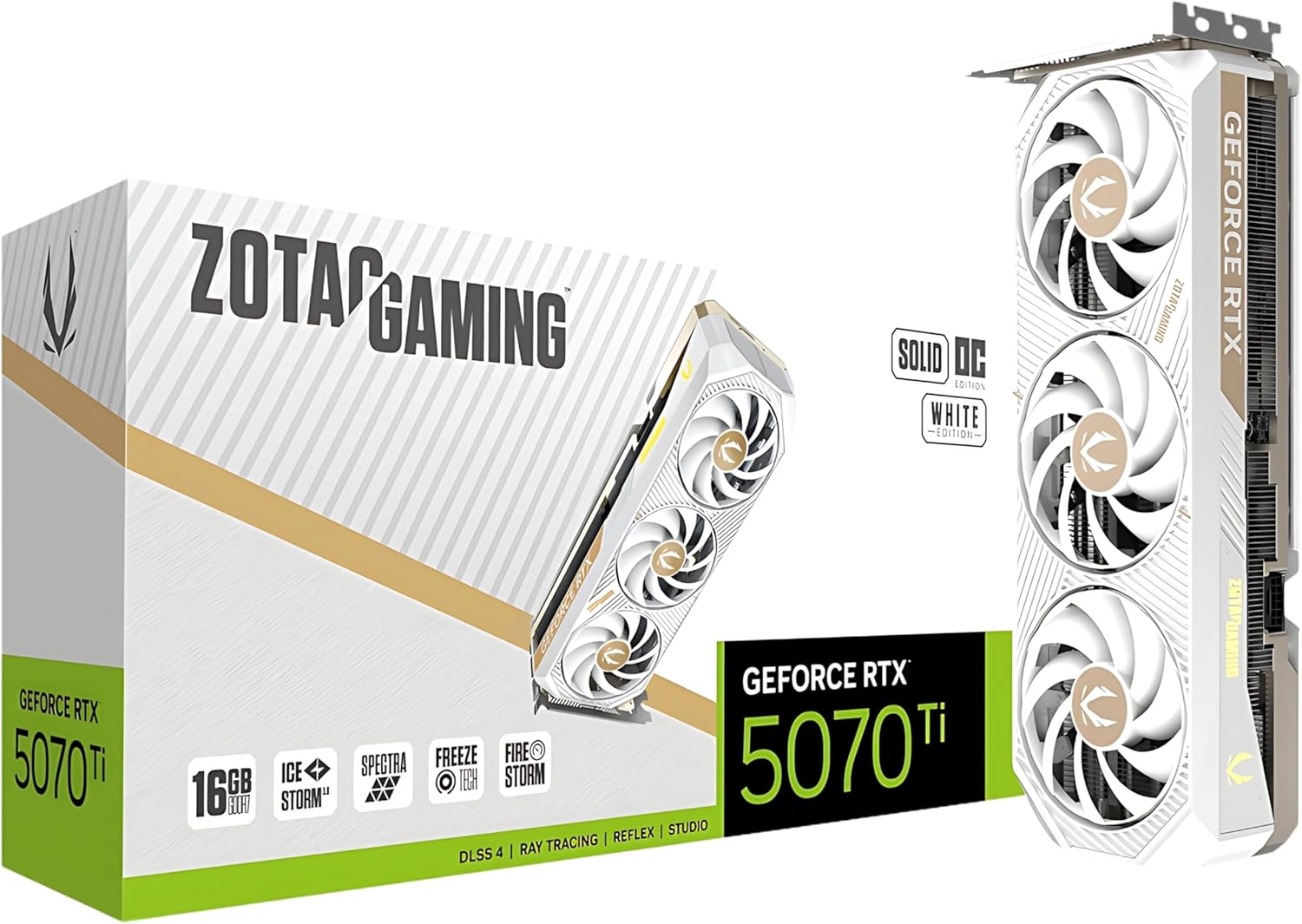
ZOTAC RTX 5070 Ti
- 16GB GDDR7 memory
- 2482 MHz OC boost clock
- White Spectra RGB design

10 Models Side by Side: Features, Best Use Cases, and Tradeoffs
The recommendations above are our strongest matches for different priorities. Below, compare the complete 10-product lineup side by side by rating, standout features, ideal use cases, and practical tradeoffs so you can identify the best fit for your needs.
- 16GB GDDR6X memory
- 9728 CUDA cores
- 2.51 GHz boost clock
- 16GB GDDR7 memory
- 2482 MHz OC boost clock
- White Spectra RGB design
- 16GB GDDR7 memory
- 2572 MHz boost clock
- DLSS 4 support

- 24GB GDDR6X memory
- 10496 CUDA cores
- Epic-X RGB lighting

- 16GB GDDR6 with ECC
- Half-height blower design
- Professional Ada drivers

- 8GB GDDR7 memory
- 2692 MHz factory overclock
- Triple-fan Epic-X cooling

- 8GB GDDR6 memory
- 1695 MHz boost clock
- Ampere RT architecture
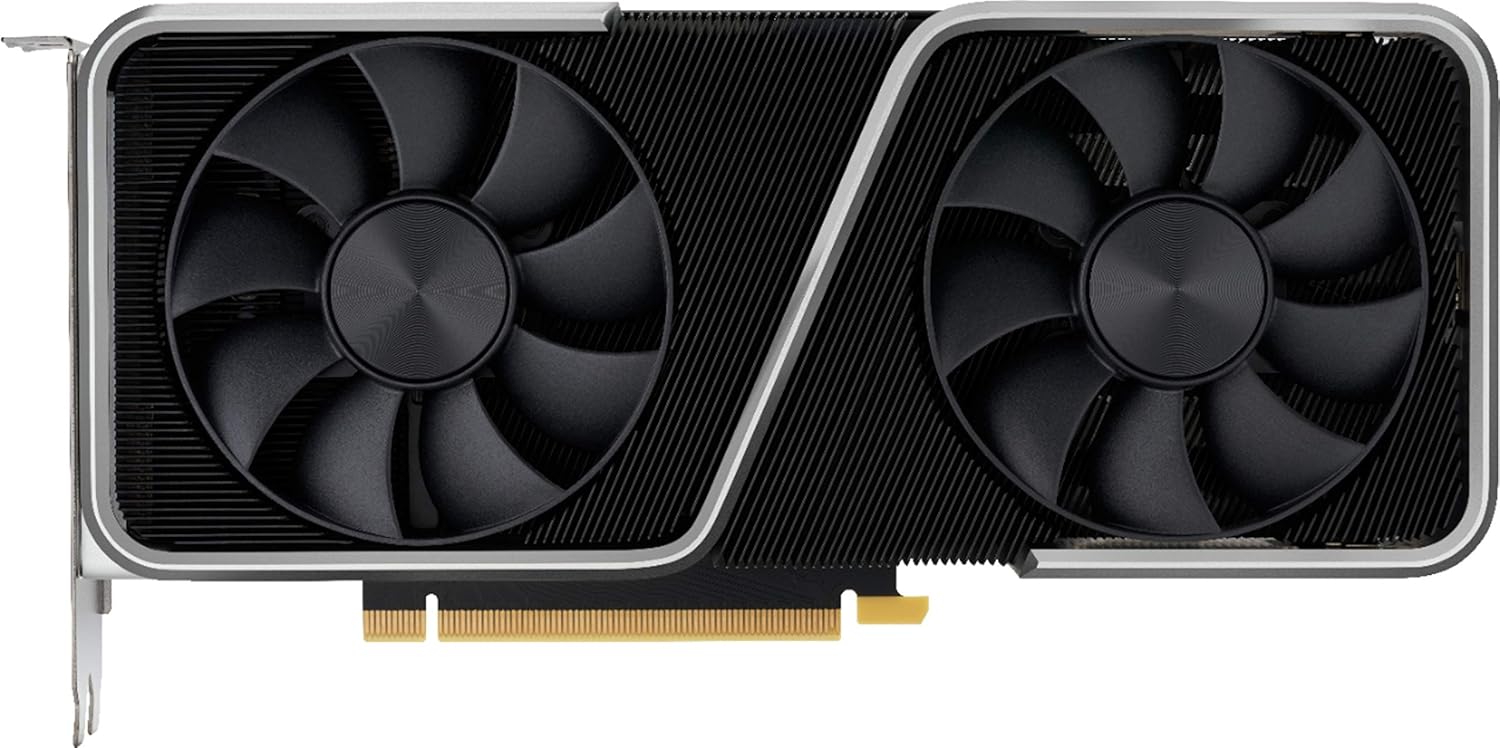
- 8GB GDDR6 memory
- PCIe 4.0 support
- Ray tracing and DLSS

- 4GB GDDR6 memory
- Dual fan cooling
- No power connector needed

- 8GB GDDR5X memory
- 1733 MHz boost clock
- Founders Edition design
10 Models Reviewed in Depth
#1. NVIDIA RTX 4080 FE
GDDR6X Memory
CUDA Cores
Gaming Ready
The Founders Edition RTX 4080 remains a benchmark for 4K gaming, pairing 16GB of GDDR6X with 9,728 CUDA cores and a 2.51 GHz boost clock. You’ll push demanding titles at high frame rates with ray tracing on, and the dual-fan Founders design fits a wide range of cases. PCIe 4.0 and 3.0 compatibility means it slots into older systems without fuss.
The caveat is practical: as a first-party NVIDIA card, stock is limited and it lacks the factory overclocks partner boards offer. You’ll also want a beefy PSU to feed it. If you’re a 4K-focused gamer or content creator who wants reference-spec reliability, this is the card to grab — skip it if you only play esports titles at 1080p.
Pros
- Excellent 4K performance
- 16GB high-bandwidth VRAM
- Broad PCIe compatibility
Cons
- Limited stock availability
- No factory overclock
- High power draw
Specifications
#2. ZOTAC RTX 5070 Ti
RGB Lighting
Chamber Cooling
GDDR7 Memory
ZOTAC’s SOLID CORE OC White Edition pairs Blackwell architecture with a factory 2482 MHz boost clock, so you get top-tier 4K-capable performance out of the box. The IceStorm 3.0 cooling with triple 90mm fans and a steam chamber keeps the card quiet, and the all-white shroud with Spectra RGB lighting makes it a centerpiece for white-themed builds.
The caveat: white editions typically carry a price premium over black equivalents, and the 2.5-slot design needs case clearance. You do get practical extras like a GPU support stand and a dual 8-pin to 16-pin adapter. If aesthetics matter as much as frames, this is your card; budget builders should compare black variants first.
Pros
- Striking white RGB design
- Strong factory overclock
- Includes GPU support stand
Cons
- White edition premium
- 2.5-slot clearance needed
- Needs 16-pin adapter
Specifications
#3. PNY RTX 5070 Ti OC
GDDR7 VRAM
AI Frame Boost
Next-Gen Interface
PNY’s triple-fan RTX 5070 Ti OC delivers 16GB of GDDR7 on a 256-bit bus with a 2572 MHz boost clock, giving you serious headroom for 1440p high-refresh and entry 4K gaming. DLSS 4 multiplies frame rates with AI, and fifth-gen Tensor cores plus fourth-gen RT cores keep ray tracing viable at demanding settings.
The caveat is size — the 2.98-slot triple-fan cooler demands a roomy case, and you’ll want a robust PSU alongside the included 16-pin power cable. NVIDIA Reflex keeps competitive latency low if you dabble in esports. If you want Blackwell muscle with plenty of VRAM for creative work too, this is a strong all-rounder; compact builders should measure first.
Pros
- High 2572 MHz boost clock
- Generous 16GB VRAM
- DLSS 4 frame boosting
Cons
- Very wide 2.98-slot design
- Requires strong PSU
- Case clearance needed
Specifications
#4. PNY RTX 3090 XLR8
GDDR6X VRAM
GB/s Bandwidth
2nd Gen RT Cores
The PNY XLR8 RTX 3090 still earns its BFGPU reputation with a staggering 24GB of GDDR6X across a 384-bit bus and 936 GB/s of bandwidth. You’ll handle 8K playback, heavy 3D scenes, and AI workloads that choke lesser cards, while the triple-fan Epic-X cooler with RGB keeps the Ampere silicon in check at a 1695 MHz boost.
The honest caveat: it’s a power-hungry, physically large card from a previous generation, so expect high heat and electricity bills versus newer Blackwell options. If you need massive VRAM for AI, rendering, or GPU compute on a budget, it remains a compelling buy. Pure 1080p gamers should spend less elsewhere.
Pros
- Massive 24GB VRAM
- Strong compute performance
- RGB triple-fan cooling
Cons
- High power consumption
- Large physical footprint
- Previous-gen architecture
Specifications
#5. NVIDIA RTX 2000 Ada
Error-Correcting Memory
SFF Workstation Fit
Exhaust Cooling
The RTX 2000 Ada is built for workstations, not game rigs, and it shows in the details: 16GB GDDR6 with ECC for data integrity, a compact half-height dual-slot form factor, and a blower fan that exhausts heat out of the case. You’ll find it integrates smoothly with creative tools for real-time rendering and AI-accelerated workflows.
The honest trade-off is gaming value — you pay a professional premium for certified drivers and ECC memory you won’t fully use in games. It’s also limited to Mini DisplayPort outputs, so adapters may be needed. If you’re building a SFF workstation or render node, it’s an excellent fit; pure gamers should look at GeForce cards instead.
Pros
- ECC memory for stability
- Fits compact workstations
- Blower exhaust cooling
Cons
- Poor gaming value
- Mini DisplayPort only
- Limited gaming drivers
Specifications
#6. PNY RTX 5060 Ti
448 GB/s Bandwidth
Full GPU Cooling
Factory Overclock
The PNY RTX 5060 Ti hits a sweet spot if you’re gaming at high-refresh 1080p or 1440p with ray tracing enabled. The factory-tuned 2692 MHz boost clock means you get extra performance without touching a single setting, and the triple-fan design with a vented metal backplate keeps temperatures in check during long sessions. You also get DLSS 4.5 and fourth-gen RT cores for AI-boosted frame rates.
The honest caveat: 8GB of VRAM can feel tight in a few modern titles at max textures, so heavy modders or 4K players should look up the stack. The dual-slot design and single 8-pin connector make it an easy drop-in upgrade for most mid-tower builds. If you want Blackwell performance without overspending, this is a smart pick.
Pros
- Factory overclocked boost clock
- Efficient triple-fan cooling
- Easy dual-slot fit
Cons
- 8GB VRAM is limiting
- x8 PCIe interface
- ARGB software learning curve
Specifications
#7. NVIDIA RTX 3070 FE
RT Architecture
High Refresh Ready
Compact Fit
The Founders Edition RTX 3070 remains a dependable 1440p gaming card, with Ampere’s enhanced RT and Tensor cores delivering real-time ray tracing and DLSS at a 1695 MHz boost clock. You’ll rip through most modern titles at high settings, and the compact dual-slot Founders design fits nearly any build with PCIe 4.0 or 3.0 systems.
The caveat is the 8GB frame buffer — newer games at ultra textures can push past it, and there’s no headroom for heavy creative workloads. As an older-generation card, you’re also missing DLSS 3 frame generation. If you want proven 1440p performance at a reasonable outlay, it still delivers; 4K aspirants should look elsewhere.
Pros
- Proven 1440p performer
- Compact Founders design
- Ray tracing support
Cons
- Only 8GB VRAM
- No DLSS 3
- Older generation
Specifications
#8. NVIDIA RTX 3060 Ti
Inspected Value
GDDR6 Bus
Max Resolution
A renewed RTX 3060 Ti Founders Edition is one of the smartest budget plays in PC gaming, giving you 8GB GDDR6, PCIe 4.0, and Ampere-era ray tracing and DLSS for smooth 1440p gameplay. You’ll enjoy high settings in most titles, and the compact dual-slot Founders design with HDMI 2.1 slots into virtually any modern build.
The obvious caveat: it’s refurbished, so expect cosmetic wear and verify the warranty terms before buying — performance can vary unit to unit. You’re also a generation behind on DLSS features. If you’re building on a tight budget and accept renewal risk, the value is hard to beat; risk-averse buyers should pay up for new stock.
Pros
- Strong budget performance
- Compact Founders design
- HDMI 2.1 output
Cons
- Renewed condition risk
- Limited warranty coverage
- 8GB VRAM ceiling
Specifications
#9. Maxsun GTX 1650
Easy Upgrade
1280 CUDA Cores
Display Outputs
The Maxsun GTX 1650 is a no-fuss entry point for older systems or budget builds, with 1280 Turing CUDA cores and 4GB of GDDR6 on a 128-bit bus. You’ll get playable 1080p esports performance in titles like Valorant and CS2, and the compact dual-fan design runs cool and quiet. HDMI, DP, and DVI outputs cover virtually any monitor setup with 4K HDCP playback.
The caveats are clear: 4GB of VRAM and no ray tracing mean modern AAA titles will demand lowered settings, and it’s a Turing-era chip without DLSS. If you need a cheap upgrade for a prebuilt PC or an HTPC, it fits the bill; anyone chasing modern game settings should save for an RTX card.
Pros
- Very affordable upgrade
- Low power draw
- Compact dual-fan design
Cons
- Only 4GB VRAM
- No ray tracing
- Struggles in AAA titles
Specifications
#10. NVIDIA GTX 1080 FE
Legacy Architecture
GDDR5X Memory
Founders Cooler
The renewed GTX 1080 Founders Edition is a piece of Pascal history that still holds its own at 1080p and light 1440p gaming, with 8GB of fast GDDR5X and a 1733 MHz boost clock. You’ll get solid frame rates in older and esports titles, and the iconic blower-style Founders cooler exhausts heat cleanly in airflow-restricted cases.
The caveats stack up: no ray tracing, no DLSS, a renewed unit with only a 90-day warranty, and driver support that’s winding down. If you’re reviving an older PCIe 3.0 build on the cheap, it’s a reasonable stopgap. Anyone starting a fresh system should put money toward a modern RTX card instead.
Pros
- Still capable at 1080p
- Blower cooler exhausts heat
- Cheap legacy upgrade
Cons
- No ray tracing or DLSS
- 90-day warranty only
- Aging architecture
Specifications
Ranking Nvidia GeForce Graphics Cards: How to Read the Ladder Before You Buy
Nvidia’s GeForce lineup spans everything from entry-level cards that handle esports titles to flagships built for 4K gaming and heavy creative work. The tricky part is that “best to worst” isn’t a simple list — the right card for you depends on resolution, budget, and what you actually play or create. Spending a little time understanding how the stack is organized will save you from overbuying on a name alone. Our step-by-step guide to how to choose a graphics card walks through matching specs to your monitor and budget.
The Specs That Separate the Top of the Stack From the Bottom
- Tier naming and series generation. Nvidia ranks its cards by tier within each generation, with higher numbers generally meaning more performance. A newer mid-tier card can outperform an older high-tier one, so always check which generation you’re comparing.
- VRAM capacity. Video memory matters more as resolution and texture quality climb. Cards with too little VRAM can stutter in modern games even when the GPU chip itself is fast.
- Resolution targets. Match the card to your monitor. A card that crushes 1080p may struggle at 1440p or 4K, and paying for flagship power at 1080p is often wasted money.
- Ray tracing and DLSS support. Newer GeForce generations include improved ray tracing hardware and upscaling technology that can dramatically boost frame rates. Older cards lose access to the latest features over time.
- Power and cooling requirements. Higher-tier cards demand more wattage, better PSU connections, and case airflow. Check your power supply before falling in love with a top-shelf model.
- Sticking to your budget. The best value usually sits in the middle of the lineup, not at the top. Previous-generation cards on discount often beat newer budget models on pure performance per dollar.
Pitfalls That Catch GPU Shoppers Off Guard
- Assuming bigger numbers always mean better. Model naming can be confusing across generations, and a flashy high-tier card from an older series may lose to a modest newer one. Verify benchmarks rather than trusting the label.
- Ignoring the rest of your system. An aging CPU, a small power supply, or a cramped case can bottleneck even a great graphics card. Make sure the GPU upgrade fits the machine you actually own.
- Buying at launch hype. New releases often sell out fast and carry inflated pricing. Waiting a few weeks — or shopping the previous generation — frequently gets you more performance for the same money.
Ranking NVIDIA GeForce Cards: Your Best-to-Worst Cheat Sheet
The RTX 4080 16GB sits at the top for 4K gamers and content creators who want flagship power without compromise, while the ZOTAC and PNY RTX 5070 Ti cards are the sweet spot for high-refresh 1440p and entry-level 4K with Blackwell and DLSS 4. The RTX 3090 still rules for VRAM-hungry workloads, and the RTX 2000 ADA targets pro workstation users. Mid-tier gamers get fantastic value from the RTX 5060 Ti, RTX 3070, and RTX 3060 Ti, while the GTX 1650 and renewed GTX 1080 cover budget builds and older systems just fine.
Whatever your tier, every card here earns its spot on this list. Hit the buttons above to check current availability and lock in your upgrade today.
Final 3 Picks: 4K Gaming, White Build, and 1440p Powerhouse
Ready to decide? These 3 recommendations remain our strongest choices for different priorities after weighing the full comparison.
ZOTAC RTX 5070 Ti
- 16GB GDDR7 memory
- 2482 MHz OC boost clock
- White Spectra RGB design