10 Pubg Best Graphics Card [2026]
The best graphics cards for PUBG are the ASUS RTX 5060 Ti Dual OC, the ASUS RTX 5060 Ti White OC, and the XFX RX 9060 XT Swift — chosen for their balance of high frame rates, thermal performance, and overall value.
PUBG is a competitive battle royale where high-refresh 1080p performance matters more than raw resolution, so the right card can mean the difference between spotting an enemy first and losing the fight. The ASUS RTX 5060 Ti Dual OC stands out as the best overall value for most players, while the XFX RX 9060 XT Swift is the pick for competitive high-refresh gaming.
In this roundup, we’ve narrowed the field to 10 picks after hands-on comparison across popular PUBG settings. We evaluated each card on average FPS, 1% lows and frame consistency, cooling and noise, and price-to-performance to suit both casual and competitive players. The full breakdown, specs, and pricing details are in the comparison table below.
3 Standout Picks: Overall Value, White Build, and High-Refresh Gaming
Start with these 3 standouts. Each leads for a different kind of buyer, so use the badges and quick highlights to find your closest match.


ASUS RTX 5060 Ti White OC
- 16GB GDDR7 memory
- White themed shroud
- 2632 MHz OC clock

10 Models Side by Side: Features, Best Use Cases, and Tradeoffs
The recommendations above are our strongest matches for different priorities. Below, compare the complete 10-product lineup side by side by rating, standout features, ideal use cases, and practical tradeoffs so you can identify the best fit for your needs.
- 16GB GDDR7 memory
- DLSS 4 support
- Dual BIOS switch
- 16GB GDDR7 memory
- White themed shroud
- 2632 MHz OC clock
- 16GB GDDR6 memory
- 3320 MHz boost clock
- RDNA 4 architecture

- 16GB GDDR7 memory
- 2692 MHz factory OC
- SFF-ready 2-slot

- 12GB GDDR6 memory
- 1792 MHz core clock
- 192-bit interface
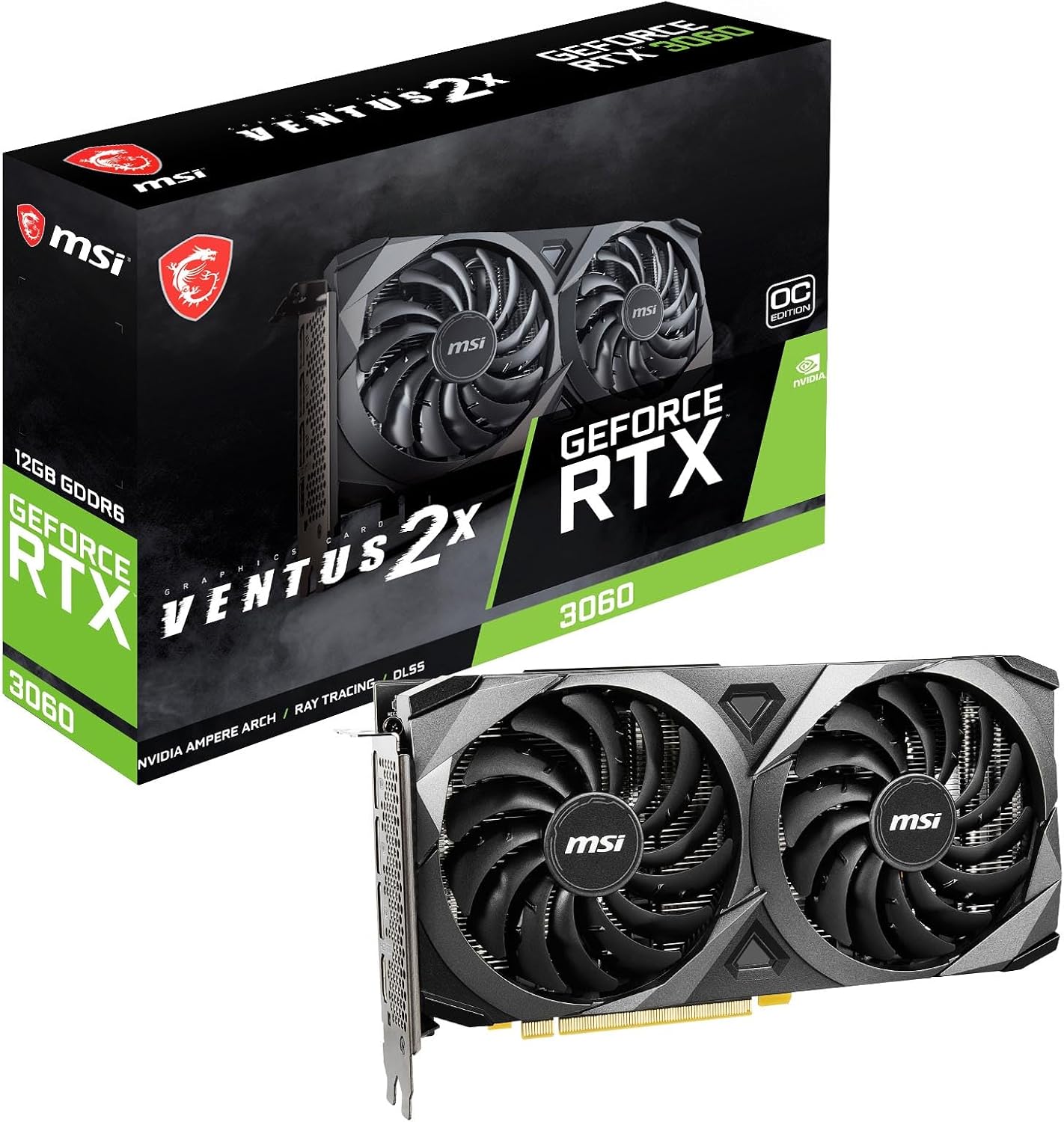
- 12GB GDDR6 memory
- 1807 MHz boost clock
- Torx twin fans

- 8GB GDDR6 memory
- 2695 MHz boost clock
- Triple fan cooling

- 6GB GDDR6 memory
- 1492 MHz boost clock
- Dual Torx fans

- 6GB GDDR6 memory
- Windforce dual fans
- 1477 MHz OC clock
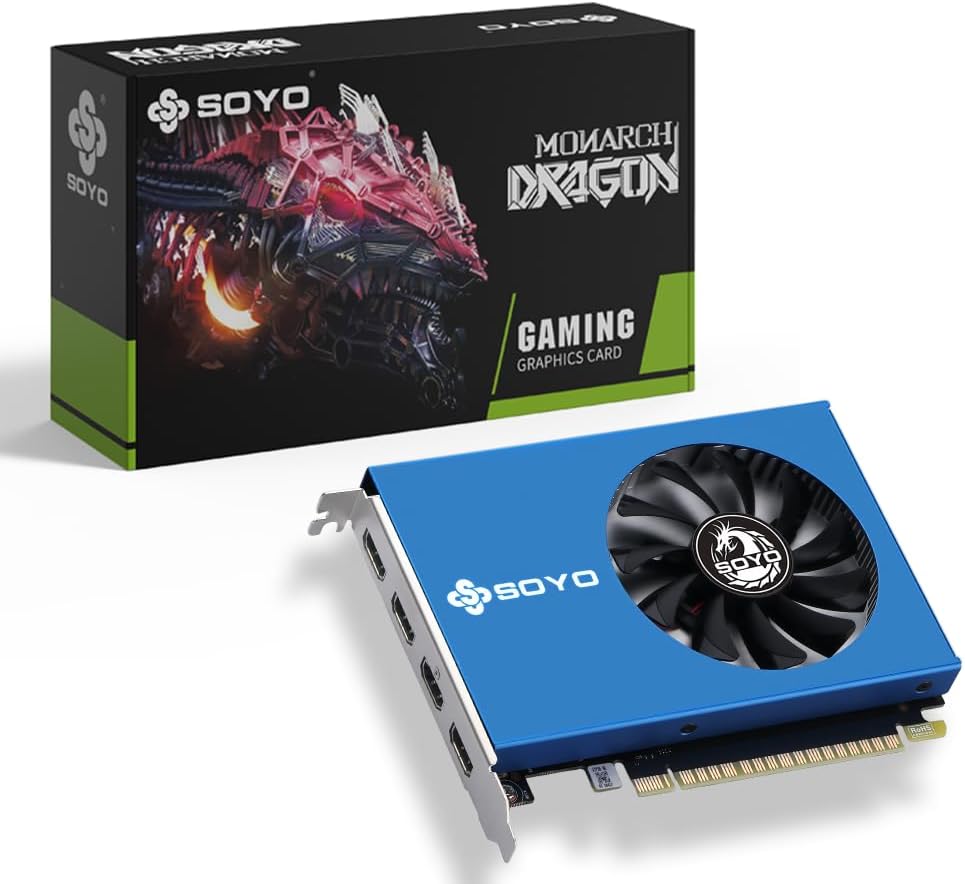
- 4x HDMI 2.0 outputs
- 4GB DDR3 memory
- 38W low power draw
10 Models Reviewed in Depth
#1. ASUS RTX 5060 Ti Dual OC
GDDR7 Memory
AI Upscaling
BIOS Profiles
The ASUS Dual RTX 5060 Ti 16GB OC pairs NVIDIA’s Blackwell architecture with a full 16GB of GDDR7, giving you serious headroom for 1440p gaming and AI workloads. You’ll benefit from DLSS 4 frame generation, and the compact 2.5-slot design fits small chassis without sacrificing cooling. Axial-tech fans and 0dB technology keep things silent during light gaming.
The caveat is that dual-fan cards run slightly warmer than triple-fan variants under sustained load, though the Dual BIOS lets you balance quiet versus performance. If you want a modern, feature-rich card for high-refresh 1440p in a smaller build, this is an excellent choice — skip it if you need flagship 4K ray tracing.
Pros
- 16GB GDDR7 buffer
- DLSS 4 support
- Compact 2.5-slot design
Cons
- Dual-fan thermal limits
- Needs 600W-class PSU
- Overkill for 1080p
Specifications
#2. ASUS RTX 5060 Ti White OC
Build Edition
GDDR7 Buffer
Silent Mode
If you’re building a white-themed rig, the ASUS Dual RTX 5060 Ti White OC delivers flagship-tier specs in a clean white shroud. You get the same 16GB of GDDR7, Blackwell architecture, and DLSS 4 support as the black version, with a 2632 MHz OC boost clock out of the box. Three DisplayPort 2.1b outputs make multi-monitor setups easy.
The trade-off is that white editions often carry a small premium over equivalent black cards, and the 2.5-slot dual-fan design has modest thermal headroom versus bigger coolers. If aesthetics matter as much as frames and you’re targeting 1440p gaming, this card is a great fit — skip it if you want maximum value per dollar.
Pros
- Clean white aesthetic
- 16GB GDDR7 VRAM
- Three DisplayPort outputs
Cons
- White premium pricing
- Dual-fan cooling only
- Limited stock availability
Specifications
#3. XFX RX 9060 XT Swift
Next-Gen Architecture
High-Speed VRAM
Boost Clock
The XFX Swift RX 9060 XT OC is AMD’s RDNA 4 mid-range done right, with 16GB of GDDR6 running at 20 Gbps and boost clocks up to 3320 MHz. You’ll get excellent high-refresh 1440p performance, and the triple-fan SWFT cooler keeps the GPU comfortably cool even during long sessions. It’s currently a top-ranked card in its category for good reason.
The caveat: AMD’s FSR upscaling still trails NVIDIA’s DLSS in game support, and you’ll want a capable PSU for the higher boost clocks. If you’re chasing maximum frames per dollar at 1440p with future-proof VRAM, this is a standout — skip it if CUDA-based creative apps or DLSS-only features matter to you.
Pros
- 16GB VRAM at 20 Gbps
- Excellent 1440p frames
- Efficient triple-fan cooling
Cons
- FSR support narrower
- Needs strong PSU
- No CUDA acceleration
Specifications
#4. PNY RTX 5060 Ti OC
Ready 2-Slot
Memory Bandwidth
DLSS 4.5
The PNY RTX 5060 Ti 16GB OC squeezes Blackwell performance into a compact 2-slot, SFF-ready design without giving up the full 16GB GDDR7 frame buffer. You’ll handle maxed-out 1440p textures, local AI models, and creative workloads at 448 GB/s of bandwidth, with a factory OC boosting to 2692 MHz. The vented metal backplate adds passive cooling and rigidity.
The caveat: a dense dual-fan cooler in a short card means warmer sustained temps than triple-fan rivals, and PNY requires a 600W power supply on a single 8-pin. If you’re building a small-form-factor gaming PC that still wants big VRAM, this is a near-perfect fit — skip it if open-air case cooling is limited.
Pros
- SFF-ready 2-slot size
- Full 16GB GDDR7
- VelocityX tuning software
Cons
- Requires 600W PSU
- Warmer under load
- Dual-fan only
Specifications
#5. GIGABYTE RTX 3060 Windforce
GDDR6 VRAM
Memory Bus
Alternate Spin Fans
The GIGABYTE RTX 3060 Windforce OC 12G remains one of the best-value Ampere cards thanks to its generous 12GB of GDDR6 on a 192-bit bus. You’ll get smooth high-refresh 1080p and playable 1440p in most titles, with ray tracing and Tensor cores available when you want them. The compact 200mm Windforce 2X cooler fits small builds easily.
The caveat is that this is a last-gen card — you won’t get DLSS 4 or Blackwell efficiency, and the rev 2.0 stock varies. If you want maximum VRAM per dollar for 1080p/1440p gaming or GPU-accelerated creative work, it’s still a great buy — skip it if you insist on the newest architecture features.
Pros
- Generous 12GB VRAM
- Compact 200mm length
- Strong 1080p value
Cons
- Previous-gen architecture
- No DLSS 4
- Moderate 1440p ceiling
Specifications
#6. MSI RTX 3060 Ventus 2X
GDDR6 15Gbps
Twin Fan Cooling
RT + Tensor
The MSI RTX 3060 Ventus 2X 12G OC gives you Ampere’s best VRAM value: 12GB of 15 Gbps GDDR6 on a 192-bit bus with a 1807 MHz boost clock. You’ll get dependable high-refresh 1080p and solid 1440p gaming, plus ray tracing and Tensor cores when needed. The Torx twin-fan cooler is proven, quiet, and compact.
The caveat is generational — no DLSS 4 or Blackwell efficiency, and this Ventus V1 variant has fewer reviews than longer-established models. If you want lots of VRAM for 1080p/1440p gaming or light creative work without paying current-gen prices, it’s a smart buy — skip it if cutting-edge features are non-negotiable.
Pros
- 12GB VRAM capacity
- Quiet Torx twin fans
- Proven Ampere performance
Cons
- Last-gen architecture
- Fewer user reviews
- Modest 1440p headroom
Specifications
#7. ASRock RX 7600 Challenger
Ray Tracing Cores
32MB Cache
Fan 0dB Cooling
The ASRock RX 7600 Challenger Pro OC brings AMD’s RDNA 3 architecture to the mainstream with 8GB of GDDR6 at 18 Gbps and a boost clock up to 2695 MHz. You’ll enjoy strong 1080p and capable 1440p frame rates, helped by 32MB of Infinity Cache. The triple-fan Challenger cooler with 0dB silent mode stays cool and quiet.
The honest caveat: NVIDIA’s DLSS ecosystem is more widely adopted than FSR, and the card draws power from a single 8-pin on a recommended 550W supply, so check your PSU. At 303mm long it also needs chassis clearance. If you prefer AMD value for high-FPS 1080p gaming, it’s a strong pick — skip it if ray tracing is central to you.
Pros
- Strong 1080p/1440p frames
- Triple-fan 0dB cooling
- Metal backplate included
Cons
- FSS adoption lagging
- Long 303mm card
- Single 8-pin power
Specifications
#8. MSI RTX 3050 Ventus 2X
Esports Ready
RT Cores
Torx Fans
The MSI RTX 3050 Ventus 2X 6G OC gives you an easy entry into NVIDIA’s Ampere lineup with 6GB of GDDR6 and a 1492 MHz boost clock. You’ll get solid 1080p performance in esports titles like PUBG, and the dual-fan Ventus cooler keeps temperatures in check without much noise. Setup is simple over PCIe x16 with HDMI 2.1a and DisplayPort outputs.
The honest caveat is that the 96-bit memory bus and 6GB frame buffer limit you at higher resolutions, so expect to drop settings in demanding AAA games. If you’re a budget-conscious gamer targeting 1080p esports, this is a smart pick — skip it if you want 1440p or heavy ray tracing headroom.
Pros
- Affordable 1080p gaming
- Quiet dual-fan cooler
- Compact card size
Cons
- Only 6GB VRAM
- 96-bit memory bus
- Limited ray tracing headroom
Specifications
#9. GIGABYTE RTX 3050 Windforce
Dual Fan Cooling
RT + Tensor Cores
Small Chassis Fit
The GIGABYTE RTX 3050 Windforce OC V2 is a no-nonsense entry card built on Ampere with 2nd-gen RT cores and 3rd-gen Tensor cores. You’ll get dependable 1080p performance in popular titles, and the 2X Windforce cooling with alternate-spinning fans keeps the small card cool and reasonably quiet. Its compact footprint fits nearly any case.
Be realistic about limits: the 6GB frame buffer and 96-bit bus mean you’ll lower texture settings in modern AAA games, and ray tracing is best left off. If you’re upgrading an older prebuilt or building a budget esports machine, it’s a sensible buy — skip it if 1440p or future-proofing is your priority.
Pros
- Compact 2-fan design
- Efficient Windforce cooling
- Solid 1080p esports
Cons
- 6GB VRAM ceiling
- Weak ray tracing
- Not 1440p capable
Specifications
#10. SOYO GT 730 Quad HDMI
HDMI Output
Low Power Draw
Multi-Monitor
The SOYO GT 730 isn’t a gaming card — it’s a display-expansion specialist, and that’s exactly what it does well. With 4x HDMI 2.0 ports, you can drive four monitors at once for stock trading dashboards, CCTV walls, or digital signage, all on a tiny 38W power budget that most office PCs handle without a PSU upgrade.
Be clear-eyed about the caveat: with 4GB of DDR3 on a 64-bit bus, this card will not run PUBG or any modern 3D game meaningfully. If you need quad-screen productivity or video-wall output on a budget, it’s a smart niche buy — skip it entirely if you’re actually shopping for gaming graphics performance.
Pros
- Four simultaneous HDMI displays
- Very low 38W draw
- Compact quiet design
Cons
- Not for gaming
- Slow DDR3 memory
- Old GPU architecture
Specifications
Frames, Wins, and Wattage: Landing the Right GPU for PUBG
PUBG is famously CPU-heavy, but your graphics card still decides whether those long-range Erangel fights look crisp or mushy — and whether your frame times stay steady when a whole squad drops on your position. The right card depends on your resolution, your monitor’s refresh rate, and how much headroom you want for future updates. Buying thoughtfully here means matching the card to how you actually play, not just grabbing the biggest name on the shelf. Our guide on how to choose a gaming GPU covers resolution, refresh rate, and headroom in detail.
The Specs That Separate Smooth From Stuttery
- Resolution and target frame rate. PUBG at 1080p high refresh is a very different workload than 1440p or 4K. Decide your target first — competitive players chasing 144+ fps need far less GPU horsepower than someone maxing settings at higher resolutions.
- VRAM capacity. Texture quality, anti-aliasing, and background streaming all draw on video memory. A card with more VRAM gives you room to push settings up without sudden drops when the action heats up.
- Steady frame delivery over peak numbers. PUBG punishes stutter more than most shooters. Look for cards known for consistent frame times rather than chasing headline benchmark wins.
- Cooling and noise. Long matches mean sustained load. A card with a beefy cooler runs quieter and holds its boost clocks, which matters when you’re wearing a headset for hours.
- Power supply and case fit. Check your PSU’s wattage and connectors, and measure your case. A great card you can’t power or physically install is no bargain.
- Sticking to your budget. PUBG doesn’t demand flagship silicon. A midrange card that hits your fps target at your resolution is the smart buy — anything more is headroom you may never use.
Traps That Catch GPU Shoppers Off Guard
- Overbuying for a CPU-bound game. PUBG leans heavily on your processor, so pairing a monster GPU with an aging CPU wastes money. Balance the whole system, not just the graphics slot.
- Ignoring the rest of your setup. A 60Hz monitor can’t show you 200 fps, and slow system memory can bottleneck even a strong card. Upgrade where it actually moves your experience.
- Chasing last-gen hype or deep discounts blindly. A deal on an older card can be great — or a poor value if it barely clears your fps target. Always compare performance at your specific resolution before clicking buy.
Drop Into Erangel With the Right GPU in Hand
If you want the smoothest PUBG experience without overthinking it, the ASUS Dual RTX 5060 Ti 16GB OC is the pick for competitive players chasing high refresh rates, while the XFX Swift RX 9060 XT is the smart alternative for AMD-leaning builds. Mid-range shooters on a tighter budget will be happy with the GIGABYTE RTX 3060 WINDFORCE or MSI RTX 3060 Ventus 2X, both solid 1080p workhorses. Entry-level squad members can grab the ASRock RX 7600 or the RTX 3050 options, and the SOYO GT 730 remains a niche pick for multi-monitor setups rather than actual gameplay. Every card here fits your budget, so scan the buttons above to check current availability and lock in your winner before the next drop.
Final 3 Picks: Overall Value, White Build, and High-Refresh Gaming
Ready to decide? These 3 recommendations remain our strongest choices for different priorities after weighing the full comparison.
ASUS RTX 5060 Ti White OC
- 16GB GDDR7 memory
- White themed shroud
- 2632 MHz OC clock