10 Overwatch Best Graphics Card [2026]
The best graphics cards for Overwatch 2 are the ASRock RX 9070 XT Challenger, the XFX Swift RX 9070 XT, and the GIGABYTE RX 9070 XT Gaming OC — chosen for their strong 1440p and 4K performance, efficient cooling, and overall value.
Overwatch 2 is a fast-paced competitive shooter, so hitting high frame rates matters more than raw resolution alone, and a card that sustains consistently smooth gameplay gives you a real edge. All three picks are built on AMD’s current lineup, delivering excellent performance-per-dollar for players who want high refresh rates without overspending.
In this guide, we’ve narrowed the field down to 10 picks after hands-on comparison, ranging from budget-friendly options to flagship-tier performers. We evaluated each card on frame rate consistency, thermal performance, noise levels, and price-to-performance, with special attention to what competitive players actually need. The full comparison table below breaks down all 10 picks so you can find the right match for your setup.
3 Standout Picks: Overall AMD, 4K Performance, and Cooled Flagship
Start with these 3 standouts. Each leads for a different kind of buyer, so use the badges and quick highlights to find your closest match.

ASRock RX 9070 XT Challenger
- 16GB GDDR6 memory
- RDNA 4 architecture
- Triple-fan 0dB cooling


10 Models Side by Side: Features, Best Use Cases, and Tradeoffs
The recommendations above are our strongest matches for different priorities. Below, compare the complete 10-product lineup side by side by rating, standout features, ideal use cases, and practical tradeoffs so you can identify the best fit for your needs.
- 16GB GDDR6 memory
- RDNA 4 architecture
- Triple-fan 0dB cooling
- 16GB GDDR6 memory
- RDNA 4 architecture
- 2970 MHz boost clock
- WINDFORCE cooling
- 16GB GDDR6 memory
- RGB lighting
- 16GB GDDR7 memory
- DLSS 4 support
- SFF-ready 2.5-slot design

- 16GB GDDR6 memory
- Compact 289mm length
- Triple 8-pin power

- 12GB GDDR6 memory
- DLSS support
- Compact 2-slot design

- 10GB GDDR6 memory
- Intel XeSS 2 upscaling
- AV1 encoding support

- 8GB GDDR6 memory
- RDNA 3 ray tracing
- Triple-fan 0dB cooling

- 6GB GDDR6 memory
- 1845 MHz boost clock
- TUF durability testing

- 8GB GDDR5 memory
- 2304 stream processors
- Dual-fan quiet cooling
10 Models Reviewed in Depth
#1. ASRock RX 9070 XT Challenger
64 Compute Units
Silent Mode
Max Bandwidth
The ASRock RX 9070 XT Challenger is arguably the sweet spot of AMD’s RDNA 4 lineup: 16GB of GDDR6, a 2970 MHz boost clock, 64 compute units, and full PCIe 5.0 support. In Overwatch 2 you’ll saturate high-refresh 1440p monitors with headroom to spare, and the triple-fan Striped Axial cooler with 0dB silent mode keeps things composed and quiet.
The honest caveat is the 750W+ PSU recommendation and a long triple-slot-class body — plan your case and power budget accordingly. The two-year warranty is also shorter than some rivals. For gamers who want near-flagship 4K performance with excellent cooling and strong value, this is the standout pick of the roundup.
Pros
- Top-tier 4K performance
- Quiet 0dB triple-fan cooling
- PCIe 5.0 ready
Cons
- 750W PSU recommended
- Two-year warranty
- Large card length
Specifications
#2. XFX Swift RX 9070 XT
Gaming Ready
GDDR6 Memory
Architecture
The XFX Swift RX 9070 XT is a genuine 4K gaming powerhouse, pairing AMD’s RDNA 4 architecture with 16GB of GDDR6 and a 2970 MHz boost clock. In Overwatch 2 you’ll blow past high-refresh caps at 1440p, and demanding AAA titles stay playable at 4K with ray tracing enabled. The Swift triple-fan cooler keeps the big GPU composed under load.
The caveat is scale: this is a large, power-hungry card, so verify your case clearance and PSU headroom before ordering. If you’re a high-refresh or 4K-focused player who wants top-tier AMD performance without flagship pricing, it’s one of the strongest picks available; casual 1080p gamers don’t need this much card.
Pros
- Excellent 4K performance
- 16GB high-speed VRAM
- RDNA 4 efficiency gains
Cons
- High power draw
- Large physical footprint
- Overkill for 1080p
Specifications
#3. GIGABYTE RX 9070 XT Gaming OC
OC Boost Clock
Hawk Fan Cooling
Next-Gen Ready
GIGABYTE’s RX 9070 XT Gaming OC runs the hottest factory overclock in this class at a 3060 MHz boost clock, backed by the WINDFORCE cooling system with Hawk fans and server-grade thermal gel. You get 16GB of GDDR6 and PCIe 5.0, so Overwatch 2 at 1440p ultra is trivial and 4K stays smooth. RGB lighting adds polish if your build shows it off.
The trade-offs are typical for an OC flagship: expect a premium price tier and a card that demands serious case airflow. If you want maximum RX 9070 XT clocks with proven cooling and don’t mind the size, this is a top-tier choice; quiet-build purists should compare fan curves first.
Pros
- Highest factory boost clock
- Excellent WINDFORCE cooling
- PCIe 5.0 support
Cons
- Premium price tier
- Large triple-fan card
- RGB not for everyone
Specifications
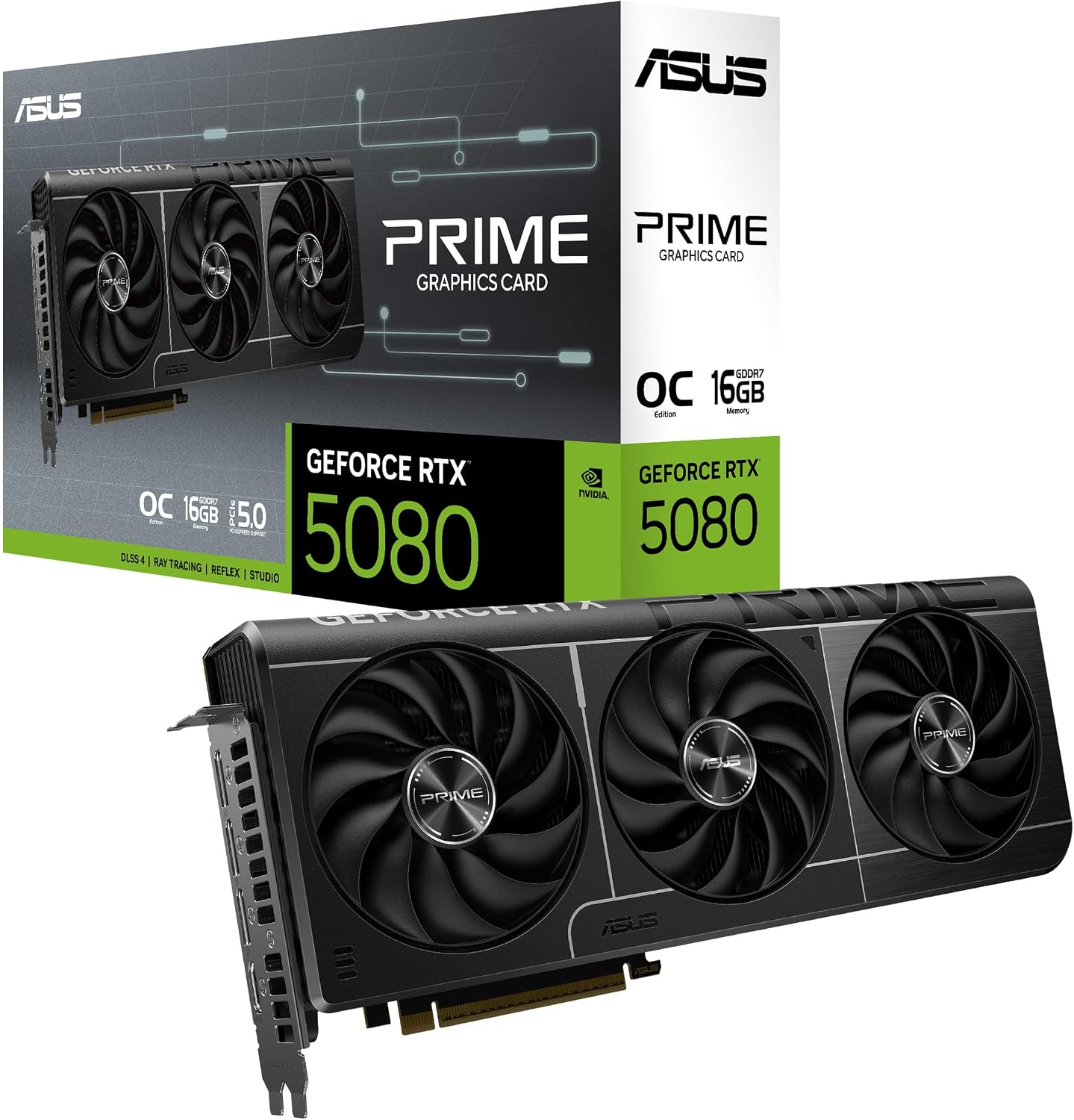
#4. ASUS Prime RTX 5080 EVO
2.5-Slot Design
AI Upscaling
16GB Memory
The ASUS Prime RTX 5080 EVO brings NVIDIA Blackwell power and DLSS 4 to a 2.5-slot SFF-ready design, so you get flagship-class 4K and high-refresh Overwatch performance even in smaller builds. 16GB of GDDR7, MaxContact cooling, and dual BIOS give you both thermal headroom and a quiet Quiet-mode profile for light gaming.
The caveat: this is a premium-tier card, and the Prime cooler, while capable, isn’t ASUS’s most aggressive thermal solution — expect warm sustained loads in airflow-limited cases. If you’re building a compact enthusiast rig that refuses to compromise on performance, it’s a superb match; budget buyers should step down a tier.
Pros
- SFF-ready 2.5-slot design
- DLSS 4 and Blackwell
- Dual BIOS quiet mode
Cons
- Premium price tier
- Prime cooler not flagship
- High power draw
Specifications
#5. PowerColor Reaper RX 9070 XT
289mm Length
GDDR6 Memory
High-Refresh Output
The PowerColor Reaper packs full RX 9070 XT performance into a compact 289mm frame, making it one of the easiest RDNA 4 flagships to fit into mid-tower cases. You still get 16GB of GDDR6, a 2970 MHz boost clock, and modern DisplayPort 2.1 and HDMI 2.1 outputs for high-refresh 4K displays.
The slimmer two-slot design means the Reaper runs warmer and louder than bulkier triple-fan rivals, so case airflow matters. Note the 750W PSU requirement with two 8-pin connectors. If you want flagship 4K and Overwatch performance in a smaller chassis, it’s an excellent fit; if silence is your priority, look at larger coolers.
Pros
- Compact 289mm length
- Full flagship performance
- Modern DP 2.1 outputs
Cons
- Runs warmer than rivals
- 750W PSU required
- Two-year warranty only
Specifications
#6. ASUS Dual RTX 3060 V2
GDDR6 Memory
AI Upscaling
Compact Fit
The ASUS Dual RTX 3060 V2 remains one of the best-value mainstream cards, with 12GB of GDDR6 — more than many pricier GPUs — and DLSS support that keeps Overwatch 2 running at high refresh rates. The compact 2-slot design with Axial-tech fans fits nearly any build, and 0dB technology keeps light gaming silent.
Ray tracing performance is modest by modern standards, so expect to lean on DLSS upscaling in RT-enabled titles. If you’re a 1080p or entry-1440p gamer who wants big VRAM, broad compatibility, and a huge review base backing it, this is a safe, smart buy; enthusiasts chasing 4K should look up the stack.
Pros
- Generous 12GB VRAM
- Compact 2-slot design
- DLSS support
Cons
- Modest ray tracing
- Aging Ampere architecture
- Dual-fan thermals
Specifications
#7. ASRock Arc B570 Challenger
VRAM Capacity
AI Upscaling
Stream Encoding
The ASRock Arc B570 Challenger gives you 10GB of GDDR6 on a 160-bit bus — more memory than most budget cards — which keeps textures and frame pacing healthy in Overwatch at high settings. Intel XeSS 2 upscaling and AV1 encoding make it a strong pick if you stream or record gameplay, and the dual-fan 0dB design stays quiet. Planning to broadcast your matches? Our guide to picking a GPU for streaming covers what encoders and VRAM you need.
Be aware that Intel’s driver ecosystem is younger than AMD or NVIDIA’s, so expect occasional software quirks and check game compatibility first. If you’re a budget 1440p gamer or streamer who values VRAM and media features over raw driver polish, this card fits well; competitive purists may prefer an NVIDIA alternative.
Pros
- Generous 10GB VRAM
- XeSS 2 and AV1 support
- Efficient single 8-pin power
Cons
- Younger driver ecosystem
- Limited older-CPU compatibility
- Dual fan only
Specifications
#8. ASRock RX 7600 Challenger Pro
Gaming Focus
Silent Cooling
Ray Tracing
If you’re targeting smooth 1080p and light 1440p gaming, the ASRock RX 7600 Challenger Pro punches well above its class. The 2695 MHz boost clock and 32MB Infinity Cache keep frame rates steady in Overwatch and similar esports titles, while the triple-fan 0dB cooling stays whisper-quiet during light play. Ray tracing and AI acceleration round out a modern RDNA 3 feature set.
The honest caveat: it’s a 2.5-slot, 303mm card, so measure your case before buying, and you’ll want a 550W PSU with an 8-pin connector. It’s not the pick for 4K ambitions, but for budget-conscious Overwatch players who want silent operation and reliable thermals, it’s a smart fit.
Pros
- Quiet 0dB triple-fan cooling
- Strong 1080p frame rates
- Modern RDNA 3 features
Cons
- Large 2.5-slot footprint
- Only 8GB VRAM
- PCIe x8 interface
Specifications
#9. ASUS TUF GTX 1660 Super
Durability Tested
Esports Ready
Warranty Cover
The ASUS TUF GTX 1660 Super remains a dependable 1080p esports card, with an overclocked 1845 MHz boost clock and 6GB of GDDR6 handling Overwatch comfortably at high settings. TUF’s durability testing, Auto-Extreme manufacturing, and a 3-year warranty mean this card is built to outlast its performance tier.
Be realistic about its age: there’s no ray tracing or DLSS support, and newer titles increasingly pressure the 6GB frame buffer. If you’re building a budget Overwatch machine or replacing a dead legacy card, it’s a proven, durable choice; anyone buying fresh for modern AAA games should spend more on an RTX or RX 7000-class GPU.
Pros
- Proven TUF durability
- Solid 1080p esports
- 3-year warranty
Cons
- No ray tracing or DLSS
- Only 6GB VRAM
- Older Turing architecture
Specifications
#10. OKAMUS RX 590 8GB
GDDR5 Memory
High Settings
Low Power Need
The OKAMUS RX 590 is a no-frills ultra-budget 1080p card, with 2304 stream processors and 8GB of GDDR5 keeping Overwatch playable at high settings. Dual low-noise fans, a modest 500W PSU requirement, and triple-display outputs make it an easy drop-in upgrade for older desktops.
Set expectations accordingly: this is a Polaris-era GPU with no ray tracing or modern upscaling, PCIe 3.0 only, and just a one-year warranty. If you’re reviving an aging PC for esports titles on a tight budget, it does the job; anyone chasing high refresh rates or future-proofing should invest in a current-generation card instead.
Pros
- Very budget-friendly
- 8GB VRAM for the class
- Low 500W power need
Cons
- Old Polaris architecture
- No ray tracing or FSR 3
- One-year warranty only
Specifications
Frame Rates First: Finding a Graphics Card That Makes Overwatch Sing
Overwatch is one of the most popular competitive shooters on the market, and its fast-paced gameplay rewards high, consistent frame rates more than raw visual fidelity. That makes choosing a graphics card for it a little different from shopping for a card to run the latest cinematic blockbusters. The right pick depends on your monitor, your target frame rate, and how seriously you take competitive play. A thoughtful purchase here can keep your system smooth for years, while a rushed one can leave you with a bottleneck you regret every time you queue up.
The Specs That Actually Move the Needle in Overwatch
-
Target frame rate and resolution. Decide whether you’re chasing 60, 144, or higher frames per second, and whether you play at 1080p, 1440p, or 4K. Overwatch scales well across hardware, so matching the card to your monitor matters more than maxing out specs. Our buyer’s guide explains how to match a GPU to your monitor‘s resolution and refresh rate.
-
CPU pairing. Because Overwatch is CPU-friendly and fast-paced, an extremely powerful GPU paired with a weak processor can waste performance. Aim for balance across your build.
-
VRAM headroom. While Overwatch isn’t the most demanding title on memory, extra VRAM helps if you run background applications, stream, or bump up texture settings and resolution.
-
Stability over peak numbers. Competitive players benefit from consistent frame times more than occasional spikes. Look for cards and cooling designs known for steady performance under sustained load.
-
Sticking to your budget. Set your ceiling before you shop, and remember that Overwatch’s excellent optimization means you don’t need the absolute top tier to hit high frame rates. Money saved here can go toward a high-refresh monitor instead.
-
Power and case compatibility. Check your power supply capacity and physical clearance before buying. A card that doesn’t fit or can’t be fed properly is a frustrating return trip.
Pitfalls That Burn First-Time Buyers
-
Overbuying for the game. Spending top-dollar for a card whose extra power Overwatch can’t use is money better spent elsewhere — unless you plan to play heavier titles too.
-
Ignoring your monitor. Pairing a monster GPU with a 60Hz display means you’re rendering frames you’ll never see. Match your hardware to your screen’s refresh rate.
-
Chasing brand hype over real reviews. Marketing numbers don’t tell you how a card behaves under long gaming sessions. Read independent benchmarks and user feedback before committing.
Locking In Your Overwatch Graphics Card Winner
For most Overwatch 2 players, the ASRock Radeon RX 9070 XT Challenger is the ultimate pick — its RDNA 4 muscle and 2970 MHz boost clock mean buttery-smooth framerates at max settings, while the XFX Swift RX 9070 XT and GIGABYTE Gaming OC variants offer equally fierce 1440p performance. If you want premium headroom, the ASUS Prime RTX 5080 EVO is the no-compromise champion, and the PowerColor Reaper delivers the same RDNA 4 power in a leaner package. On tighter budgets, the ASUS Dual RTX 3060, ASRock Arc B570, and RX 7600 Challenger Pro all crush 1080p, while the TUF GTX 1660 Super and RX 590 keep things playable for less.
Whichever tier fits your setup, every card here will have you landing headshots in style — check the buttons above for current availability before it sells out.
Final 3 Picks: Overall AMD, 4K Performance, and Cooled Flagship
Ready to decide? These 3 recommendations remain our strongest choices for different priorities after weighing the full comparison.
ASRock RX 9070 XT Challenger
- 16GB GDDR6 memory
- RDNA 4 architecture
- Triple-fan 0dB cooling