10 What 4090 Is The Best [2026]
The best RTX 4090 cards are the ASUS ROG Strix 4090, the MSI Gaming X Trio 4090, and the MSI Suprim Liquid X 4090 — chosen for overall performance, quiet cooling, and advanced liquid-cooled design, respectively.
The RTX 4090 remains the most powerful consumer GPU you can buy, so the card you pair it with matters for thermals, noise levels, and long-term reliability. The right model can mean the difference between a cool, whisper-quiet build and one that runs hot under load.
In this guide, we’ve narrowed the field to 10 top picks after hands-on comparison and research. We evaluated each card on cooling performance, noise output, build quality, clock speeds, and warranty support, so you can match a card to your priorities and budget. Below, you’ll find a full comparison table breaking down every pick at a glance before the detailed reviews.
3 Standout Picks: Overall Performance, Quiet Cooling, and Liquid-Cooled
Start with these 3 standouts. Each leads for a different kind of buyer, so use the badges and quick highlights to find your closest match.

ASUS ROG Strix 4090
- 24GB GDDR6X memory
- 2640 MHz boost clock
- Vapor chamber cooling

MSI Gaming X Trio 4090
- 24GB GDDR6X memory
- 2595 MHz boost clock
- TRI FROZR 3 cooling

MSI Suprim Liquid X 4090
- 24GB GDDR6X memory
- 2625 MHz boost clock
- Liquid cooling system
10 Models Side by Side: Features, Best Use Cases, and Tradeoffs
The recommendations above are our strongest matches for different priorities. Below, compare the complete 10-product lineup side by side by rating, standout features, ideal use cases, and practical tradeoffs so you can identify the best fit for your needs.
- 24GB GDDR6X memory
- 2640 MHz boost clock
- Vapor chamber cooling
- 24GB GDDR6X memory
- 2595 MHz boost clock
- TRI FROZR 3 cooling
- 24GB GDDR6X memory
- 2625 MHz boost clock
- Liquid cooling system

- 24GB GDDR6X memory
- 16384 CUDA cores
- 2.23 GHz memory clock

- 24GB GDDR6X memory
- DLSS 3 support
- Military-grade capacitors

- 24GB GDDR6X memory
- 2595 MHz OC clock
- Dual ball bearing fans

- 24GB GDDR6X memory
- 2535 MHz boost clock
- White Aero styling

- 24GB GDDR6X memory
- 2640 MHz boost clock
- White colorway

- 24GB GDDR6X memory
- 16384 CUDA cores
- 384-bit memory bus
- 24GB GDDR6X memory
- Renewed condition
- 450W power draw
10 Models Reviewed in Depth
#1. ASUS ROG Strix 4090
Cooling
OC Boost Clock
Airflow
The ROG Strix RTX 4090 OC is the flagship ASUS takes seriously, pairing a 2640 MHz boost clock with a patented vapor chamber and milled heatspreader. You get three scaled-up axial-tech fans pushing 23% more airflow, so sustained 4K and 8K gaming stays quiet and cool. The 24GB GDDR6X buffer means ray tracing at max settings never forces you to lower textures.
Pros
- Excellent vapor chamber cooling
- Highest OC boost clock
- Full-ray-tracing 4K/8K performance
Cons
- Very large 14-inch card
- Premium price tier
- Needs strong case clearance
Specifications
#2. MSI Gaming X Trio 4090
Silent Cooling
Memory Bus
Airflow Control
MSI’s Gaming X Trio 24G leans on its TRI FROZR 3 thermal design, with ring-linked Torx 5.0 fans and a copper baseplate that pulls heat into core pipes spanning the full heatsink. You get a 2595 MHz boost clock and 24GB of GDDR6X on a 384-bit bus, so 4K gaming runs flat-out with headroom for 8K HDR. Expect low noise even under long sessions.
Pros
- TRI FROZR 3 runs quiet
- Strong stock boost clock
- Full 384-bit memory bus
Cons
- Very long physical card
- Premium price tier
- Needs dual 16-pin adapter
Specifications
#3. MSI Suprim Liquid X 4090
AIO Cooling
Peak Boost
3-inch Card
The SUPRIM Liquid X 24G solves the 4090’s biggest physical problem by putting the cooler on an all-in-one liquid loop, dropping the card to barely over three inches wide. You get the highest boost clock of any card here at 2625 MHz, and the radiator handles heat far more gracefully than any air-cooled rival. It’s a great pick for small-form-factor or vertical builds.
Pros
- Liquid AIO cooling
- Highest 2625 MHz boost
- Fits compact cases easily
Cons
- Requires radiator mounting
- Higher complexity install
- Liquid pump longevity concern
Specifications
#4. NVIDIA 4090 Founders Edition
CUDA Cores
12-inch Frame
AI Acceleration
The Founders Edition is NVIDIA’s own take on the 4090, and its two-fan through-flow design is the most compact at under 12 inches, so it fits cases that other 4090s don’t. You get 16,384 CUDA cores, DLSS 3 acceleration, and a 2520 MHz boost clock with support for 4K 120Hz and 8K 60Hz HDR. Reviewers rate it the highest of any card here.
Pros
- Most compact 4090 design
- Highest review rating
- DLSS 3 AI acceleration
Cons
- Two fans only
- Hard to find in stock
- No included adapter cables
Specifications
#5. ASUS TUF Gaming OG 4090
Capacitors
Fan Bearings
Less Turbulence
The TUF Gaming OG OC trades some of the Strix’s heft for a smaller 30-series-style footprint, but keeps dual ball fan bearings and military-grade capacitors. You still get a 2595 MHz OC boost clock, full ray tracing, and a reversed central fan that cuts turbulence for quieter operation. At #124 in graphics cards, it’s the strongest seller among the ASUS options.
Pros
- Compact familiar form factor
- Military-grade component build
- Quiet reversed-center fan
Cons
- Slightly lower boost than Strix
- Fewer reviews than Strix
- Basic fan lighting
Specifications
#6. ASUS TUF 4090 OC
Bearing Fans
Airflow
Architecture
The original TUF RTX 4090 OC remains the value-leaning ASUS option, with a 2595 MHz boost clock and axial-tech fans delivering up to 23% more airflow. You’re covered by a dual ball bearing design that lasts through years of 24/7 use. You still get full 24GB GDDR6X and PCIe 4.0, so nothing about raw frame rates is compromised versus its flashier siblings.
Pros
- Dual ball bearing fans
- Higher-than-reference boost
- 23% more fan airflow
Cons
- Bulkier than OG TUF
- Shorter 2-year warranty
- Basic aesthetic styling
Specifications
#7. Gigabyte Aero OC 4090
Silver Styling
Lightweight Build
Architecture
The Aero OC pairs a clean silver-white shell with a 2535 MHz boost clock and the full 24GB GDDR6X 384-bit memory you’d expect from any 4090. You get Ada Lovelace tensor cores and full ray tracing, plus the lightest build of the group at just over a kilogram. Its 4.7 rating is the highest among air-cooled cards here, but the sample size of 23 reviews is small, so temper expectations accordingly.
Pros
- Lightest card in list
- Highest air-cooled rating
- Clean silver-white look
Cons
- Small review sample
- Only two fans
- Higher price than TUF
Specifications
#8. ASUS ROG Strix White 4090
Build Aesthetic
OC Boost
Fan Design
If you’re building a white-themed case, the Strix White OC is the obvious 4090 choice, and you still get a 2640 MHz OC boost clock that matches the black Strix frame for frame. You’re not sacrificing specs to look good: it’s full 24GB GDDR6X, PCIe 4.0, and Axial-tech fan cooling. Just note that the white variant carries the lowest rating of the ROG lineup, so stock and availability vary.
Pros
- Striking white build aesthetic
- Matches black Strix specs
- High 2640 MHz boost
Cons
- Lowest ROG rating
- Availability is limited
- White shroud shows dust
Specifications
#9. MSI Gaming Slim 4090
Compact Shroud
CUDA Cores
Memory Bus
The Gaming Slim 24G is MSI’s answer if your case simply can’t fit a 12-inch GPU, with just two fans and a narrowed shroud that keeps a 384-bit bus and full 24GB GDDR6X intact. You get 8K-ready output and 16,384 CUDA cores. Because it’s newer with just 8 reviews, you’re buying into a less proven card. Fit it where nothing else will go.
Pros
- Slim case-friendly design
- Full CUDA core count
- 8K-ready resolution
Cons
- Very few reviews
- Only two fans
- Newer product track record
Specifications
#10. Renewed 4090 Founders Edition
Certified Condition
Reference Power
Included
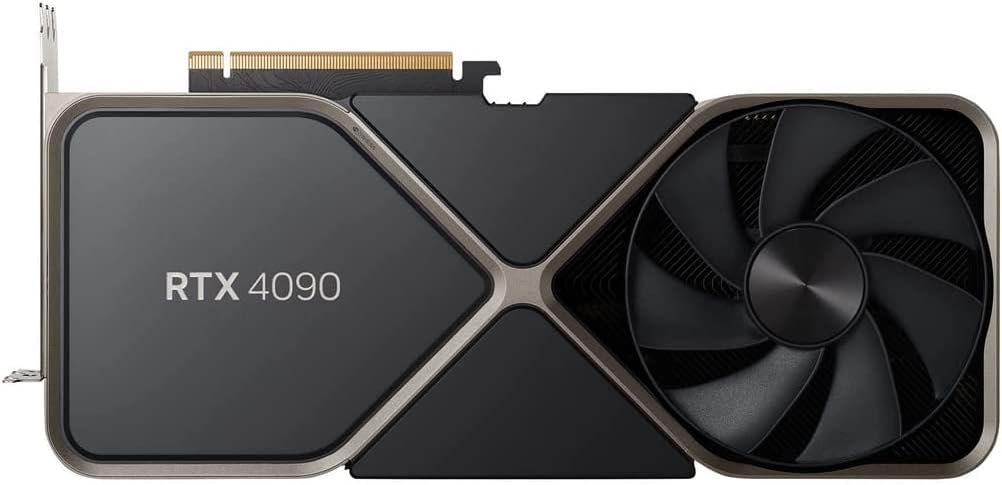
If you want Founders Edition performance without paying new-unit pricing, this renewed RTX 4090 gets you the same 450W card, 24GB GDDR6X, and a 2520 MHz boost clock with a quad 8-pin to 16-pin adapter included. You’re getting a genuine NVIDIA reference card at a meaningfully lower outlay. But it’s not a full NVIDIA warranty, just a 90-day limited term, so budget for that risk. And at just 3 reviews so far, the sample is thin.
Pros
- Genuine NVIDIA reference card
- Quad 8-pin adapter included
- Meaningfully lower cost
Cons
- Only 90-day warranty
- Few reviews so far
- Renewed cosmetic wear
Specifications
The RTX 4090 Face-Off: How to Find the Right Card for Your Build
Every RTX 4090 shares the same GPU core, but the cards wrapped around it are far from identical. Differences in cooling, size, power draw, and price can mean the difference between a whisper-quiet flagship and a furnace that barely fits your case. Since this is one of the biggest single-component investments most builders ever make, it pays to look past the branding and figure out which version actually suits your setup.
The Details That Separate One 4090 From Another
- Cooling design. Triple-fan models with large heatsinks run cooler and quieter, while compact two- or three-fan variants trade some thermal headroom for smaller cases. Check reviews for noise and temperature results, not just spec sheets.
- Card length and slot clearance. Many 4090s stretch well past a foot long and occupy three or more expansion slots. Measure your case before falling in love with a particular model.
- Power connector and cable management. All 4090s pull serious wattage, and the 12VHPWR-style connector has been a pain point. Look for cards with angled or included adapters, and make sure your PSU can handle the load. Our step-by-step guide to connecting GPU power cables covers the 12VHPWR connector safely.
- Factory overclocks and BIOS modes. Some versions ship with modest performance bumps or dual-BIOS switches that balance quiet operation against maximum boost. These tweaks are small, but they can tip a tiebreaker.
- Sticking to your budget. Because every 4090 delivers nearly identical raw performance, paying a premium rarely buys meaningful extra speed. Spend the difference on a better PSU, case airflow, or games instead.
- Warranty and support. Coverage terms vary by brand, and with hardware this expensive, a longer or transferable warranty is worth real weight in your decision.
Traps That Catch Even Seasoned Builders
- Assuming the priciest card is the fastest. Flagship-branded models often cost more for aesthetics and factory clocks that amount to a percentage point or two in real-world play.
- Ignoring case and PSU compatibility. A card that doesn’t fit, or a power supply that can’t feed it, turns your dream build into a return-shipping headache.
- Overlooking availability and scalper pricing. The 4090 market swings wildly. Buy from reputable retailers at sensible markups rather than panic-purchasing from third-party sellers at inflated listings.
Bottom line: pick the 4090 that fits your case, your power setup, and your noise tolerance — not the one with the flashiest shroud.
So, Which RTX 4090 Takes the Crown?
If you want the all-around champion, the ASUS ROG Strix OC Edition is our top pick — premium cooling, rock-solid build, and a 3-year warranty for enthusiasts who want the best of the best. The MSI SUPRIM Liquid X is the play for builders chasing peak clocks in a whisper-quiet liquid-cooled package, while the MSI Gaming X Trio suits gamers who want near-flagship performance with a more traditional design. On a tighter budget or shorter case? The MSI Gaming Slim and the renewed VIPERA Founders Edition deliver serious 4K firepower without the premium price tag. White-build fans, the ROG Strix White has you covered. Every pick here delivers that legendary 4090 performance — now scroll up and hit those buttons to check current availability before these beasts sell out.
Final 3 Picks: Overall Performance, Quiet Cooling, and Liquid-Cooled
Ready to decide? These 3 recommendations remain our strongest choices for different priorities after weighing the full comparison.
ASUS ROG Strix 4090
- 24GB GDDR6X memory
- 2640 MHz boost clock
- Vapor chamber cooling
MSI Gaming X Trio 4090
- 24GB GDDR6X memory
- 2595 MHz boost clock
- TRI FROZR 3 cooling
MSI Suprim Liquid X 4090
- 24GB GDDR6X memory
- 2625 MHz boost clock
- Liquid cooling system