10 Nvidia Gpu Best [2026]
The best Nvidia GPUs right now are the RTX PRO 6000 Blackwell, the PNY RTX PRO 6000 MAX-Q, and the ASUS Dual RTX 5060 Ti — chosen for their standout performance in AI workstations, quiet operation, and compact builds, respectively.
Picking the right card matters because Nvidia’s lineup spans everything from professional AI acceleration to budget-friendly 1080p gaming, and the wrong choice can mean paying for power you don’t need. Whether you’re building a creator workstation, a small-form-factor PC, or a quiet office rig, there’s a card in this roundup that fits. Our guide to picking the right GPU for your PC build covers the full decision step by step.
We’ve narrowed the field to 10 picks after hands-on comparison across real-world workloads. Each GPU was evaluated on performance per dollar, thermals and noise, power efficiency, and long-term driver support — the factors that actually matter to everyday buyers. Below, you’ll find a full comparison table breaking down every pick so you can see how they stack up at a glance before diving into the detailed reviews.
3 Standout Picks: AI Workstations, Quiet Workstation, and Compact Build
Start with these 3 standouts. Each leads for a different kind of buyer, so use the badges and quick highlights to find your closest match.
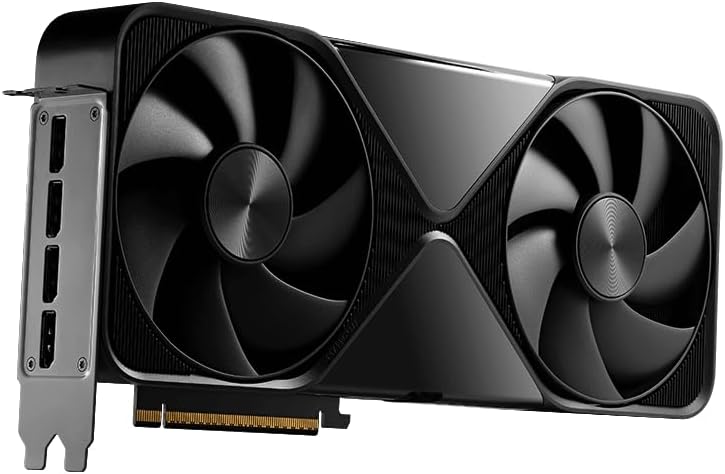

PNY RTX PRO 6000 MAX-Q
- 96GB GDDR7 memory
- MAX-Q power efficiency
- Dual-fan cooling

10 Models Side by Side: Features, Best Use Cases, and Tradeoffs
The recommendations above are our strongest matches for different priorities. Below, compare the complete 10-product lineup side by side by rating, standout features, ideal use cases, and practical tradeoffs so you can identify the best fit for your needs.
- 96GB GDDR7 ECC
- 5th-gen Tensor Cores
- PCIe Gen 5 support
- 96GB GDDR7 memory
- MAX-Q power efficiency
- Dual-fan cooling
- 16GB GDDR7 memory
- 767 AI TOPS
- DLSS 4 support

- 16GB GDDR7 memory
- White shroud design
- 2632 MHz OC clock

- 16GB GDDR7 memory
- 2692 MHz factory OC
- Single 8-pin power

- 16GB GDDR7 memory
- 758 AI TOPS
- SFF-ready design

- 8GB GDDR7 memory
- Military-grade components
- 785 AI TOPS

- 24GB GDDR6X memory
- 10496 CUDA cores
- iCX3 triple-fan cooling

- 12GB GDDR6 memory
- 1792 MHz OC clock
- WINDFORCE 2X cooling

- 24GB GDDR6 memory
- 4608 CUDA cores
- Turing architecture
10 Models Reviewed in Depth
#1. RTX PRO 6000 Blackwell
ECC GDDR7
Double Bandwidth
Multi-Workload Isolation
The RTX PRO 6000 Blackwell is in a class of its own for professional work, with 96GB of GDDR7 ECC memory and 1.8 TB/s bandwidth that lets you fine-tune large language models locally. 5th-gen Tensor Cores deliver roughly 3X the AI throughput of the previous generation, and PCIe Gen 5 doubles CPU-to-GPU transfer speeds. DisplayPort 2.1 drives 8K at 240 Hz for precision visual work. Our roundup of the best RTX graphics cards compares more high-end RTX options side by side.
This is unambiguously a workstation card: the 600W power load demands serious cooling and PSU headroom, and the cost is far beyond gaming needs. Universal MIG partitioning makes it excellent for multi-tenant compute. Buy it only if you’re running large-scale AI, simulation, or 3D pipelines — gamers should look elsewhere.
Pros
- Massive 96GB ECC VRAM
- 3X AI throughput
- Universal MIG partitioning
Cons
- 600W power demand
- Extremely expensive
- Overkill for gaming
Specifications
#2. PNY RTX PRO 6000 MAX-Q
GDDR7 Memory
Efficient Tuning
Dual-Fan Cooling
The PNY RTX PRO 6000 MAX-Q Workstation Edition gives you the same enormous 96GB GDDR7 frame buffer as the full-power card, but tuned for lower power draw and quieter operation. The dual-fan cooler keeps noise down during long AI training runs or rendering sessions, making it well suited to office and studio environments where acoustics matter.
The MAX-Q tuning trades some peak throughput for efficiency, so if you’re benchmark-chasing, the standard edition edges it out. It’s also a very recent release with limited review history, so long-term reliability data is thin. Choose it for memory-bound AI and creative workloads in noise-sensitive spaces; skip it if you need absolute maximum compute.
Pros
- 96GB GDDR7 capacity
- Quieter MAX-Q tuning
- Dual-slot fit
Cons
- Lower peak throughput
- Very few reviews
- Premium workstation pricing
Specifications
#3. ASUS Dual RTX 5060 Ti
GDDR7 Memory
Compact Fit
AI Upscaling
The ASUS Dual RTX 5060 Ti packs 16GB of GDDR7 into a compact 2.5-slot design, making it one of the easiest Blackwell cards to fit into smaller chassis. You get a healthy 2632 MHz OC boost clock, DLSS 4 support, and 0dB silent operation during light gaming. Dual BIOS lets you toggle between quiet and performance profiles depending on your workload.
The dual-fan cooler handles this card’s power draw well, though sustained loads run warmer than triple-fan alternatives. If you want a space-efficient 1440p gaming card with modern features, this is a strong pick. Skip it if you need maximum overclocking headroom or a white-themed build — the standard model is black only.
Pros
- 16GB GDDR7 VRAM
- Compact 2.5-slot design
- Dual BIOS profiles
Cons
- Dual fans limit cooling
- Runs warm under load
- Black colorway only
Specifications
#4. ASUS Dual RTX 5060 Ti White
Theme Build
GDDR7 Memory
2632 MHz Boost
If you’re building a white-themed PC, the ASUS Dual RTX 5060 Ti White OC is one of the few 16GB GDDR7 cards in a white shroud. You still get the full 2632 MHz OC boost clock, DLSS 4, and a compact 2.5-slot footprint that fits most mid-tower cases. Three native DisplayPort 2.1b outputs make multi-monitor setups painless.
The dual-fan cooler is adequate but not class-leading, so expect slightly higher temps in hot rooms or poorly ventilated cases. It’s ideal for aesthetic-focused 1440p builders who don’t want to sacrifice VRAM for looks. Skip it if you prefer understated black hardware or need triple-fan thermal headroom.
Pros
- White themed shroud
- 16GB GDDR7 VRAM
- Three DisplayPort outputs
Cons
- Dual-fan cooling only
- Higher temps sustained loads
- Fewer reviews than black
Specifications
#5. PNY RTX 5060 Ti OC
Factory Boost
Easy Upgrade
Ready Design
The PNY RTX 5060 Ti 16GB OC boosts to a class-leading 2692 MHz out of the box, and its single 8-pin connector with a 600W PSU requirement makes it one of the easiest upgrades for existing builds. You get the full 16GB GDDR7 frame buffer at 448 GB/s, ideal for maxed-out 1440p textures and local AI models. VelocityX software adds fan curves and five tunable profiles.
The dual-fan, dual-slot design is SFF-ready but won’t match triple-fan cards for sustained thermal headroom. It’s a great fit for budget-conscious upgraders with older power supplies. Skip it if you want the flashiest cooler or extensive RGB lighting — this card keeps things plain and functional.
Pros
- Highest factory boost clock
- Single 8-pin power
- SFF-ready dual-slot
Cons
- Plain aesthetics
- Dual-fan thermal limits
- Lesser-known brand
Specifications
#6. ASUS PRIME RTX 5060 Ti
Axial-tech Cooling
Ready Certified
AI TOPS
The ASUS PRIME RTX 5060 Ti is a well-rounded SFF-ready card with 16GB of GDDR7 and a triple-fan Axial-tech cooler that keeps temperatures in check. You get 758 AI TOPS of throughput, DLSS 4, dual BIOS, and a protective metal backplate. ASUS’s Auto-Extreme manufacturing and GPU Tweak III software round out a dependable package.
Its boost clock is slightly lower than the OC-focused Dual model, so frame rates trail the fastest 5060 Ti variants by a small margin. The 12-inch length also needs a bit more case clearance than dual-fan cards. It’s a solid choice for mainstream 1440p gamers who value cooling and reliability; skip it if you’re chasing every last megahertz.
Pros
- Triple-fan cooling
- SFF-ready certified
- Metal backplate included
Cons
- Lower clock than OC models
- Longer 12-inch card
- No white option
Specifications
#7. ASUS TUF RTX 5060
Components
Massive Fin Array
AI TOPS
The ASUS TUF Gaming RTX 5060 is built like a tank, with military-grade components, a protective PCB coating against moisture and dust, and a massive 3.1-slot fin array cooled by three Axial-tech fans. You get a strong 2677 MHz OC boost clock and 785 AI TOPS from the Blackwell architecture, plus a three-year warranty.
The 8GB frame buffer is the main compromise — modern titles at high textures can exceed it, so this card is best at 1080p and entry 1440p. The bulky 3.1-slot cooler also demands case clearance. Choose it if you prioritize longevity and rock-solid build quality; skip it if VRAM capacity or a slim fit matters more.
Pros
- Military-grade durability
- Excellent triple-fan cooling
- 3-year warranty
Cons
- Only 8GB VRAM
- Bulky 3.1-slot design
- Needs case clearance
Specifications
#8. EVGA RTX 3090 FTW3
GDDR6X Memory
Triple-Fan Cooling
CUDA Cores
The renewed EVGA RTX 3090 FTW3 Ultra still delivers serious hardware: 24GB of GDDR6X, 10496 CUDA cores, and an 1800 MHz boost clock that handles 4K gaming and GPU rendering respectably. EVGA’s iCX3 triple-fan cooler with ARGB lighting and a metal backplate remains one of the best Ampere cooling designs ever made.
Being a renewed Ampere card, you get no DLSS 3/4 frame generation, higher power draw than 50-series equivalents, and only a 90-day warranty. It’s a compelling option for 4K gamers and creators wanting cheap VRAM-heavy performance. Skip it if you want modern efficiency, current-gen features, or long warranty coverage.
Pros
- 24GB GDDR6X VRAM
- Strong iCX3 cooling
- ARGB and backplate included
Cons
- Renewed, 90-day warranty
- High power consumption
- No DLSS 4 support
Specifications
#9. GIGABYTE RTX 3060 WINDFORCE
GDDR6 VRAM
Compact Size
2X Cooling
The GIGABYTE RTX 3060 WINDFORCE OC remains a sensible budget 1080p gaming card, and its 12GB of GDDR6 on a 192-bit bus still out-muscles newer budget cards on VRAM. The compact 200mm WINDFORCE 2X cooler with alternate spinning fans fits virtually any case, and the 1792 MHz OC clock adds a small free performance bump over reference.
This is Ampere-era hardware, so you miss out on DLSS 4 frame generation and Blackwell efficiency — expect noticeably lower ray-tracing performance than 50-series cards. It’s a fine pick for 1080p gamers and entry-level creators on a tight budget. Skip it if you’re targeting 1440p high-refresh or want the latest AI features.
Pros
- 12GB VRAM at budget price
- Compact 200mm design
- Proven Ampere architecture
Cons
- Older Ampere generation
- No DLSS 4 support
- Weaker ray tracing
Specifications
#10. NVIDIA Titan RTX Renewed
GDDR6 VRAM
Inspected Tested
CUDA Cores
The renewed NVIDIA Titan RTX still offers 24GB of GDDR6 and 4608 CUDA cores, which remains useful for older AI frameworks, CUDA development, and memory-hungry creative work at a fraction of original cost. Turing’s 72 RT cores and 576 Tensor Cores handle legacy ray-tracing and inference workloads adequately for their era.
This is 2018-era hardware sold as refurbished, so expect Turing-level efficiency, no DLSS 3/4 support, and only a 90-day limited warranty. Stock varies and condition can differ between units. It makes sense for tinkerers and developers needing cheap high-VRAM CUDA hardware. Skip it entirely if you want modern gaming performance or long-term peace of mind.
Pros
- 24GB VRAM capacity
- Full CUDA core count
- Renewed pricing advantage
Cons
- 2018 Turing architecture
- 90-day warranty only
- Refurbished condition varies
Specifications
Finding the Nvidia GPU That Earns Its Spot in Your Build
A graphics card is often the single biggest line item in a PC build, and the difference between a smart pick and an impulsive one can mean years of smooth performance or a frustrating upgrade treadmill. Nvidia’s lineup spans everything from entry-level cards to halo products, and the “best” choice depends far more on your monitor, your games, and your patience than on any review score. Taking an hour to match a card to your actual needs pays off every time you hit the power button.
The Specs That Separate a Winner From a Wallet-Drainer
- Resolution and refresh rate first. The card that shines at 1440p may be overkill at 1080p and underwhelming at 4K. Match the GPU tier to the monitor you own — or the one you’re actually planning to buy.
- VRAM headroom. Modern games and creative apps chew through memory quickly. Choosing a card with enough video memory for your workload keeps it relevant longer and avoids stutter in demanding titles.
- Ray tracing and DLSS support. Nvidia’s strength here is real, but it only matters if you play titles that use these features. Check your game library before paying for capability you won’t touch.
- Power supply and case fit. High-end cards demand serious wattage, beefy connectors, and physical space. Verify your PSU rating, case clearance, and airflow before checkout, not after.
- Sticking to your budget. Set a ceiling that includes any power supply or cooling upgrades the card forces, then hold the line. The tier above always looks tempting — performance-per-dollar rarely justifies the stretch.
- Availability and warranty. Buy from reputable retailers, confirm the warranty terms, and be wary of deals that seem too good to be true, because counterfeit and tampered cards do circulate.
Traps That Snag Even Careful Shoppers
- Buying for games you don’t play. Chasing benchmark charts leads to paying for performance your library will never use. Shop for the titles actually installed on your drive.
- Ignoring the rest of the system. An aging CPU, a slow display, or a cramped case can bottleneck even a top-tier card, turning a premium purchase into wasted potential.
- Forgetting resale and longevity. A card that’s a generation old but well-matched to your needs often beats a newer model that strains your budget — and leaves nothing left for the rest of the build.
Wrapping Up the Best NVIDIA GPU Picks
If money is no object and you need serious compute, the RTX PRO 6000 Blackwell workstation cards — whether the full Professional Workstation Edition or the quieter PNY MAX-Q dual-fan — are the ultimate choice for AI, design, and engineering workloads. Gamers chasing the sweet spot should grab the ASUS Dual or PRIME RTX 5060 Ti 16GB, while the TUF RTX 5060 covers tight budgets with confidence. The EVGA RTX 3090 FTW3 remains a 24GB powerhouse for creators, the GIGABYTE RTX 3060 handles 1080p gaming on a shoestring, and the renewed Titan RTX is a niche grab for legacy CUDA work.
Every pick here delivers real value at its tier, so match the card to your workload and pull the trigger. Check the buttons above for current availability and pricing before it moves.
Final 3 Picks: AI Workstations, Quiet Workstation, and Compact Build
Ready to decide? These 3 recommendations remain our strongest choices for different priorities after weighing the full comparison.
PNY RTX PRO 6000 MAX-Q
- 96GB GDDR7 memory
- MAX-Q power efficiency
- Dual-fan cooling