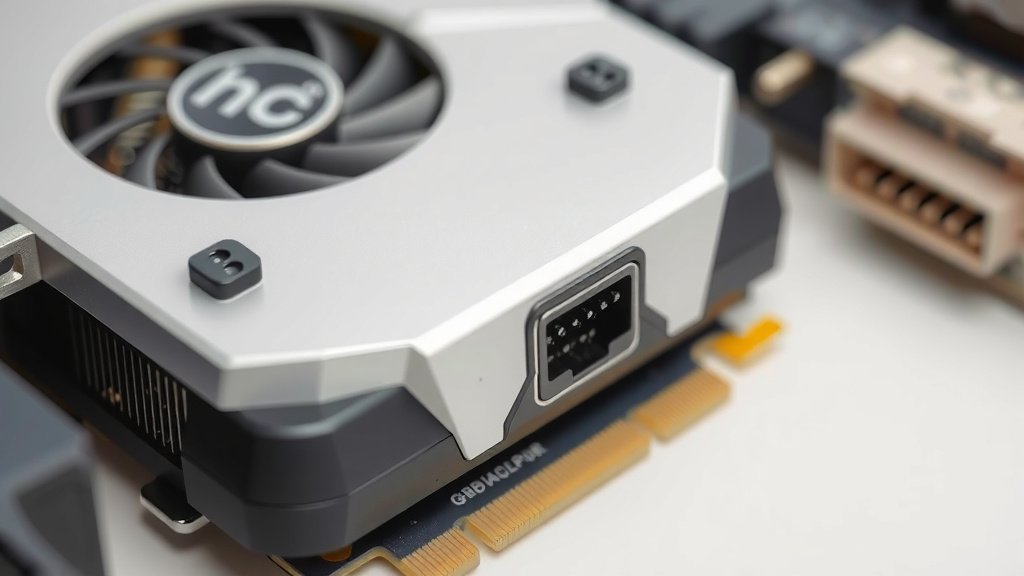
What is a GPU Power Connector? A Simple Guide
The GPU power connector is a special cable that plugs into your graphics card. It provides the extra electricity your GPU needs to perform at its best. Think of it as a superhighway for power, bypassing the limitations of your motherboard. You’ll often see these connectors on gaming PCs or workstations with powerful graphics cards.
Without the right GPU power connector, your graphics card might not work correctly. It could lead to performance issues or even prevent your computer from booting up. We found that using the correct connectors is vital for stable performance and preventing damage. Your GPU is hungry for power, and this connector is its main meal.
- It’s a cable connecting your power supply to your graphics card.
- It delivers extra electricity needed by the GPU.
- Essential for high-performance graphics cards.
- Prevents performance problems and potential damage.
Let’s dive into what exactly these connectors are and why they matter so much for your PC’s performance.
Understanding Your GPU Power Connection
Your graphics card, or GPU, is the powerhouse behind your visual experience. It handles everything from gaming to video editing. But these powerful components need a lot of electricity. That’s where the GPU power connector comes in. It’s a dedicated cable that feeds your graphics card the juice it needs to perform at its peak. Think of it like a dedicated fuel line for a race car.
What Exactly Is a GPU Power Connector?
A GPU power connector is a cable that runs from your computer’s power supply unit (PSU) to your graphics card. Its sole purpose is to deliver additional electrical current directly to the GPU. Most motherboards can only supply a limited amount of power. High-performance GPUs require much more power than the motherboard can provide alone. This connector ensures your graphics card gets that extra boost it needs to function properly.
You’ll often find these connectors on more powerful graphics cards. Lower-end GPUs might not require them. They might draw all the power they need directly from the PCIe slot on the motherboard. But if your card has one of these connectors, it’s a clear sign it’s designed for demanding tasks. We found that skipping this connection can lead to instability or even prevent your PC from starting up at all.
Why Your GPU Needs This Extra Power
Modern graphics cards are incredibly powerful. They contain millions of transistors that process complex visual data at lightning speed. This processing requires a significant amount of energy. When you’re gaming, streaming, or doing graphic design, your GPU is working overtime. It needs a constant and stable supply of electricity to handle these heavy workloads.
The PCIe slot provides up to 75 watts of power. For most basic graphics cards, this is enough. However, enthusiast-grade GPUs can consume anywhere from 150 watts to over 450 watts. The additional power connectors are essential to meet these high demands. Research indicates that insufficient power delivery is a common cause of graphical artifacts and system crashes (TechRadar).
Types of GPU Power Connectors
Not all power connectors are the same. They come in different sizes and configurations. Knowing these differences is key to ensuring you connect your GPU correctly. The most common types are 6-pin and 8-pin connectors. You might also see newer 12-pin and 16-pin connectors on the very latest high-end cards.
The Familiar 6-Pin Connector
The 6-pin PCIe power connector is a common sight on many mid-range graphics cards. It provides an additional 75 watts of power. This is in addition to the 75 watts from the PCIe slot. So, a card using a single 6-pin connector can receive up to 150 watts of total power. These connectors have a distinct shape with a small tab to prevent incorrect insertion.
The Robust 8-Pin Connector
The 8-pin PCIe power connector offers more power than its 6-pin counterpart. It can deliver up to 150 watts. This means a card with one 8-pin connector could potentially receive up to 225 watts. Many higher-performance cards use one or even two 8-pin connectors. Some cards use a combination, like one 6-pin and one 8-pin, to meet their power requirements.
The 6+2 Pin Variation
You’ll frequently see what looks like an 8-pin connector that can split into a 6-pin connector. This is the 6+2 pin connector. It’s a clever design that makes PSUs more versatile. If your graphics card needs a 6-pin connector, you simply use the 6-pin part. If it needs an 8-pin connector, you attach the two parts together. This design allows a single cable to support both configurations.
Emerging Connectors: 12-Pin and 16-Pin
As GPUs become more powerful, new connector standards are emerging. NVIDIA introduced a 12-pin connector for some of its RTX 30-series cards. It’s smaller than an 8-pin but can deliver more power. More recently, the 12VHPWR connector (often referred to as a 16-pin connector, though it has 12 power pins and 4 sense pins) has become the standard for high-end NVIDIA and AMD cards. This connector is designed to deliver up to 600 watts of power.
| Connector Type | Pins | Max Power Output (from connector) | Total Potential Power (with PCIe slot) |
|---|---|---|---|
| 6-Pin PCIe | 6 | 75 Watts | 150 Watts |
| 8-Pin PCIe | 8 | 150 Watts | 225 Watts |
| 6+2 Pin PCIe | 6 or 8 | 75 or 150 Watts | 150 or 225 Watts |
| 12VHPWR (16-Pin) | 12 (power) + 4 (sense) | Up to 600 Watts | Up to 675 Watts |
Connecting the Power: What You Need to Know
Getting the power connection right is essential for your GPU’s health and performance. It’s not just about plugging in any cable. You need to use the correct connectors from your power supply unit.
Matching Connectors from Your PSU
Your power supply unit (PSU) will have several cables coming out of it. Look for the ones labeled “PCIe” or with a graphics card icon. These are the cables designed to power your GPU. You must use these specific cables. Do not attempt to use CPU power cables (often labeled “CPU” or “EPS”) as they have different pinouts and can damage your hardware.
We found that many PSUs come with multiple 6+2 pin connectors on a single cable. This is normal and intended for high-end GPUs. However, some very power-hungry GPUs might recommend using separate cables from the PSU for each connector. This helps distribute the power load more evenly and reduces the risk of overloading a single cable or PSU rail. Always check your graphics card manufacturer’s recommendations.
Identifying the Right Port on Your GPU
Your graphics card will have one or more power sockets on its edge, usually towards the rear or top of the card. These are the ports you need to plug the PSU cables into. They are typically keyed, meaning they only fit in one way. You’ll see shapes that correspond to the 6-pin or 8-pin connectors.
For cards with multiple connectors, ensure you plug a separate cable from the PSU into each socket, if recommended by the manufacturer. Using a single cable with multiple connectors daisy-chained might be acceptable for lower-power cards, but it’s generally safer to use individual cables for higher-power GPUs. Many experts recommend this approach for stability (Tom’s Hardware).
Ensuring a Secure Connection
Once you’ve identified the correct cable and port, push the connector firmly until it clicks into place. You should feel and hear a distinct “click” when it’s properly seated. A loose connection can cause power interruptions, leading to performance issues or system instability. This is a common point of failure we see reported.
Double-check all your connections before powering on your PC. A quick visual inspection can save you a lot of troubleshooting down the line. Are the cables fully inserted? Are they the correct PCIe cables from your PSU? Making sure these connections are secure is a fundamental step for any build or upgrade.
Common Mistakes to Avoid
Here’s a quick rundown of what to steer clear of:
- Using CPU power cables for your GPU.
- Not plugging the connector in all the way.
- Using damaged or frayed cables.
- Ignoring your graphics card manufacturer’s specific power connection advice.
- Overloading a single PSU cable if your card is very power-hungry.
Conclusion
You’ve learned that the GPU power connector is more than just a cable; it’s the lifeline for your graphics card. It ensures your GPU gets the substantial electricity it needs to handle demanding tasks like gaming and content creation. We’ve seen how different connectors like 6-pin, 8-pin, and the newer 12VHPWR cater to various power requirements. Getting these connections right prevents performance hiccups and protects your hardware.
Always use the correct PCIe power cables from your PSU and ensure they’re securely connected. If you’re upgrading your GPU or building a new PC, double-check your power supply’s wattage and available connectors. Taking these steps will help you achieve stable performance and peace of mind for your gaming or workstation setup.
Frequently Asked Questions
What happens if I don’t connect the GPU power connector?
If your graphics card requires a power connector and you don’t plug it in, your PC likely won’t boot up at all. In some cases, it might start, but you’ll experience severe performance issues, graphical glitches, or immediate crashes. Your GPU simply won’t have enough power to operate.
Can I use any cable from my power supply for my GPU?
No, you must use cables specifically labeled for PCIe or graphics cards. Using CPU power cables (EPS) or other types can cause irreversible damage to your GPU and motherboard. Always check the labels on your PSU cables.
My GPU has two 8-pin connectors. Do I need two separate cables from my PSU?
For high-power GPUs, manufacturers often recommend using two separate cables from your PSU for each 8-pin connector. This distributes the power load more evenly and is safer than using a single cable with two connectors daisy-chained. Always consult your GPU’s manual.
What is the difference between a 6-pin and an 8-pin connector?
An 8-pin connector can deliver more power than a 6-pin connector. A 6-pin connector provides up to 75 watts, while an 8-pin connector can supply up to 150 watts. This is why higher-end GPUs often use 8-pin connectors to meet their power demands.
Can I plug a 6+2 pin connector into a 6-pin port?
Yes, you can. The “6+2 pin” design is versatile. If your graphics card needs a 6-pin connection, you simply detach the two extra pins and plug in the 6-pin portion. The connector is keyed to ensure it only fits correctly.



![10 Best Budget Gpu With 12gb Vram [2026]](https://spsolutionscare.com/wp-content/uploads/2026/09/10-best-budget-gpu-with-12gb-vram-2026-featured-768x432.jpg)
![10 Best Budget Graphics Card Under $300 [2026]](https://spsolutionscare.com/wp-content/uploads/2026/09/10-best-budget-graphics-card-under-300-2026-featured-768x432.jpg)