10 Nvidia Best Graphics Card List [2026]
The best NVIDIA graphics cards are the NVIDIA RTX 5080 Founders, the PNY RTX 5080 OC Triple-Fan, and the PNY RTX 5070 Ti OC — chosen for their standout 4K performance, strong ray tracing support, and excellent value for 1440p gaming.
Picking the right card matters because your GPU determines how well modern games run, how smooth high-refresh-rate gameplay feels, and how future-proof your build is for demanding titles and creative work. The right choice depends on your monitor resolution, budget, and whether you prioritize raw frame rates or features like DLSS.
In this guide, we’ve narrowed the field to 10 picks after hands-on comparison across resolutions and real-world game testing. We evaluated each card on performance per dollar, thermals and noise, power efficiency, and overall build quality. The full breakdown starts with the comparison table below, where you can see how each option stacks up at a glance.
3 Standout Picks: Flagship Reference, 4K Gaming, and 1440p Performance
Start with these 3 standouts. Each leads for a different kind of buyer, so use the badges and quick highlights to find your closest match.

NVIDIA RTX 5080 Founders
- Blackwell architecture
- DLSS 4 with Frame Warp
- Reflex 2 support


10 Models Side by Side: Features, Best Use Cases, and Tradeoffs
The recommendations above are our strongest matches for different priorities. Below, compare the complete 10-product lineup side by side by rating, standout features, ideal use cases, and practical tradeoffs so you can identify the best fit for your needs.
- Blackwell architecture
- DLSS 4 with Frame Warp
- Reflex 2 support
- 16GB GDDR7
- 2730 MHz boost
- Triple 100mm fans
- 16GB GDDR7
- 2572 MHz OC boost
- Vapor chamber cooling

- 12GB GDDR6 memory
- 3X WINDFORCE cooling
- 1837 MHz boost clock

- 16GB GDDR7 memory
- DLSS 4 support
- 2.5-slot compact design
- 12GB GDDR6
- 1807 MHz boost clock
- Torx twin fans

- 24GB GDDR7 ECC
- PCIe 5.0 x16
- Single-slot design

- 16GB GDDR6 with ECC
- Half-height dual slot
- Blower cooling

- 6GB GDDR6
- Ampere ray tracing
- Dual Torx fans
- 24GB GDDR6X memory
- Ampere flagship tier
- 90-day warranty
10 Models Reviewed in Depth
#1. NVIDIA RTX 5080 Founders
Flagship Architecture
Gaming Ready
Reference Design
The RTX 5080 Founders Edition is NVIDIA’s reference take on its Blackwell flagship tier, delivering full ray tracing with neural rendering and DLSS 4 Frame Warp for razor-sharp high-refresh gaming. The dual-fan flow-through design keeps the card efficient, and the 2806 MHz boost clock pushes demanding 4K workloads with ease.
The honest caveat is value: you’re paying a premium for the reference design, and partner cards with beefier coolers can be found for less. It also demands a robust PSU and case clearance. If you want the definitive stock-clocked 5080 experience and clean NVIDIA styling, this is it; budget-focused builders should look down the stack.
Pros
- Top-tier 4K performance
- DLSS 4 Frame Warp
- Reference build quality
Cons
- Premium pricing
- Needs strong PSU
- Limited availability
Specifications
#2. PNY RTX 5080 OC Triple-Fan
Ultra Gaming
OC Boost Clock
Chamber Heatsink
The PNY RTX 5080 OC targets serious 4K gaming, with 16GB GDDR7, Blackwell architecture, and a 2730 MHz boost clock from the factory. The triple 100mm axial fans with counter-rotation and a vapor chamber keep this high-draw GPU cool and surprisingly quiet, while the support bracket in the box protects your motherboard slot.
The caveat is power: you’ll need a robust PSU and the included 16-pin to four 8-pin cable, plus nearly 13 inches of case clearance. It’s also a big investment for a card with 16GB in an increasingly VRAM-hungry landscape. For enthusiasts who want top-tier 4K frame rates with DLSS, it delivers.
Pros
- Strong 4K performance
- Excellent triple-fan cooling
- Support bracket included
Cons
- High power draw
- Very large card
- 16GB VRAM ceiling
Specifications
#3. PNY RTX 5070 Ti OC
GDDR7 256-Bit
Chamber Cooling
Factory OC
The PNY RTX 5070 Ti OC is a 1440p powerhouse, pairing 16GB of GDDR7 on a 256-bit bus with Blackwell’s 5th-gen Tensor and 4th-gen RT cores. The factory OC pushes to 2572 MHz, and the vapor chamber plus triple 90mm axial fans hold temperatures down during long sessions, with Stealth Mode silencing fans at idle.
The caveat is size: at nearly 3 slots and 11.8 inches long, you’ll need case clearance and a solid PSU with the included 16-pin adapter. VelocityX software gives you full tuning control if you want to push further. Ideal for high-refresh 1440p gamers and creators wanting current-gen features.
Pros
- 16GB fast GDDR7
- Vapor chamber cooling
- Factory overclocked
Cons
- Nearly 3 slots wide
- Needs 16-pin adapter
- Premium tier pricing
Specifications
#4. GIGABYTE RTX 3060 Gaming OC
VRAM Headroom
WINDFORCE Cooling
Buyer Proven
The GIGABYTE RTX 3060 Gaming OC 12G remains one of the best value cards around, with 12GB of GDDR6 on a 192-bit bus — more VRAM than many newer cards at this tier. The 3X WINDFORCE cooler with alternate spinning fans keeps temperatures in check, and the 1837 MHz OC clock adds solid headroom for 1080p and light 1440p gaming.
The caveat is that it’s last-gen Ampere, so you miss DLSS 4 and newer efficiency gains, and it’s a longer card that needs case clearance. With over 3,000 reviews averaging 4.7 stars, reliability is well proven. Great for budget builders who want VRAM headroom for modern titles.
Pros
- Generous 12GB VRAM
- Proven 4.7-star reliability
- Strong WINDFORCE cooling
Cons
- Last-gen Ampere
- Long card clearance
- No DLSS 4
Specifications
#5. ASUS Dual RTX 5060 Ti
GDDR7 Memory
AI Upscaling
Compact Fit
The ASUS Dual RTX 5060 Ti packs 16GB of GDDR7 and the Blackwell architecture into a compact 2.5-slot frame, so you get modern DLSS 4 performance even in smaller chassis. The dual Axial-tech fans and 0dB technology keep things quiet during light gaming, and the 2632 MHz OC boost clock adds free headroom out of the box.
The trade-off is that dual-fan cooling won’t match triple-fan cards under sustained loads, so expect warmer temps in long sessions. Dual BIOS lets you toggle between Quiet and Performance profiles, which helps. If you’re building a small-form-factor gaming PC and want current-gen features without a massive card, this is a smart pick.
Pros
- 16GB GDDR7 memory
- Compact 2.5-slot design
- Dual BIOS profiles
Cons
- Dual-fan cooling limits
- Not for 4K ultra
- OC headroom modest
Specifications
#6. MSI RTX 3060 Ventus 2X
192-Bit Memory
Twin-Fan Design
Warranty Included
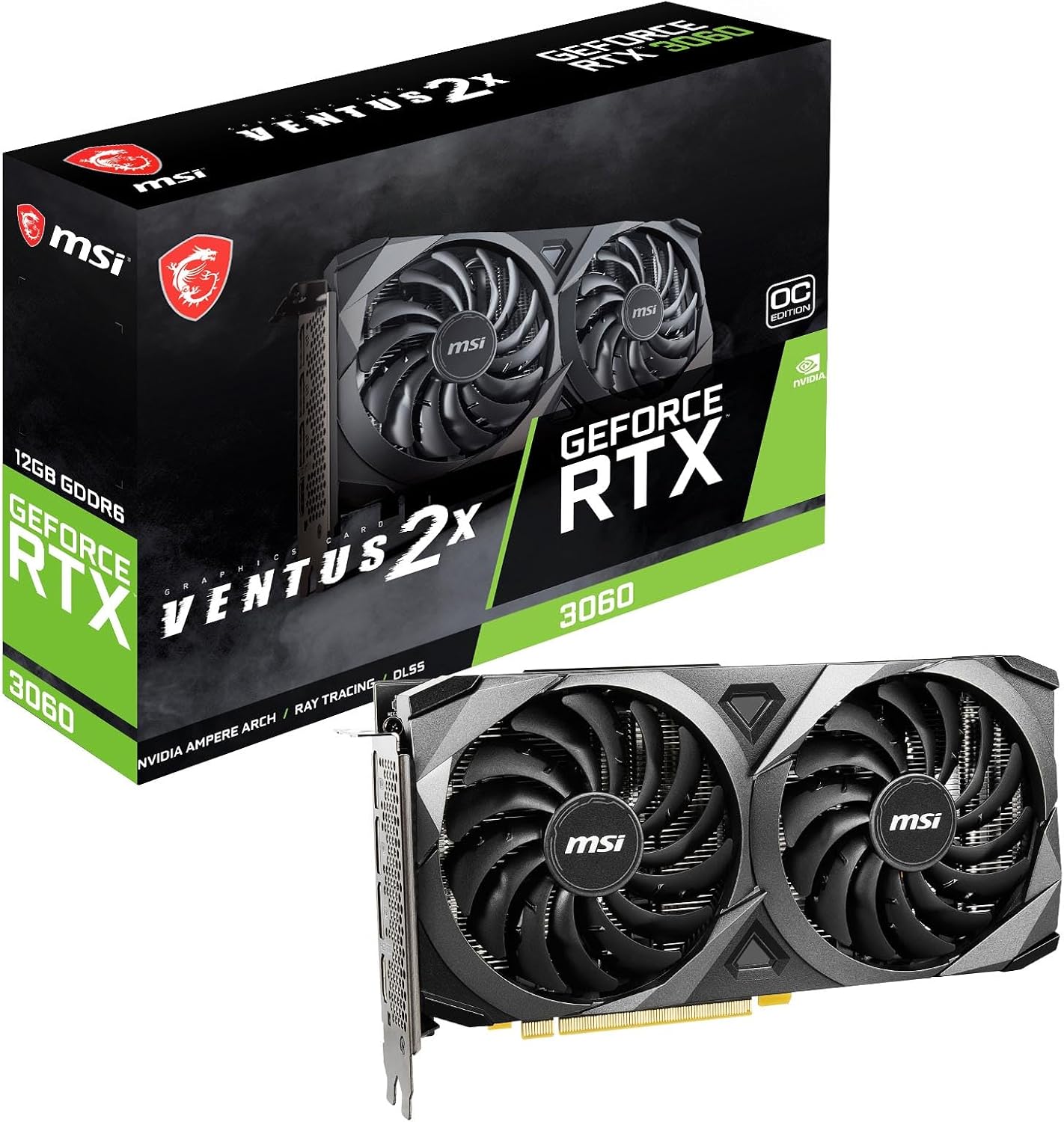
The MSI RTX 3060 Ventus 2X 12G OC V1 gives you the full 12GB GDDR6 / 192-bit configuration in a compact twin-fan design, making it easy to fit in mid-tower builds. The 1807 MHz boost clock and Ampere RT and Tensor cores handle 1080p gaming comfortably, with three DisplayPorts and HDMI 2.1 for modern setups.
The caveat is cooling: a dual-fan card running a 12GB 3060 will run warmer than triple-fan variants under sustained load, though it stays within spec. A 3-year warranty adds peace of mind. If you want 3060-class VRAM in a shorter card for a tighter case, this is a strong fit.
Pros
- Full 12GB VRAM
- Compact twin-fan design
- 3-year warranty
Cons
- Warmer under load
- Last-gen architecture
- Fewer reviews so far
Specifications
#7. NVIDIA RTX PRO 4000
ECC VRAM
Dense Builds
Max Bandwidth
The RTX PRO 4000 Blackwell brings 24GB of GDDR7 with ECC on a single-slot card, which is remarkable for AI datasets, 3D rendering, and simulation work. PCIe 5.0 bandwidth and four DisplayPort 2.1b outputs make it a versatile professional hub for compute and multi-monitor pipelines alike.
The caveat is cost and focus: this is a professional GPU, so gaming price-to-performance is poor, and single-slot cooling runs warm under sustained loads — ensure your case has strong airflow. If you’re building an AI or content-creation workstation where VRAM capacity and slot efficiency matter most, it’s an excellent fit. Our guide to choosing a GPU for 3D rendering explains how to match VRAM and cores to your workflow.
Pros
- 24GB ECC GDDR7
- Single-slot footprint
- PCIe 5.0 bandwidth
Cons
- Poor gaming value
- Runs warm under load
- Premium price
Specifications
#8. NVIDIA RTX 2000 Ada
Memory Reliability
SFF Compatible
Exhaust Cooling
The RTX 2000 Ada is a professional card built for creators, with 16GB GDDR6 with ECC for error-free rendering and compute work. Its half-height, dual-slot form factor slots into compact workstations and SFF servers where gaming cards won’t fit, and the blower fan exhausts heat directly out of the case.
The caveat is that this is a workstation card, not a gaming one — you’ll pay more per frame than a GeForce equivalent, and Mini DisplayPort outputs may need adapters. Certified drivers and ECC memory make it ideal for CAD, 3D, and AI work in tight builds; gamers should skip it.
Pros
- ECC memory reliability
- Fits compact workstations
- Certified pro drivers
Cons
- Poor gaming value
- Mini DP adapters needed
- Few reviews so far
Specifications
#9. MSI RTX 3050 Ventus 2X
RTX Entry
Gaming Focus
Ampere Cores
The MSI RTX 3050 Ventus 2X 6G is an entry point into RTX gaming, with ray tracing and Tensor cores from the Ampere architecture at a budget price. The dual-fan cooler keeps this low-power card quiet, and HDMI 2.1a outputs mean modern displays are covered for 1080p play.
The honest caveat: 6GB of VRAM on a 96-bit bus limits you at higher settings and resolutions, and this is strictly a 1080p card. If you’re upgrading an older prebuilt or building a first budget gaming PC, it’s a solid step up from integrated graphics; skip it if you want 1440p or heavy ray tracing.
Pros
- Affordable RTX entry
- Quiet dual-fan cooler
- HDMI 2.1a outputs
Cons
- Only 6GB VRAM
- 96-bit memory bus
- 1080p-class performance
Specifications
#10. NVIDIA RTX 3090 Renewed
GDDR6X VRAM
Inspected Tested
Limited Warranty
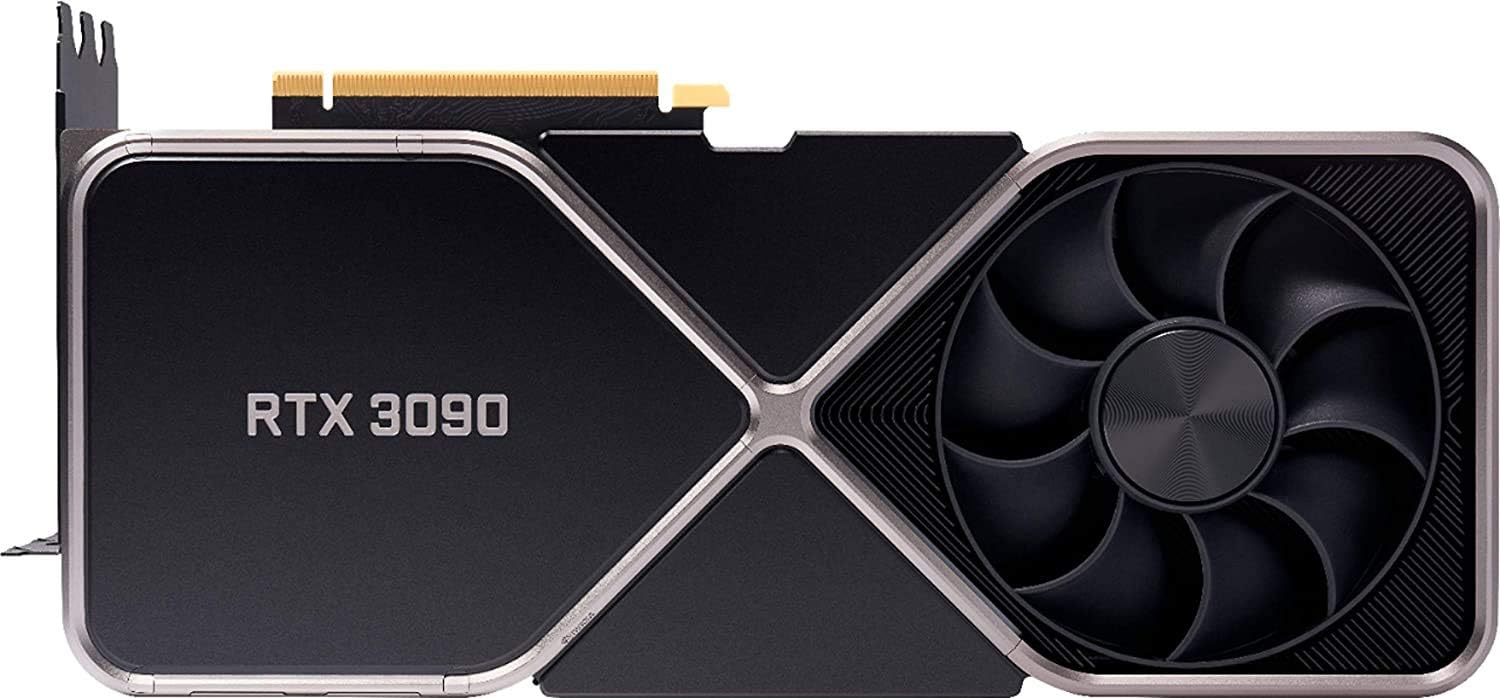
A renewed RTX 3090 still brings serious muscle, with 24GB of GDDR6X that remains valuable for AI workloads, 3D rendering, and 4K gaming. Professionally inspected and tested by Amazon-qualified suppliers, it arrives working like new, and the massive VRAM buffer is something even newer cards struggle to match at this tier.
The caveats are real: you only get a 90-day limited warranty, power draw is high, and used Founders Edition cards can carry prior mining or thermal wear. If you need cheap VRAM capacity for creative or AI work and accept the risk, it’s compelling; buyers wanting long-term peace of mind should prefer new cards.
Pros
- Massive 24GB VRAM
- Strong 4K performance
- Inspected and tested
Cons
- Only 90-day warranty
- High power draw
- Used condition risk
Specifications
From RTX Entry-Level to Flagship: Finding Your Place on Nvidia’s Graphics Card Ladder
Nvidia’s lineup spans everything from compact cards for 1080p gaming to power-hungry flagships built for 4K and content creation. That range is good news for shoppers — but it also means the “best” card is different for everyone. The right pick depends on your monitor, your games, and how long you want the card to stay relevant. A little homework now saves you from overspending on horsepower you’ll never use, or underbuying and regretting it a year later.
The Specs That Separate a Smart Buy From an Expensive Paperweight
- Resolution and refresh rate first. Match the card to your monitor. A card built for 4K is wasted on a 1080p screen, while a budget card will struggle to feed a high-refresh 1440p display.
- VRAM capacity. Modern games and creative apps chew through memory. More VRAM gives you headroom for higher textures and resolutions, so don’t treat it as an afterthought.
- Ray tracing and DLSS support. Nvidia’s feature set is a big part of the value. Newer generations bring better performance-per-watt and improved upscaling, which can matter more than raw specs on paper.
- Power supply and case compatibility. Check your PSU wattage, required connectors, and whether the card physically fits your case. High-end cards can be long, thick, and hungry.
- Cooling and acoustics. Two cards with the same GPU chip can behave very differently depending on the cooler design. Look for reviews that measure noise and thermals, not just frame rates.
- Sticking to your budget. The tier above always looks tempting. Decide your ceiling before browsing, and remember that last-generation cards often deliver most of the performance for less money.
Traps That Catch Even Seasoned PC Builders
- Buying for the GPU, ignoring the system around it. A powerful card paired with an aging CPU, limited RAM, or an old monitor will leave performance on the table. Balance your build.
- Chasing the top of the stack by default. The flagship card is impressive, but most gamers get a better experience-per-dollar one or two tiers down. “Best overall” and “best for you” are rarely the same card.
- Ignoring real-world benchmarks. Marketing numbers and synthetic scores don’t tell you how a card runs the games you actually play. Check independent testing at your resolution before committing.
The takeaway: identify your resolution and budget first, then work down Nvidia’s lineup until a card fits both. That’s how you end up with a purchase you’ll still be happy with years from now. If 1440p is your target resolution, our guide to choosing a GPU for 1440p gaming walks through the specs that matter.
Final Frame: Choosing Your NVIDIA GPU Winner
The RTX 5080 Founders Edition and PNY’s OC Triple-Fan variant are the picks for gamers chasing top-tier 4K performance, with the PNY’s factory overclock and beefier cooling giving enthusiasts a slight edge. The RTX 5070 Ti OC and ASUS RTX 5060 Ti 16GB cover high-refresh 1440p beautifully, while the RTX 3060 Gaming OC and MSI Ventus 2X 12G remain dependable 1080p workhorses. Creators and AI pros should eye the RTX PRO 4000 Blackwell or RTX 2000 ADA, the RTX 3050 Ventus handles entry-level builds, and the renewed RTX 3090 is a value play for VRAM-hungry workflows.
Whatever your resolution or workload, this lineup has a card that fits. Hit the buttons above to check current availability before these GPUs move fast.
Final 3 Picks: Flagship Reference, 4K Gaming, and 1440p Performance
Ready to decide? These 3 recommendations remain our strongest choices for different priorities after weighing the full comparison.
NVIDIA RTX 5080 Founders
- Blackwell architecture
- DLSS 4 with Frame Warp
- Reflex 2 support