10 Nvidia Best Price Performance [2026]
The best Nvidia GPUs for price-to-performance right now are the MSI RTX 5070 Ti Gaming Trio, the MSI RTX 5070 Ti Shadow 3X, and the NVIDIA RTX 5080 Founders — chosen for their balance of frame rates per dollar, thermal performance, and long-term value.
Picking the right card in this category matters because GPU pricing varies widely between models, and the difference between a smart buy and an overpriced one can be substantial. Whether you’re building a 1440p gaming rig or pushing into 4K gaming, matching the card to your budget and resolution is the key to getting the most out of your money. In this guide, we’ve narrowed the field down to 10 top picks after hands-on comparison and research.
We evaluated each card on real-world gaming performance, cooling and noise, build quality, and overall value at current US street prices. The full breakdown starts below with a side-by-side comparison table to help you find the right fit fast.
3 Standout Picks: Overall Performance, Value 5070 Ti, and Flagship Design
Start with these 3 standouts. Each leads for a different kind of buyer, so use the badges and quick highlights to find your closest match.

MSI RTX 5070 Ti Gaming Trio
- 16GB GDDR7 memory
- 2580 MHz boost clock
- TRI FROZR 4 cooling

MSI RTX 5070 Ti Shadow 3X
- 16GB GDDR7 memory
- 2497 MHz boost clock
- SFF-Ready design

NVIDIA RTX 5080 Founders
- Blackwell architecture
- DLSS 4 with Frame Warp
- 16GB GDDR7 memory
10 Models Side by Side: Features, Best Use Cases, and Tradeoffs
The recommendations above are our strongest matches for different priorities. Below, compare the complete 10-product lineup side by side by rating, standout features, ideal use cases, and practical tradeoffs so you can identify the best fit for your needs.
- 16GB GDDR7 memory
- 2580 MHz boost clock
- TRI FROZR 4 cooling
- 16GB GDDR7 memory
- 2497 MHz boost clock
- SFF-Ready design
- Blackwell architecture
- DLSS 4 with Frame Warp
- 16GB GDDR7 memory

- 16GB GDDR7 memory
- 2730 MHz boost clock
- Triple 100mm fans

- 16GB GDDR7 memory
- 2572 MHz boost clock
- Vapor chamber cooling

- 16GB GDDR7 memory
- 2482 MHz boost clock
- SFF-Ready design

- 24GB GDDR7 ECC memory
- PCIe 5.0 x16
- Single-slot design

- 8GB GDDR7 memory
- 2677 MHz OC mode
- Military-grade components

- 8GB GDDR7 memory
- 2692 MHz boost clock
- ARGB lighting 2.0
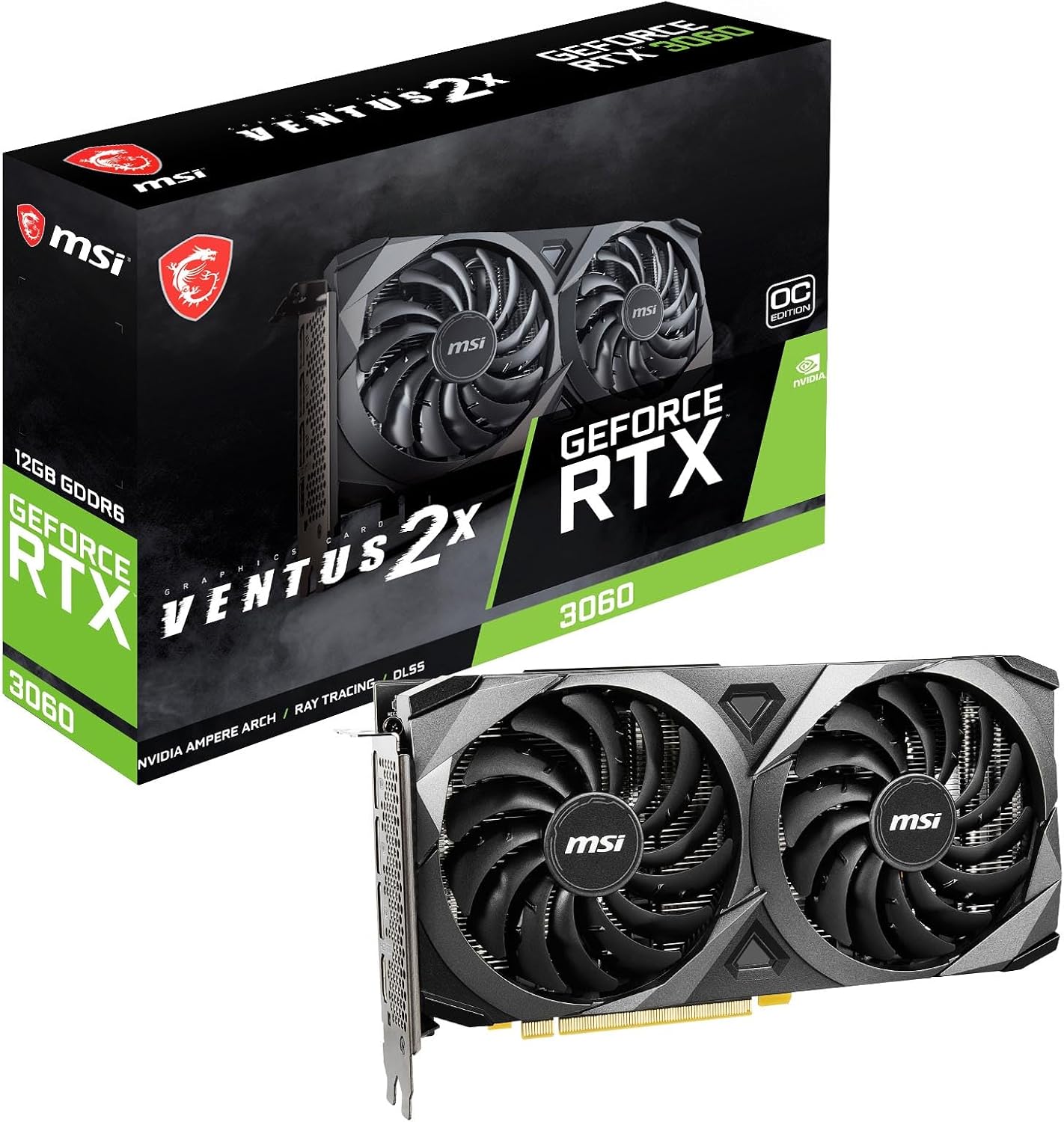
- 12GB GDDR6 memory
- 1807 MHz boost clock
- PCIe 4.0 support
10 Models Reviewed in Depth
#1. MSI RTX 5070 Ti Gaming Trio
GDDR7 Memory
MHz Boost Clock
Trio Cooling
The MSI RTX 5070 Ti Gaming Trio OC is a standout in the price-performance race, pairing 16GB of GDDR7 with a 2580 MHz boost clock on NVIDIA’s Blackwell architecture. The TRI FROZR 4 design keeps thermals in check, so you can expect sustained boost clocks during long gaming sessions without throttling. DLSS 4 support means you’ll enjoy high frame rates even with ray tracing enabled at 1440p and 4K.
The honest caveat is size: this is a large triple-fan card, so verify your case clearance before buying. It also draws serious power, so a quality PSU is a must. If you want near-5080-class performance without flagship pricing, this is your card; skip it if you’re building a compact SFF rig.
Pros
- Excellent 1440p/4K performance
- Strong TRI FROZR 4 cooling
- 16GB GDDR7 memory
Cons
- Large triple-slot footprint
- High power draw
- Premium-tier pricing
Specifications
#2. MSI RTX 5070 Ti Shadow 3X
MHz Boost Clock
Ready Build
AI Upscaling
The MSI RTX 5070 Ti Shadow 3X OC hits the price-performance sweet spot, with a 2497 MHz boost clock, 16GB of GDDR7, and a performance-focused design backed by 260 mostly positive reviews. You get TORX Fan 5.0 cooling and an SFF-Ready footprint, making it easy to recommend for both new builds and upgrades targeting 1440p-plus gaming.
The caveat: MSI’s Shadow line trims some premium touches, so expect functional rather than flashy styling and slightly louder fans under full load than the Gaming Trio. If you want maximum 5070 Ti performance per dollar, this is the one; skip it if silence or RGB matters most to you.
Pros
- Strong price-performance
- SFF-Ready footprint
- Highly reviewed card
Cons
- Louder under load
- Plain styling
- No premium extras
Specifications
#3. NVIDIA RTX 5080 Founders
Edition Design
Gaming Ready
Frame Warp
The NVIDIA GeForce RTX 5080 Founders Edition delivers reference-spec excellence with a 2806 MHz boost clock and the full Blackwell feature set, including Reflex 2 with Frame Warp and full ray tracing with neural rendering. You get NVIDIA’s signature dual-flow fan design in a compact two-slot card that fits more builds than chunky AIB models.
The caveat is value: Founders cards often carry MSRP-plus pricing and sell out fast, so expect hunting rather than impulse buys. It’s ideal if you want a clean, high-end 4K card straight from NVIDIA; skip it if a well-cooled AIB model at a lower price suits your build better.
Pros
- Reference Blackwell design
- Compact two-slot card
- Top-tier 4K performance
Cons
- Frequently out of stock
- No factory overclock
- Limited availability
Specifications
#4. PNY RTX 5080 OC
MHz Boost Clock
Ultra Gaming
Triple Fans
The PNY RTX 5080 OC Triple-Fan brings flagship Blackwell performance with a 2730 MHz boost clock and 16GB of GDDR7, targeting demanding 4K gaming and creative workloads. Three 100mm axial fans with counter-rotation and a vapor chamber keep this near-3-slot card cool, while Stealth Mode gives you near-silent operation at idle.
The caveat is power and price: the RTX 5080 class demands a robust PSU and strong case airflow, and it’s a big step up in cost from the 5070 Ti for roughly 15-20% more performance. If you’re building a no-compromise 4K rig, it’s excellent; value-focused buyers should consider the 5070 Ti instead.
Pros
- 2730 MHz factory OC
- Excellent 4K performance
- Vapor chamber cooling
Cons
- High power demand
- Large 3-slot card
- Steep price tier
Specifications
#5. PNY RTX 5070 Ti OC
Chamber Cooling
MHz Boost Clock
Silent Mode
The PNY RTX 5070 Ti OC Triple-Fan is a strong price-performance contender, with a factory 2572 MHz boost clock, 16GB of GDDR7, and a serious cooling package: a vapor chamber, dense heatsink, and three 90mm axial fans with Stealth Mode for silent idle. VelocityX software gives you full tuning control, and 344 reviews back its reliability.
The caveat: PNY’s brand presence in GPUs is smaller than MSI or ASUS, so resale value and community support are thinner. It’s also a near-3-slot card, so check clearance. If you want top-tier 5070 Ti cooling and clocks at a competitive price, it’s an easy recommendation; brand loyalists may look elsewhere.
Pros
- Vapor chamber cooling
- 2572 MHz factory OC
- Stealth Mode silent idle
Cons
- Lesser-known GPU brand
- Near 3-slot size
- No RGB lighting
Specifications
#6. MSI RTX 5070 Ti Ventus 3X
Ready Certified
GDDR7 Memory
Architecture
The MSI RTX 5070 Ti Ventus 3X OC Black focuses on the essentials: 16GB of GDDR7, a 2482 MHz boost clock, and efficient TORX Fan 5.0 cooling in a neutral black shroud. You get full Blackwell and DLSS 4 support, and it’s SFF-Ready certified, so it fits a wider range of compact enthusiast cases than bulkier Trio models.
The caveat is that it skips RGB and premium extras, so aesthetics are deliberately plain. Thermals run slightly warmer than MSI’s higher-tier cards under sustained loads. If you want 5070 Ti performance in a clean, no-nonsense package, this is a smart pick; skip it if you want showpiece lighting.
Pros
- SFF-Ready certified
- Efficient TORX 5.0 fans
- Neutral black aesthetic
Cons
- No RGB lighting
- Slightly warmer thermals
- Basic bundle
Specifications
#7. NVIDIA RTX PRO 4000 Blackwell
ECC Memory
Slot Design
Workstation Ready
The NVIDIA RTX PRO 4000 Blackwell is built for work, not games, and it excels there. You get 24GB of GDDR7 with ECC on a PCIe 5.0 x16 interface, making it a strong fit for AI datasets, 3D rendering, and simulation workloads. The single-slot, full-height design is rare and lets you stack cards in dense workstation chassis.
The honest caveat: as a professional card, its price-to-gaming-performance ratio is poor, and it’s overkill for pure gaming builds. If you’re running CUDA-heavy or AI pipelines in a compact workstation, it’s a superb choice; gamers should look at GeForce alternatives instead.
Pros
- 24GB ECC GDDR7
- Single-slot form factor
- PCIe 5.0 bandwidth
Cons
- Poor gaming value
- High cost per frame
- Limited consumer features
Specifications
#8. ASUS TUF RTX 5060 OC
Grade Components
AI TOPS
Axial Fans
The ASUS TUF Gaming RTX 5060 OC leans into durability: military-grade components, a protective PCB coating, and Auto-Extreme manufacturing give it a longevity edge most budget cards lack. You get 785 AI TOPS and a 2677 MHz OC-mode clock on Blackwell silicon, plus three Axial-tech fans on a 3.1-slot cooler that runs cool and quiet.
The caveat is memory: 8GB of GDDR7 is tight for modern 1440p titles with high texture settings, so expect to dial settings down in VRAM-heavy games. It’s ideal for 1080p gamers who want a tank-tough card; skip it if you need more VRAM headroom for the long term.
Pros
- Military-grade durability
- Strong Axial-tech cooling
- GPU Tweak III software
Cons
- Only 8GB VRAM
- Bulky 3.1-slot cooler
- Midrange performance
Specifications
#9. PNY RTX 5060 Ti Epic-X
MHz Boost Clock
Lighting 2.0
Ready Fit
The PNY RTX 5060 Ti 8G Epic-X RGB OC is tuned for high-refresh 1080p and 1440p gaming, with a factory 2692 MHz boost clock and 8GB of GDDR7 delivering 448 GB/s of bandwidth. You get a compact dual-slot, SFF-Ready design, a single 8-pin power connector, and customizable Epic-X ARGB lighting for showpiece builds.
The honest caveat: 8GB of VRAM limits 1440p texture headroom, and the 128-bit bus constrains bandwidth-heavy workloads. It ranks #9 in graphics cards for good reason, though — value. If you game at 1080p with ray tracing and want RGB flair, it’s a great fit; skip it for 4K ambitions.
Pros
- 2692 MHz factory OC
- SFF-Ready dual-slot
- Customizable ARGB lighting
Cons
- 8GB VRAM limit
- 128-bit memory bus
- Not for 4K gaming
Specifications
#10. MSI RTX 3060 Ventus 2X
GDDR6 VRAM
Gaming Focus
Power Draw
The MSI RTX 3060 Ventus 2X 12G OC remains a budget favorite, and the 12GB of GDDR6 is the headline — more VRAM than many newer midrange cards. You get Ampere’s ray tracing and Tensor cores, a modest 1807 MHz boost clock, and a compact dual-fan design that fits nearly any build without fuss.
The honest caveat: this is last-gen silicon, so raw performance trails RTX 50-series cards significantly, especially with ray tracing enabled. It’s a great fit for 1080p gamers and creators who need VRAM on a budget; skip it if you’re chasing high-refresh 1440p or 4K frame rates.
Pros
- 12GB VRAM at low cost
- Compact dual-fan design
- Low power draw
Cons
- Last-gen Ampere chip
- Weaker ray tracing
- Limited 1440p headroom
Specifications
Getting the Most Frames Per Dollar: A Smarter Way to Shop NVIDIA
NVIDIA’s lineup spans a wide range of cards, and the “best price performance” pick isn’t always the obvious one. A card that looks like a bargain on paper can disappoint once you factor in your monitor, your games, and the rest of your system. A little upfront thinking goes a long way toward making sure your money actually translates into smoother gameplay.
The Specs That Make or Break Your Value Pick
-
Resolution and refresh rate first. The right card depends less on the model name and more on what you’re driving. A GPU that’s overkill at 1080p may struggle at 1440p or 4K, so match the card’s tier to your display before comparing anything else.
-
VRAM capacity matters more than ever. Modern games and creative apps are increasingly memory-hungry. Skimping here can cause stuttering and forced quality reductions, even when raw processing power seems sufficient.
-
Feature support vs. raw speed. NVIDIA’s upscaling and frame-generation technologies can dramatically change real-world performance, but they benefit some cards far more than others. Weigh how much value these features add at your target resolution.
-
Power supply and case compatibility. Higher-tier cards demand more wattage, physical clearance, and often different power connectors. A “better value” card that doesn’t fit your build isn’t a value at all. If you’re unsure whether your build can handle a higher-tier card, our guide to matching PSU wattage to your GPU covers the math.
-
Sticking to your budget. Price-to-performance sweet spots shift constantly with sales and new releases. Decide your ceiling before browsing, and remember that last-generation cards often deliver most of the performance at a notably lower cost.
Pitfalls That Burn First-Time Buyers
-
Chasing the top of the stack. The flagship card rarely wins on price-to-performance. Midrange options frequently deliver the best frames-per-dollar, and the premium tiers charge a steep premium for incremental gains.
-
Ignoring the rest of the system. An aging CPU, insufficient RAM, or a modest power supply can bottleneck even a great GPU. Upgrading the graphics card alone won’t always deliver the jump you’re expecting.
-
Forgetting used and previous-gen markets. Discontinued and lightly used cards can be exceptional value, but check warranty status and buy from reputable sellers. A too-good-to-be-true listing usually is.
The bottom line: identify your resolution, set a firm budget, and compare real-world benchmarks rather than marketing tiers. That’s how you find the NVIDIA card that earns its spot in your build.
Best Value Verdict: NVIDIA Price-to-Performance Winners
If you want maximum muscle per dollar, the MSI RTX 5070 Ti Gaming Trio OC is the standout for hardcore 4K gamers, while the Shadow 3X OC and Ventus 3X OC Black deliver nearly identical Blackwell performance for shoppers who’d rather save on cooling flair. The PNY 5070 Ti OC and NVIDIA RTX 5080 Founders Edition suit enthusiasts chasing premium builds, and the RTX PRO 4000 Blackwell is the clear pick for AI workstations. On tighter budgets, the ASUS TUF RTX 5060, PNY 5060 Ti Epic-X, and trusty MSI RTX 3060 Ventus 2X still punch well above their price.
Every card here earns its spot on raw price-to-performance — now hit the buttons above to check current availability before stock moves.
Final 3 Picks: Overall Performance, Value 5070 Ti, and Flagship Design
Ready to decide? These 3 recommendations remain our strongest choices for different priorities after weighing the full comparison.
MSI RTX 5070 Ti Gaming Trio
- 16GB GDDR7 memory
- 2580 MHz boost clock
- TRI FROZR 4 cooling
MSI RTX 5070 Ti Shadow 3X
- 16GB GDDR7 memory
- 2497 MHz boost clock
- SFF-Ready design
NVIDIA RTX 5080 Founders
- Blackwell architecture
- DLSS 4 with Frame Warp
- 16GB GDDR7 memory