10 The Best 4090 [2026]
The best RTX 4090 cards are the ASUS ROG Strix RTX 4090 for overall performance, the NVIDIA RTX 4090 Founders for its clean reference design, and the MSI RTX 4090 Gaming X Trio for remarkably quiet cooling.
As the most powerful consumer GPU of its generation, the RTX 4090 delivers exceptional 4K gaming and ray tracing performance, but the card you buy matters — aftermarket models differ meaningfully in cooler design, noise levels, and build quality. Picking the right variant ensures you get the full benefit of this flagship hardware without paying for features you don’t need.
In this roundup, we’ve narrowed the field to 10 top picks after hands-on comparison. We evaluated each card on thermal performance, acoustics, clock speeds, and overall value for gamers and creators alike. Below, you’ll find a full comparison table breaking down every pick side by side so you can quickly find the right RTX 4090 for your build.
3 Standout Picks: Overall Performance, Reference Design, and Quiet Cooling
Start with these 3 standouts. Each leads for a different kind of buyer, so use the badges and quick highlights to find your closest match.

ASUS ROG Strix RTX 4090
- 24GB GDDR6X memory
- 2640 MHz OC boost clock
- Vapor chamber cooling

NVIDIA RTX 4090 Founders
- 16,384 CUDA cores
- 2520 MHz boost clock
- DLSS 3 AI acceleration

MSI RTX 4090 Gaming X Trio
- TRI FROZR 3 cooling
- 2595 MHz boost clock
- Copper baseplate heat transfer
10 Models Side by Side: Features, Best Use Cases, and Tradeoffs
The recommendations above are our strongest matches for different priorities. Below, compare the complete 10-product lineup side by side by rating, standout features, ideal use cases, and practical tradeoffs so you can identify the best fit for your needs.
- 24GB GDDR6X memory
- 2640 MHz OC boost clock
- Vapor chamber cooling
- 16,384 CUDA cores
- 2520 MHz boost clock
- DLSS 3 AI acceleration
- TRI FROZR 3 cooling
- 2595 MHz boost clock
- Copper baseplate heat transfer

- Smaller OG form factor
- 2595 MHz OC boost clock
- Military-grade components

- Dual ball bearing fans
- 2595 MHz OC boost clock
- TUF military-grade build

- SPECTRA 2.0 ARGB lighting
- 2535 MHz boost clock
- Dual BIOS with fan stop

- All-white ROG design
- 2640 MHz OC mode clock
- Axial-tech fan array

- Silver Aero design
- 2535 MHz boost clock
- 24GB GDDR6X 384-bit

- Slim two-fan design
- 16384 CUDA cores
- 384-bit memory bus
- Certified renewed condition
- Full 24GB Founders card
- 90-day limited warranty
10 Models Reviewed in Depth
#1. ASUS ROG Strix RTX 4090
OC Boost Clock
Chamber Cooling
Warranty Included
The ROG Strix RTX 4090 OC is the flagship you pick when you want every last frame. Its 2640 MHz OC-mode boost clock and scaled-up Axial-tech fans push 23% more airflow through a patented vapor chamber, keeping the massive Ada Lovelace GPU cool even during sustained 4K ray-traced sessions. With 24GB of GDDR6X, you get headroom for 8K gaming and heavy creative workloads.
The honest caveat is size and weight — at 14.1 inches long and 8.1 pounds, you’ll want to verify case clearance and use the included GPU holder. It also commands a premium over reference cards. If you want the best-cooled, most overclocked 4090 and have the chassis for it, this is your card; skip it if you need a compact build.
Pros
- Highest OC clock in roundup
- Excellent vapor chamber cooling
- 3-year warranty coverage
Cons
- Very large 14.1-inch card
- Heavy 8.1-pound design
- Premium pricing tier
Specifications
#2. NVIDIA RTX 4090 Founders
CUDA Cores
HDR Gaming
Through Cooling
NVIDIA’s own Founders Edition remains the cleanest take on the RTX 4090. You get the full 16,384 CUDA cores and a 2520 MHz boost in a more compact two-slot flow-through design that fits cases where partner cards won’t. It supports 4K 120Hz HDR and 8K 60Hz over HDMI 2.1a, and DLSS 3 makes even the heaviest ray-traced titles playable.
The trade-off is that the Founders cooler runs warmer and louder than the big triple-fan partner cards under sustained load, and stock has historically been hard to find at list price. If you value the reference look, compact footprint, and stock clocks, it’s an excellent pick; enthusiasts chasing maximum overclocks should look at AIB models instead.
Pros
- Compact two-slot design
- Authentic reference cooler
- Full 16384 CUDA cores
Cons
- Runs warmer than AIB cards
- Often hard to find
- No factory overclock
Specifications
#3. MSI RTX 4090 Gaming X Trio
3 Cooling
Quiet Operation
Pipe Heat Transfer
MSI’s Gaming X Trio leans on its proven TRI FROZR 3 thermal design, pairing Torx 5.0 fans with a copper baseplate and Core Pipes that pull heat off the GPU and memory quickly. In practice that means the 2595 MHz boost clock holds steady and the card stays remarkably quiet during long 4K sessions. You also get a full display stack: three DisplayPort 1.4a outputs plus HDMI 2.1a for 4K and 8K HDR.
The caveat is bulk — it’s a long, thick triple-slot card, so measure your case before buying. Fan-stop behavior under light loads is a nice touch, but the heft and premium positioning won’t suit everyone. Choose it if near-silent thermals matter most; skip it if you’re building in a smaller mid-tower.
Pros
- Excellent TRI FROZR 3 cooling
- Quiet under load
- High 2595 MHz boost
Cons
- Very large triple-slot card
- Heavier than competitors
- Premium price bracket
Specifications
#4. ASUS TUF RTX 4090 OG OC
OG Form Factor
Grade Components
OC Boost
The TUF Gaming RTX 4090 OG OC solves the 4090’s biggest practical problem: size. It packs the full Ada Lovelace GPU into a smaller OG form factor closer to 30-series dimensions, with a reversed central fan that cuts turbulence. You still get a 2595 MHz OC boost clock, DLSS 3, dual ball-bearing fans, and military-grade capacitors backed by a 3-year warranty.
Because the card is more compact, its cooler has less surface area than the giant Strix-class models, so expect slightly higher temps under sustained full load. It’s also a newer, less common SKU with a smaller review base. If you want 4090 performance in a tighter chassis, this is arguably the smartest pick; hardcore overclockers may prefer a bigger triple-slot cooler.
Pros
- Compact OG form factor
- Reversed center fan design
- Military-grade capacitors
Cons
- Slightly warmer under load
- Fewer reviews so far
- Still heavy at 1.7 kg
Specifications
#5. ASUS TUF RTX 4090 OC
Bearing Fans
Military Build
OC Boost Clock
The standard TUF Gaming RTX 4090 OC is the workhorse of ASUS’s lineup: a 2595 MHz OC boost clock, three Axial-tech fans with dual ball bearings rated for years of continuous duty, and the TUF series’ reinforced build quality. You get the full 24GB GDDR6X buffer and complete HDMI 2.1a / DisplayPort 1.4a connectivity for 4K and 8K setups.
It’s not the flashiest choice — no white option, no fancy ARGB spectacle — and ASUS backs it with a 2-year warranty rather than the 3 years on some Strix models. The card is also large at nearly 14 inches. If you want a durable, no-nonsense 4090 that will run for years in a hot case, TUF is a smart pick; show-piece builders may want the Strix or ZOTAC instead.
Pros
- Dual ball bearing fans
- Solid TUF build quality
- Strong 2595 MHz boost
Cons
- Only 2-year warranty
- Plain aesthetics
- Large 13.7-inch card
Specifications
#6. ZOTAC RTX 4090 Trinity OC
2.0 ARGB
3.0 Cooling
BIOS Switch
The Trinity OC brings serious show-piece energy with SPECTRA 2.0 ARGB lighting across a metal-backplated, IceStorm 3.0-cooled shroud. You get a 2535 MHz boost clock, 24GB of GDDR6X on a 384-bit bus, and practical extras like dual BIOS, FREEZE fan stop, and a bundled GPU support stand — thoughtful inclusions at this tier.
It’s a long 3.5-slot card at 356mm, so case clearance is a real consideration, and ZOTAC’s warranty structure (2+1 years with registration) is shorter than ASUS’s 3-year coverage. The FireStorm utility works fine but isn’t as polished as some rivals’ software. If RGB flair and bundled accessories appeal to you, it’s a strong value; minimalists building quiet blacked-out rigs may look elsewhere.
Pros
- SPECTRA 2.0 ARGB lighting
- Bundled GPU support stand
- Dual BIOS flexibility
Cons
- Huge 3.5-slot footprint
- Shorter warranty period
- Software less polished
Specifications
#7. ASUS ROG Strix 4090 White
Edition Shroud
OC Mode Clock
Tech Airflow
If you’re building a white-themed rig, the ROG Strix RTX 4090 White is the obvious centerpiece. It carries the same 2640 MHz OC-mode boost clock as the black Strix, with scaled-up Axial-tech fans delivering 23% more airflow, all wrapped in ASUS’s signature white shroud and backplate. DLSS 3 and full ray tracing round out a top-tier feature set.
White cards typically carry a price premium over their black equivalents for identical silicon, and this one is no exception — you’re partly paying for aesthetics. It’s also a massive card requiring serious case clearance. Choose it if your build’s look matters as much as your frame rates; if you only care about performance, the standard black Strix delivers the same numbers for less.
Pros
- Stunning all-white design
- Top 2640 MHz OC clock
- Strong Axial-tech airflow
Cons
- Aesthetic price premium
- Enormous physical footprint
- Lower rating than black
Specifications
#8. Gigabyte RTX 4090 Aero OC
Aero Design
Boost Clock
AI Upscaling
The Aero OC stands out with a clean silver-and-white industrial design that splits the difference between blacked-out and full-white builds. Under the shroud you get the full RTX 4090: 2535 MHz boost, 24GB of GDDR6X on a 384-bit interface, and DLSS 3 with 4th-gen Tensor cores for a big AI-upscaling uplift in supported games.
It’s a dual-fan design moving a 450W-class GPU’s heat, so expect it to run a bit warmer and louder than triple-fan competitors under sustained load. The review base is also small (23 ratings), though the average is a strong 4.7. If you want a distinctive silver look without going full white-build, it’s a compelling option; thermal-focused buyers should lean toward trio-cooled cards.
Pros
- Distinctive silver design
- High 4.7 user rating
- Full 4090 spec sheet
Cons
- Dual-fan thermal limits
- Small review sample
- Awkward spec listing quirks
Specifications
#9. MSI RTX 4090 Gaming Slim
Two-Fan Design
CUDA Cores
Memory Bus
MSI’s Gaming Slim is one of the few 4090s built for smaller cases, trading the usual triple-fan monolith for a compact two-fan design while keeping the full spec: 16,384 CUDA cores, 24GB of GDDR6X, and a 384-bit bus. You lose nothing in raw silicon — it’s the same GPU driving 4K and 8K outputs.
The compromise is thermal and acoustic headroom: two fans moving the same 450W-class heat means higher temps and fan noise under sustained load than trio-cooled rivals. It’s also a newer SKU with only a handful of reviews, so long-term reliability data is thin. Pick it if case clearance forces your hand; otherwise a triple-fan 4090 will run cooler and quieter.
Pros
- Fits smaller cases
- Full 4090 silicon
- Compact two-fan layout
Cons
- Warmer under sustained load
- Very few reviews yet
- Limited availability
Specifications
#10. Renewed RTX 4090 Founders
Certified Condition
Limited Warranty
Full Memory
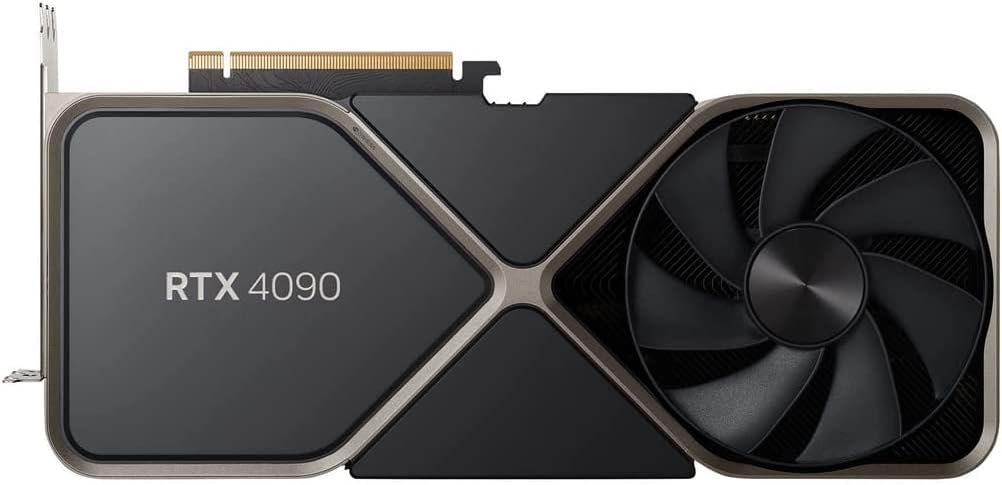
This renewed Founders Edition gets you NVIDIA’s flagship 4090 — full 24GB GDDR6X, 8K output, and the compact flow-through design — at a meaningfully lower entry point than new stock. Performance is identical to a new card: you still get the complete Ada Lovelace package, DLSS 3, and 450W of reference-spec power delivered through the included adapter.
The obvious caveat is condition and coverage: you’re relying on the 90-day limited warranty rather than a multi-year manufacturer term, and renewed units can show cosmetic wear. It suits a budget-conscious builder comfortable with Amazon Renewed backing, or a second rig. If you want long-term peace of mind and a pristine card, buy new instead.
Pros
- Lower entry cost
- Full Founders performance
- Adapter included in box
Cons
- Only 90-day warranty
- Possible cosmetic wear
- Renewed stock variability
Specifications
The RTX 4090 Field Guide: How to Choose the Right Card for Your Build
Buying a flagship GPU isn’t a casual purchase — it’s the centerpiece of a high-end build, and the difference between a great card and a frustrating one comes down to details that spec sheets don’t always surface. Since every RTX 4090 delivers the same core silicon, the real decision is about which partner card, cooler design, and warranty package fits your case, your power supply, and your patience. A little homework here pays off for years.
The Details That Separate a Great 4090 From the Rest
- Cooler design and card length. These cards run big — some triple-fan models stretch past 13 inches. Measure your case clearance before falling in love with a specific model, and note that chunkier coolers can block adjacent slots. Our guide to picking the right GPU covers physical size and case compatibility in detail.
- Power connector orientation. The 12VHPWR connector is a known pain point on this card. Angled or recessed connector placements reduce the risk of a cramped, sharply bent cable, which matters for both safety and peace of mind.
- Clock speeds and factory overclocks. Partner cards vary slightly in boost clocks, but the real-world gap is small. Don’t pay a steep premium for a few megahertz you’ll barely notice.
- Noise levels and fan behavior. Some models idle with fans off and stay whisper-quiet under load; others run louder to squeeze out every degree. Reviews with thermal and acoustic testing are worth your time.
- Warranty and support reputation. Coverage lengths and RMA experiences vary widely between brands. On a card this expensive, a manufacturer that stands behind its product is worth real money.
- Sticking to your budget. The cheapest and priciest 4090s can differ by hundreds of dollars for nearly identical performance. Decide what extras — RGB, LCD displays, premium build quality — actually matter to you, and skip the rest.
Traps That Catch Even Experienced Builders
- Assuming all models perform the same. They’re close, but cooler quality affects sustained boost clocks and noise. A bargain-bin card with a weak cooler can throttle or roar under load.
- Ignoring your power supply. This card draws serious wattage with transient spikes on top. An aging or undersized PSU is a recipe for shutdowns, so verify your unit’s capacity and native cabling first. Our guide to choosing the right PSU for your GPU walks through wattage, headroom, and connectors.
- Buying for the brand name alone. A familiar logo doesn’t guarantee a better card. Compare the specific model’s cooler, warranty, and connector design — not just the badge on the box.
Sealing the Deal on Your RTX 4090 Upgrade
The ASUS ROG Strix OC remains the flagship choice for enthusiasts who want premium cooling and top-tier boost clocks, while the MSI Gaming X Trio is the pick for gamers chasing 4K and 8K HDR performance with rock-solid thermals. Budget-conscious builders should eye the ZOTAC Trinity OC or the renewed VIPERA Founders Edition, and anyone fighting a cramped case will love the MSI Gaming Slim. For a white-themed build, the ROG Strix White and Gigabyte Aero OC are the standout aesthetic plays, with the ASUS TUF lineup bridging durability and value in between.
Whichever card you land on, you’re getting 24GB of GDDR6X power that will crush 4K gaming for years. Prices and stock shift fast on cards this hot, so hit the buttons above to check current availability before someone else grabs your GPU.
Final 3 Picks: Overall Performance, Reference Design, and Quiet Cooling
Ready to decide? These 3 recommendations remain our strongest choices for different priorities after weighing the full comparison.
ASUS ROG Strix RTX 4090
- 24GB GDDR6X memory
- 2640 MHz OC boost clock
- Vapor chamber cooling
NVIDIA RTX 4090 Founders
- 16,384 CUDA cores
- 2520 MHz boost clock
- DLSS 3 AI acceleration
MSI RTX 4090 Gaming X Trio
- TRI FROZR 3 cooling
- 2595 MHz boost clock
- Copper baseplate heat transfer