10 Nvidia Gpu Best To Worst [2026]
The best NVIDIA GPUs from best to worst are the NVIDIA RTX PRO 4000 Blackwell, the ASUS Dual RTX 5060 Ti, and the NVIDIA RTX PRO 4000 SFF — chosen for their balance of raw performance, value per dollar, and real-world reliability.
Picking the right GPU matters more than ever, since the gap between tiers affects everything from frame rates at 1440p to AI model training speed. The right card also determines whether your system stays cool and quiet under sustained load.
In this roundup, we’ve narrowed the field to 10 picks after hands-on comparison of NVIDIA’s current lineup, ranked from strongest to weakest. We evaluated each card on gaming performance, productivity and AI workloads, power efficiency, and long-term value for general buyers. Below, you’ll find the full ranking with a side-by-side comparison table to help you match a card to your budget and build.
3 Standout Picks: AI Workstations, Overall Gaming, and Compact Workstation
Start with these 3 standouts. Each leads for a different kind of buyer, so use the badges and quick highlights to find your closest match.

NVIDIA RTX PRO 4000 Blackwell
- 24GB GDDR7 ECC memory
- PCIe 5.0 x16 interface
- Single-slot full-height design

ASUS Dual RTX 5060 Ti
- 16GB GDDR7 memory
- 767 AI TOPS performance
- Dual Axial-tech fans

NVIDIA RTX PRO 4000 SFF
- 24GB GDDR7 ECC memory
- Low-profile dual-slot
- PCIe 5.0 x8 interface
10 Models Side by Side: Features, Best Use Cases, and Tradeoffs
The recommendations above are our strongest matches for different priorities. Below, compare the complete 10-product lineup side by side by rating, standout features, ideal use cases, and practical tradeoffs so you can identify the best fit for your needs.
- 24GB GDDR7 ECC memory
- PCIe 5.0 x16 interface
- Single-slot full-height design
- 16GB GDDR7 memory
- 767 AI TOPS performance
- Dual Axial-tech fans
- 24GB GDDR7 ECC memory
- Low-profile dual-slot
- PCIe 5.0 x8 interface

- 6GB GDDR6 memory
- 1507 MHz boost clock
- Ampere ray tracing cores

- 6GB GDDR6 memory
- 1492 MHz boost clock
- Ventus 2X dual-fan cooling

- 8GB GDDR6 memory
- 896 CUDA cores
- Single-slot ultra-quiet design

- 4GB GDDR5 memory
- Low-profile slim design
- No external power needed

- 4GB DDR3 memory
- Passively cooled silent design
- Triple simultaneous display

- 1GB DDR3 memory
- Silent low-profile design
- HDMI and VGA outputs
- 2GB GDDR3 memory
- Low-profile silent fan
- DVI, VGA, HDMI outputs
10 Models Reviewed in Depth
#1. NVIDIA RTX PRO 4000 Blackwell
ECC GDDR7 Memory
Next-Gen Bandwidth
AI Architecture
If you’re building a serious AI or rendering workstation, the RTX PRO 4000 Blackwell delivers professional-grade muscle in a remarkably compact single-slot design. You get 24GB of GDDR7 with ECC, which matters when you’re crunching massive datasets or running long training jobs where memory errors are unacceptable. The PCIe 5.0 interface keeps data flowing, and four DisplayPort 2.1b outputs drive up to 8K displays with ease.
The honest caveat is that this is a workstation card, not a gaming card — you’re paying for certified drivers, ECC memory, and reliability rather than raw gaming frames. If your workload is CUDA, AI inference, or 3D simulation, it’s an easy recommendation. If you just want to play games, a consumer GeForce card will serve you better for less.
Pros
- 24GB ECC GDDR7 memory
- Compact single-slot design
- Blackwell AI acceleration
Cons
- Overkill for gaming
- Limited review history
- Premium workstation pricing
Specifications
#2. ASUS Dual RTX 5060 Ti
GDDR7 Memory
AI Upscaling
AI TOPS Power
The ASUS Dual RTX 5060 Ti hits a sweet spot for 1440p gaming, pairing 16GB of GDDR7 with the Blackwell architecture and DLSS 4 support. In OC mode you’re boosting to 2632 MHz, and the compact 2.5-slot design fits small chassis without sacrificing cooling. The 0dB technology means light gaming runs in near silence.
You should know the dual-fan cooler is solid but not class-leading under sustained loads — expect warmer temps than triple-fan models. Dual BIOS lets you toggle between Quiet and Performance profiles, which is a nice touch. If you want strong 1080p/1440p performance in a compact build, this is an easy pick; competitive 4K gamers should look upmarket.
Pros
- 16GB GDDR7 memory
- DLSS 4 support
- Quiet 0dB mode
Cons
- Dual-fan cooling limits
- Not ideal for 4K
- 2.5-slot blocks airflow slightly
Specifications
#3. NVIDIA RTX PRO 4000 SFF
SFF Ready
ECC GDDR7
Ray Tracing Core
The RTX PRO 4000 SFF packs a full 24GB of ECC GDDR7 into a low-profile dual-slot card, making it the rare professional GPU that fits SFF workstations and compact servers. You still get Blackwell architecture, ray tracing, and PCIe 5.0 bandwidth, so AI inference and 3D workloads run comfortably in tiny builds.
The trade-off is the PCIe 5.0 x8 interface rather than full x16, which slightly caps bandwidth for extremely data-heavy tasks, and the compact cooler works harder than a full-size card’s. Four mini DisplayPort outputs cover multi-monitor professional setups. If you need workstation-class compute in a small form factor, this is nearly your only real option — full-tower builders can save with the standard model.
Pros
- Fits SFF builds
- 24GB ECC memory
- Blackwell AI performance
Cons
- x8 interface only
- Compact cooler runs warm
- Very few reviews
Specifications
#4. MSI RTX 3050 Gaming X
Ray Tracing Cores
Boost Clock
Cooling Design
The MSI RTX 3050 Gaming X 6G is a straightforward 1080p card built on the Ampere architecture with dedicated ray tracing and Tensor cores. You get a 1507 MHz boost clock, 14 Gbps memory, and dual fans that keep things cool and reasonably quiet during long sessions.
The honest caveat is the 96-bit memory bus and 6GB VRAM — modern AAA titles at high settings will push against that limit, and ray tracing is more of a novelty here than a feature. For esports titles, older games, and everyday 1080p play, it’s a dependable budget pick. If you want headroom for future releases, step up to a 5060 Ti. Our guide to choosing a GPU for 1080p gaming explains what actually matters at this resolution.
Pros
- Solid 1080p performance
- Dual-fan cooling
- Ray tracing support
Cons
- Only 6GB VRAM
- Narrow 96-bit bus
- Weak ray tracing
Specifications
#5. MSI RTX 3050 Ventus 2X
Dual-Fan Cooling
GDDR6 Speed
Gaming Focus
The Ventus 2X OC variant of the RTX 3050 gives you the same Ampere-based 1080p gaming foundation with a 1492 MHz boost clock and MSI’s proven dual-fan cooler. It’s a slightly shorter card than the Gaming X, so it slips into more compact cases without drama, and it ranks among the top sellers in its category for good reason.
The same caveats apply: 6GB of VRAM on a 96-bit bus limits high-texture gaming, and you shouldn’t expect meaningful ray tracing performance. For budget builds, HTPC upgrades, and esports, it’s a smart buy. If you play modern AAA titles at high settings, budget for more VRAM.
Pros
- Compact dual-fan design
- Good 1080p value
- Top-selling card
Cons
- 6GB VRAM limit
- 96-bit memory bus
- Modest OC headroom
Specifications
#6. PNY NVIDIA T1000 8GB
Ultra-Quiet Fan
CUDA Cores
Multi-Display Support
The PNY T1000 is a sensible entry into NVIDIA’s professional lineup, offering 8GB of GDDR6 and certified drivers in a single-slot, ultra-quiet package. With 896 CUDA cores on the Turing architecture, you get more than 50% better performance than the previous P1000, and it drives 8K displays across four mini DisplayPort outputs.
Be realistic about its limits: this is a CAD and multi-monitor card, not a gaming or heavy AI GPU, and PCIe 3.0 is a generation behind. If you’re outfitting office workstations, running SolidWorks, or driving display walls, it’s a great fit. Gamers and AI researchers should look elsewhere.
Pros
- Single-slot quiet design
- Certified pro drivers
- Four mDP outputs
Cons
- Weak gaming performance
- Older PCIe 3.0
- Modest CUDA count
Specifications
#7. Maxsun GTX 1050 Ti LP
SFF Slim Fit
GDDR5 Bus
No Extra Power
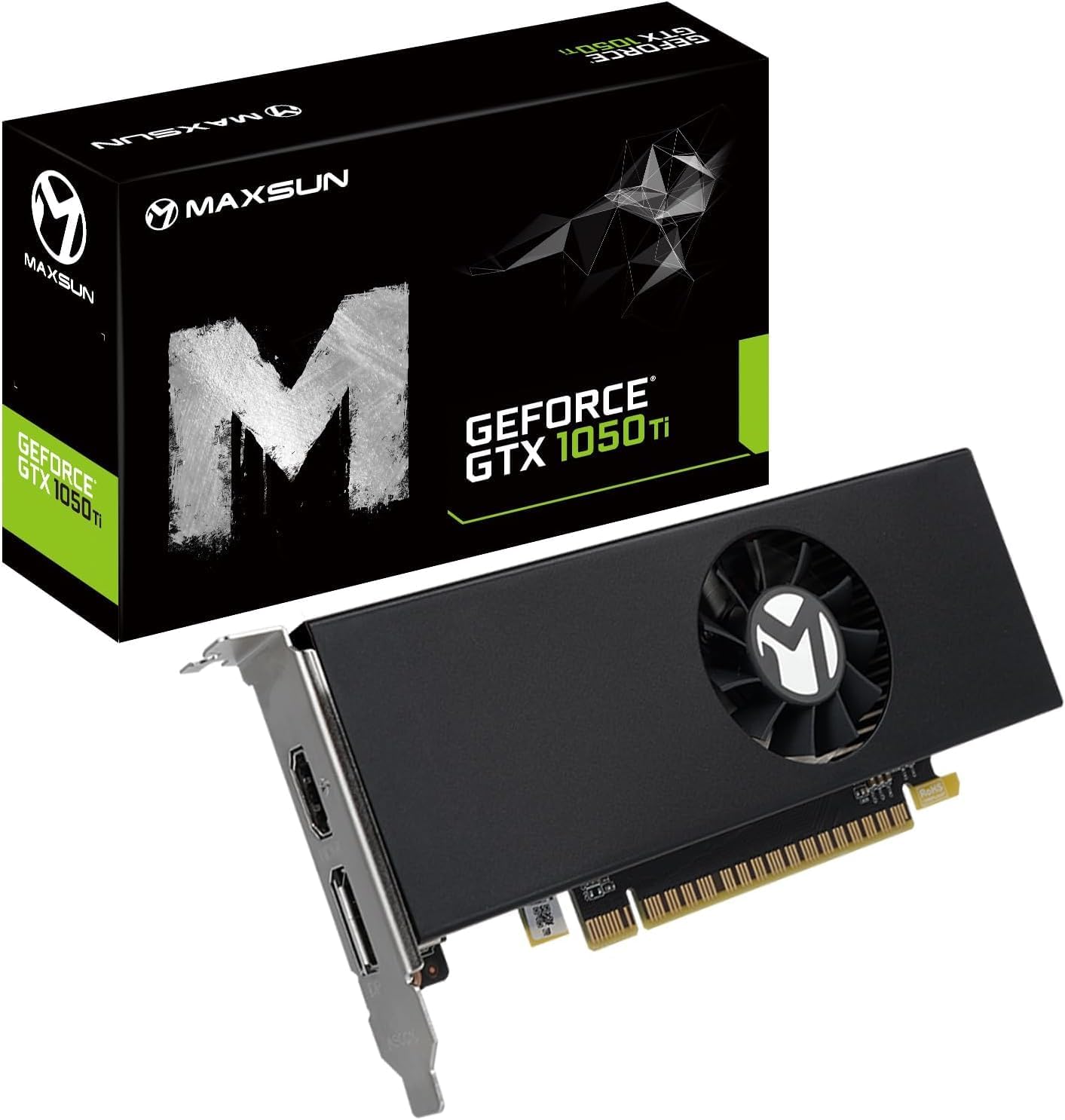
The Maxsun GTX 1050 Ti low-profile card is a classic SFF upgrade, squeezing Pascal-era performance into a slim 6.5-inch design that fits Dell OptiPlex, Lenovo ThinkCentre, and HP EliteDesk machines. You get 4GB of GDDR5 on a 128-bit bus, HDMI and DP outputs supporting 8K resolution, and solid-state capacitors for stability.
Temper expectations: this is a 2016-era GPU, so modern AAA gaming is off the table, and the single-fan cooler can get audible under load. It’s ideal for breathing new life into an old office PC for light gaming, media, and multi-monitor use. Skip it if you’re building a modern gaming rig.
Pros
- Fits SFF office PCs
- 128-bit memory bus
- No external power
Cons
- Aging Pascal architecture
- Single-fan noise
- Limited modern game support
Specifications
#8. ZOTAC GT 730 Zone
Passive Cooling
Low Power Draw
Display Outputs
The ZOTAC GT 730 Zone Edition is fundamentally a display and multimedia card, not a gaming card — and at that job it’s excellent. The passively cooled design is completely silent, it draws just 25W max with no external power connector, and triple simultaneous outputs (DVI, HDMI, VGA) make multi-monitor office setups trivial. Low-profile brackets are included for SFF cases.
Understand what you’re buying: with a 64-bit DDR3 bus and 384 cores, gaming performance is minimal, and it’s an old PCIe 2.0 design. If you need to add monitor outputs to a prebuilt PC or replace failed integrated graphics, it’s a proven workhorse with thousands of reviews. Gamers, look elsewhere.
Pros
- Completely silent cooling
- Only 25W power draw
- Triple display outputs
Cons
- Minimal gaming power
- Old PCIe 2.0 design
- Slow DDR3 memory
Specifications
#9. Glorto GT 210 1GB
Fanless-Style Design
HTPC Ready
HD Video Out
The Glorto GT 210 exists for one purpose: getting a picture on screen when a PC’s integrated graphics die or you need basic video output in an old machine. It’s a silent, low-profile card with 1GB of DDR3, HDMI and VGA outputs, and half-height brackets included, so it drops into virtually any desktop including HTPCs.
Be clear-eyed: this is a 2009-era GPU with DirectX 10.1 support, so modern games are completely out of reach, and even HD video playback is its ceiling. It’s fine for office desktops, media playback, and diagnostic builds. Anyone wanting actual gaming or compute performance should spend more — this is purely a functional replacement part.
Pros
- Silent operation
- Fits any low-profile case
- Very affordable entry
Cons
- Ancient 2009-era GPU
- Only 1GB memory
- No modern game support
Specifications
#10. XUANMO GT610 2GB
GDDR3 Memory
DVI VGA HDMI
Silent Fan
The XUANMO GT610 is another bare-minimum display card, offering 2GB of GDDR3 and a full DVI, VGA, and HDMI output set in a low-profile design with a quiet 0dB-style fan. It’s plug-and-play on PCIe x16 slots and supports up to 2560×1600 resolution, which covers office desktops and legacy media PCs adequately.
The GT610 is a 2012-era Fermi-family chip, so gaming is effectively off the table and driver support is aging. The listing’s description is also cluttered with copy-pasted text about unrelated cards, which doesn’t inspire confidence in documentation. Buy it only if you need cheap video outputs for an old machine; anything more demanding deserves a modern card.
Pros
- Triple video outputs
- 2GB memory for class
- Low-profile fit
Cons
- Very old GPU
- Messy product listing
- No gaming capability
Specifications
Ranking Nvidia GPUs From Best to Worst: A Smarter Way to Shop the Lineup
Nvidia’s GPU lineup can feel like a maze — dozens of model names, tier numbers, and suffixes that seem designed to confuse rather than clarify. Whether you’re building a gaming PC, upgrading an aging system, or just trying to figure out where your money goes furthest, understanding how these cards stack up against each other is the difference between a purchase you’ll be happy with for years and one you’ll regret by next season. Here’s how to think about the hierarchy without getting lost in the marketing.
The Tiers That Actually Matter When Comparing Nvidia Cards
- Know the tier structure. Nvidia’s cards generally fall into entry-level, mainstream, performance, and flagship tiers. The jump between tiers usually matters far more than the difference between two cards in the same tier, so identify your tier first and shop within it. If you’re unsure where to start, our guide to how to pick the right GPU walks through the whole decision.
- Decode the naming. Model numbers follow a pattern: the generation, then a tier number, with suffixes like Ti or Super indicating a step up within that tier. Once you understand the ladder, ranking cards from strongest to weakest becomes much easier.
- Match the card to your monitor. A top-tier card is wasted on a modest display, while a lower-tier card may struggle to feed a high-resolution, high-refresh-rate screen. Your resolution and refresh rate should drive your position on the best-to-worst spectrum.
- Check your power supply and case. Higher-ranked cards demand more power and more physical space. Before you chase the top of the lineup, confirm your system can actually support it.
- Consider the used and previous-generation market. Last generation’s upper-tier cards often outperform this generation’s mid-tier options. Ranking across generations — not just within one — opens up better value.
- Sticking to your budget. The “best” card is simply the highest one your budget comfortably allows after accounting for the rest of your build. Never let a flagship tier stretch you so thin that other components suffer.
Traps That Catch GPU Shoppers Off Guard
- Buying at the top of your tier when a small bump gets you into the next one. Sometimes spending slightly more (or slightly less) lands you a meaningfully better card — always check where a model sits relative to tier boundaries.
- Assuming newer always means better. A fresh generation’s entry-level card can lose to the previous generation’s mid-tier offering. Cross-reference rankings rather than trusting the newest badge.
- Ignoring your CPU and other bottlenecks. Pairing a top-ranked GPU with an aging processor wastes its potential. The best-to-worst ranking only matters if the rest of your system can keep up.
Rank deliberately, buy confidently, and your card will feel like the right pick every time you hit the power button.
From Blackwell Power to Budget Basics: Ranking the NVIDIA GPU Lineup
The RTX PRO 4000 Blackwell is the clear champion for AI workstations and pro creators, while the ASUS RTX 5060 Ti 16GB hits the sweet spot for gamers wanting modern GDDR7 performance. The RTX PRO 4000 SFF serves compact pro builds, the T1000 quietly powers multi-display workstations, and the RTX 3050 pair (MSI Dual and Ventus 2X) covers entry-level 1080p gaming. Further down, the GTX 1050 Ti and GT 730 handle legacy or SFF builds, and the GT 210 and GT610 are strictly for basic display output only.
Whatever your tier, match the card to your actual workload — don’t overpay for ECC memory you won’t use. Check current availability and pricing through the buttons above before you buy.
Final 3 Picks: AI Workstations, Overall Gaming, and Compact Workstation
Ready to decide? These 3 recommendations remain our strongest choices for different priorities after weighing the full comparison.
NVIDIA RTX PRO 4000 Blackwell
- 24GB GDDR7 ECC memory
- PCIe 5.0 x16 interface
- Single-slot full-height design
ASUS Dual RTX 5060 Ti
- 16GB GDDR7 memory
- 767 AI TOPS performance
- Dual Axial-tech fans
NVIDIA RTX PRO 4000 SFF
- 24GB GDDR7 ECC memory
- Low-profile dual-slot
- PCIe 5.0 x8 interface