
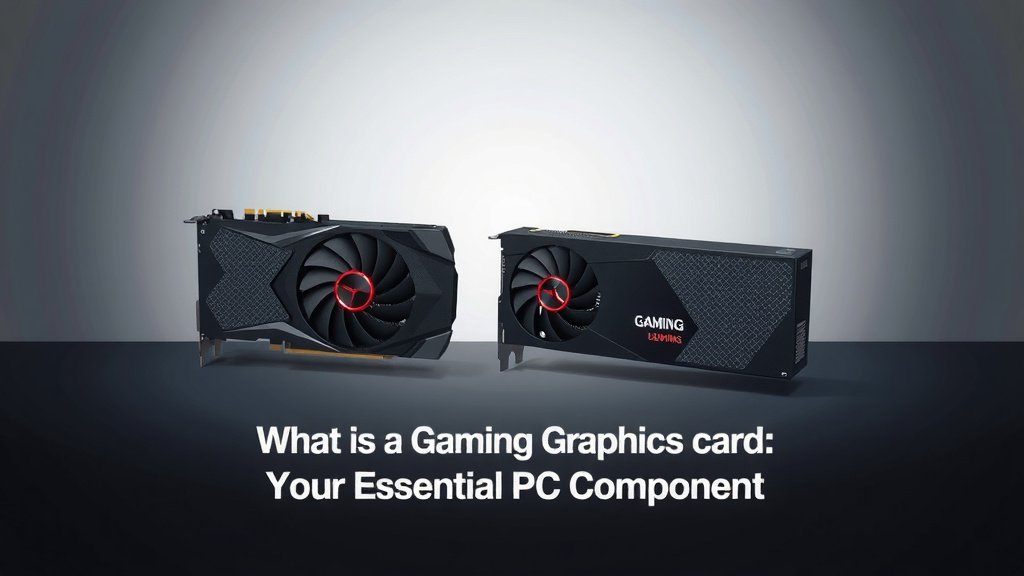
What is a Gaming Graphics Card: Your Essential PC Component
A gaming graphics card, often called a GPU, is a specialized computer component that handles all visual processing. It’s like your computer’s artist, drawing everything you see on screen. Without a good graphics card, your games simply won’t look or run well. This essential piece of hardware makes your favorite games look amazing.
Think of it as the engine that powers your game’s visuals. It takes the game’s data and turns it into the smooth animations and detailed graphics you experience. When you see stunning environments and fast-paced action, your graphics card is working hard. It’s arguably the most important part for a gamer.
- A gaming graphics card (GPU) creates all the visuals you see in games.
- It processes game data to produce smooth animations and detailed graphics.
- It’s a vital component for achieving good gaming performance and visual quality.
- Upgrading your graphics card can dramatically improve your gaming experience.
Let’s dive into what makes a gaming graphics card tick and why it’s so important for your setup.
Understanding Your Gaming Graphics Card’s Role
So, what exactly makes a gaming graphics card so important? It’s the heart of your computer’s visual performance. Think of it as your PC’s dedicated artist. This specialized component is solely focused on creating every image, every animation, and every special effect you see on your monitor. Without a capable GPU, your games would struggle to display smoothly, or look quite dull. It’s what transforms lines of code into the vibrant worlds you explore.
When you launch a game, your CPU (the computer’s brain) does a lot of the heavy lifting, like managing game logic and AI. But when it comes to drawing all those pixels, the graphics card takes over. It receives instructions and data from the CPU and then performs complex calculations. These calculations determine what color each pixel should be, how light should reflect, and how objects move. It’s a constant, high-speed process.
The Core Components of a Graphics Card
A gaming graphics card isn’t just one single thing. It’s a collection of powerful components working together. Each part plays a vital role in delivering stunning visuals.
The Graphics Processing Unit (GPU) Itself
The GPU is the brain of the graphics card. It’s a massively parallel processor, meaning it has thousands of small cores that can handle many tasks simultaneously. This is very different from your CPU, which has fewer, more powerful cores designed for general tasks. Research shows that GPUs are specifically designed for parallel processing, which is perfect for rendering graphics (NVIDIA).
Video Memory (VRAM)
This is like the GPU’s short-term memory. VRAM stores all the textures, models, and other visual data that the GPU needs quick access to. The more VRAM your card has, the higher resolution textures and more complex scenes it can handle without slowing down. For modern games, 8GB of VRAM is often considered a good starting point, with higher amounts beneficial for ultra-high settings.
Cooling System
All this processing generates a lot of heat. A good graphics card needs an effective cooling system to prevent overheating. This usually involves fans, heatsinks, and sometimes even liquid cooling. Keeping your GPU cool ensures it can perform at its best for longer periods. Overheating can lead to reduced performance or even damage to the card.
Power Connectors and VRMs
Graphics cards, especially high-end ones, require a lot of power. They have dedicated power connectors that plug directly into your power supply unit (PSU). Voltage Regulator Modules (VRMs) manage the power delivery to the GPU and VRAM, ensuring stable operation. A robust PSU is essential to properly power your graphics card.
How a Graphics Card Powers Your Games
Let’s break down the journey of a frame from your game to your screen. It’s a fascinating process that highlights the graphics card’s importance.
From Data to Pixels: The Rendering Pipeline
When you play a game, the game engine sends commands to your graphics card. These commands describe the 3D scene, including where objects are, how they look, and how light interacts with them. The graphics card then processes this data through a series of steps, often called the rendering pipeline.
Geometry Processing
First, the GPU figures out the shape and position of all the objects in the scene. This involves transforming 3D models into a 2D view that can be displayed on your screen. It’s like taking a sculpture and deciding exactly how it will look from a specific angle.
Texturing and Shading
Next, the GPU applies textures – the surfaces and details that give objects their appearance. Think of it as painting the flat shapes with realistic materials like wood, metal, or fabric. Shaders are then used to determine how light behaves on these surfaces, creating realistic reflections, shadows, and colors. This is where games start to look truly lifelike.
Rasterization and Frame Buffering
Finally, the GPU converts the processed 3D scene into a 2D image made of pixels. This is rasterization. The completed image is stored temporarily in a buffer, ready to be sent to your monitor. Each frame has to be rendered incredibly quickly – 60 times per second or more for smooth gameplay.
Why Graphics Card Specs Matter
When you look at graphics cards, you’ll see a lot of technical terms. Understanding these helps you choose the right card for your needs.
Clock Speed and Core Count
The clock speed of a GPU indicates how fast its cores can process information. A higher clock speed generally means better performance. The core count refers to how many processing units are on the GPU. More cores allow the card to handle more tasks simultaneously. Many reviews point to a balance between these two for optimal performance (TechRadar).
Memory Bandwidth and Type
Memory bandwidth is how quickly the GPU can access its VRAM. Higher bandwidth is crucial for feeding the GPU with data quickly, especially at higher resolutions. VRAM types, like GDDR6 or GDDR6X, also offer different levels of speed and efficiency. We found that cards with higher memory bandwidth tend to perform better in demanding titles.
Ray Tracing and DLSS/FSR
Modern graphics cards support advanced features. Ray tracing simulates real-world light behavior for incredibly realistic lighting, reflections, and shadows. Technologies like NVIDIA’s DLSS (Deep Learning Super Sampling) and AMD’s FSR (FidelityFX Super Resolution) use AI to upscale lower-resolution images, boosting performance while maintaining visual quality. These features can dramatically improve visual fidelity.
Choosing the Right Graphics Card for You
Selecting a graphics card can feel overwhelming, but it boils down to a few key considerations.
Your Gaming Goals and Budget
What kind of games do you play? Are you aiming for 1080p gaming at high frame rates, or are you looking to experience demanding titles at 4K resolution? Your budget will heavily influence your options. Mid-range cards offer excellent performance for most gamers, while enthusiast-level cards are for those seeking the absolute best.
Resolution and Refresh Rate of Your Monitor
Your monitor plays a huge role. A 1440p or 4K monitor requires a more powerful graphics card than a 1080p display. Similarly, if you have a high refresh rate monitor (like 144Hz or 240Hz), you’ll need a card that can push enough frames per second to take advantage of it. Many sources suggest matching your GPU to your monitor’s capabilities.
Here’s a quick checklist to consider:
- What is your target resolution (1080p, 1440p, 4K)?
- What is your monitor’s refresh rate (60Hz, 144Hz, 240Hz)?
- What is your gaming budget?
- Do you want ray tracing capabilities?
- Are you interested in AI upscaling like DLSS or FSR?
- What power supply do you currently have?
Conclusion
You’ve learned that a gaming graphics card, or GPU, is your computer’s visual powerhouse. It’s the component responsible for rendering every image, animation, and effect you see. From its core components like the GPU chip and VRAM to the rendering pipeline that brings games to life, understanding these parts helps you appreciate its role. With this knowledge, you can now make informed decisions about choosing the right graphics card to match your gaming goals, monitor, and budget. So, take that next step and find the GPU that will truly transform your gaming experience.
Frequently Asked Questions
Do I need a graphics card if I don’t play video games?
If you’re not playing games or doing demanding visual work like video editing or 3D modeling, a dedicated gaming graphics card is likely unnecessary. Most standard computer tasks are handled perfectly well by the integrated graphics found on your CPU or motherboard. These are sufficient for everyday browsing, email, and office applications.
Can a CPU handle graphics processing on its own?
While a CPU can perform basic graphics tasks, it’s not designed for the heavy lifting required by modern games. CPUs have fewer, more powerful cores meant for sequential tasks. GPUs, on the other hand, have thousands of smaller cores optimized for parallel processing, which is essential for rendering complex game graphics quickly.
How much VRAM do I really need for gaming?
The amount of VRAM you need depends on the resolution and graphical settings you plan to use. For 1080p gaming at medium to high settings, 6GB to 8GB of VRAM is often adequate. If you’re targeting 1440p or 4K resolutions, or want to enable demanding features like ray tracing, aiming for 10GB or more is highly recommended.
What’s the difference between NVIDIA and AMD graphics cards?
NVIDIA and AMD are the two main manufacturers of gaming graphics cards. They offer competing products at various price points, each with its own strengths in terms of performance, features, and driver support. Researching specific model comparisons for your budget and needs is the best way to decide between them.
Will a new graphics card fix my slow computer?
A graphics card primarily impacts your computer’s performance in graphically intensive tasks like gaming and video rendering. If your computer is slow with general tasks like web browsing or opening applications, the bottleneck might be your CPU, RAM, or storage drive, rather than the graphics card.
![10 Best Budget Gaming Video Cards [2026]](https://spsolutionscare.com/wp-content/uploads/2026/09/10-best-budget-gaming-video-cards-2026-featured-768x432.jpg)

![10 Best Amd Graphics Card For Price [2026]](https://spsolutionscare.com/wp-content/uploads/2026/08/10-best-amd-graphics-card-for-price-2026-featured-768x432.jpg)
![10 Manufacturer [2026]](https://spsolutionscare.com/wp-content/uploads/2026/08/10-manufacturer-2026-featured-768x432.jpg)