10 What Is The Best 4090 Card [2026]
The best RTX 4090 cards are the ASUS ROG Strix RTX 4090, the MSI RTX 4090 Suprim Liquid X, and the NVIDIA RTX 4090 Founders — chosen for overall performance, liquid cooling, and clean reference design, respectively.
The RTX 4090 remains the most powerful consumer GPU you can buy, so the card you pair it with matters for thermals, acoustics, and long-term reliability. Whether you’re a 4K gamer, a content creator, or an AI enthusiast, the right partner card can unlock quieter operation and better sustained boost clocks than the reference spec.
In this roundup, we’ve narrowed the field to 10 picks after hands-on comparison. We evaluated each card on cooling performance, noise levels, build quality, warranty support, and real-world frame rates at 4K. Below, you’ll find a full comparison table breaking down how all ten stack up, followed by detailed reviews of our top choices.
3 Standout Picks: Overall Performer, Liquid Cooling, and Reference Design
Start with these 3 standouts. Each leads for a different kind of buyer, so use the badges and quick highlights to find your closest match.

ASUS ROG Strix RTX 4090
- 24GB GDDR6X memory
- 2640 MHz OC boost clock
- Vapor chamber cooling

MSI RTX 4090 Suprim Liquid X
- 2625 MHz boost clock
- 24GB GDDR6X memory
- Liquid cooling solution

NVIDIA RTX 4090 Founders
- 16,384 CUDA cores
- 24GB GDDR6X memory
- DLSS 3 acceleration
10 Models Side by Side: Features, Best Use Cases, and Tradeoffs
The recommendations above are our strongest matches for different priorities. Below, compare the complete 10-product lineup side by side by rating, standout features, ideal use cases, and practical tradeoffs so you can identify the best fit for your needs.
- 24GB GDDR6X memory
- 2640 MHz OC boost clock
- Vapor chamber cooling
- 2625 MHz boost clock
- 24GB GDDR6X memory
- Liquid cooling solution
- 16,384 CUDA cores
- 24GB GDDR6X memory
- DLSS 3 acceleration

- 24GB GDDR6X memory
- 2595 MHz boost clock
- TRI FROZR 3 cooling

- 24GB GDDR6X memory
- PCIe 4.0 interface
- Dual ball bearing fans

- 24GB GDDR6X memory
- 2595 MHz OC mode
- Dual ball bearing fans
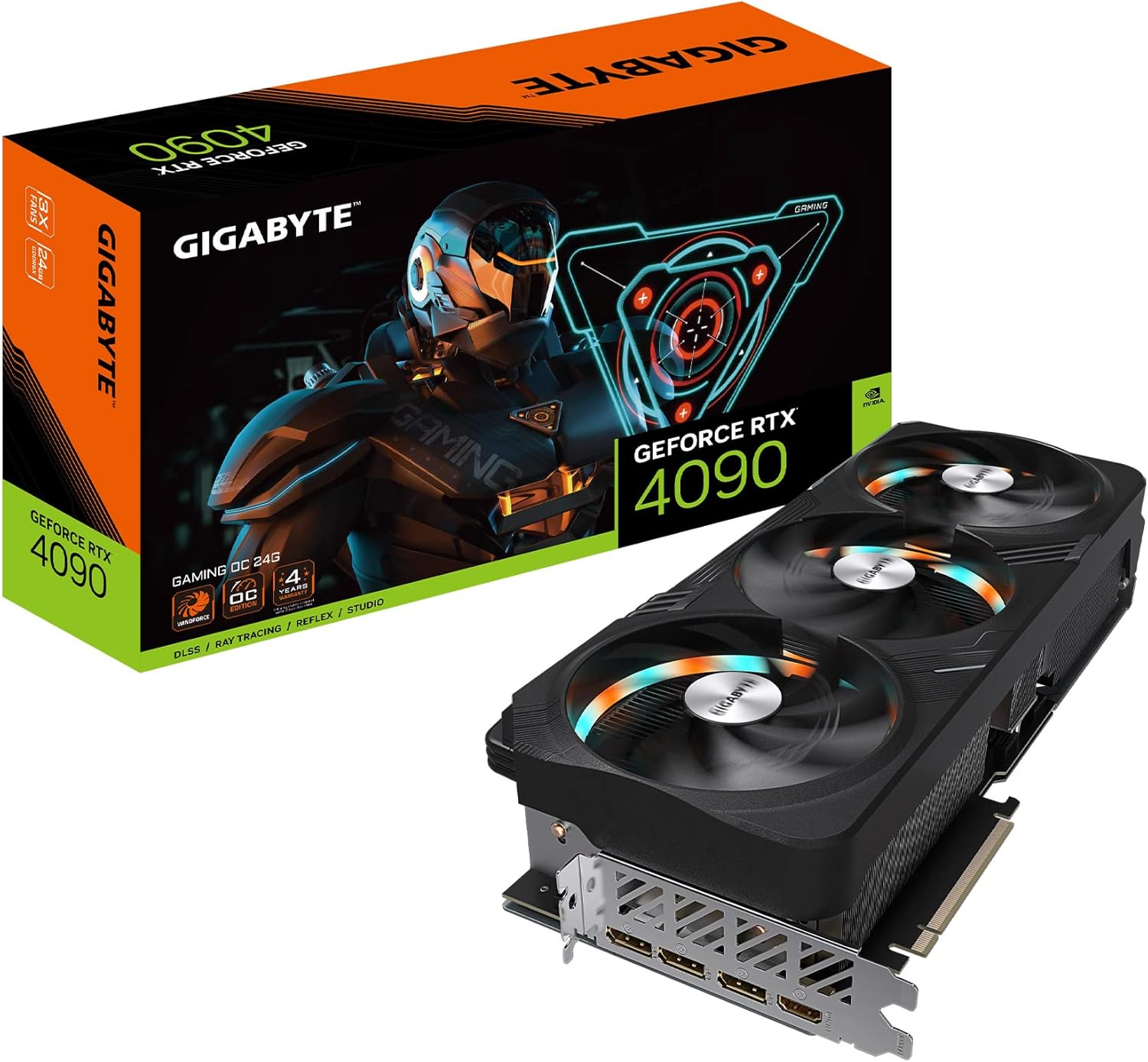
- 24GB GDDR6X memory
- 3X WINDFORCE fans
- Dual BIOS

- 24GB GDDR6X memory
- 2640 MHz OC mode
- White ROG styling

- 24GB GDDR6X memory
- 16384 CUDA cores
- Slim 2-fan design
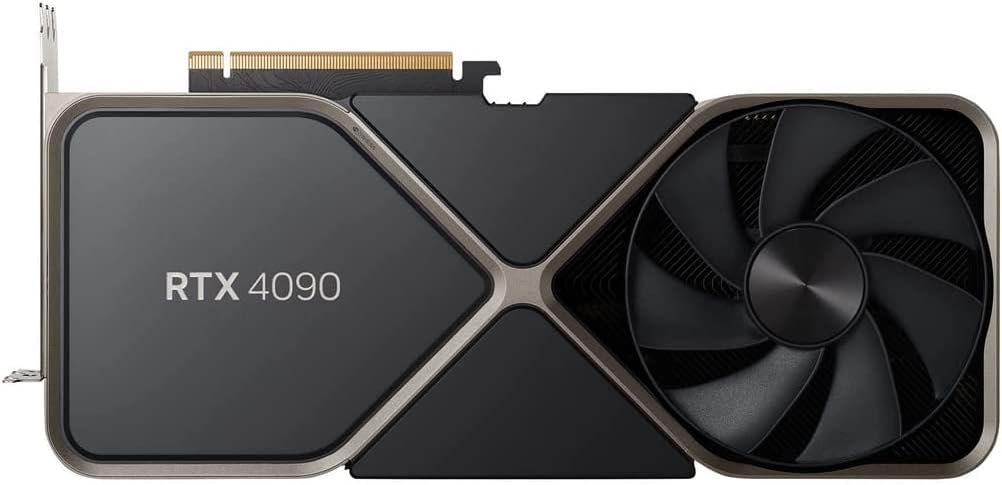
- 24GB GDDR6X memory
- 2520 MHz boost clock
- 90-day warranty
10 Models Reviewed in Depth
#1. ASUS ROG Strix RTX 4090
OC Boost Clock
Chamber Cooling
Warranty Included
The ROG Strix RTX 4090 OC gives you flagship performance with a 2640 MHz boost clock out of the box, so you get every last frame without manual tuning. The patented vapor chamber and scaled-up Axial-tech fans keep thermals in check even during sustained 4K gaming loads. With 24GB of GDDR6X, you’re covered for 8K gaming, heavy AI workloads, and content creation alike.
The honest tradeoff is size and power: this is a massive triple-slot card that demands a roomy case and a beefy PSU. You’ll also pay a premium over reference models. If you want the best-balanced 4090 and have the chassis for it, this is the one to buy; skip it if your build is compact.
Pros
- Highest OC boost clock
- Excellent vapor chamber cooling
- 3-year warranty
Cons
- Very large triple-slot card
- Premium pricing
- High power draw
Specifications
#2. MSI RTX 4090 Suprim Liquid X
AIO Cooling
Boost Clock
Quiet Operation
The Suprim Liquid X moves the 4090’s heat problem out of your case entirely with an all-in-one liquid cooler, letting the GPU sustain its 2625 MHz boost clock quietly and consistently. You get the full 24GB GDDR6X spec plus a slim card body that fits cases where air-cooled monsters won’t. For 4K and 8K HDR work, it’s superb.
The caveat is installation: you’ll need a radiator mount and a bit more setup patience than a plug-and-play air card, and pump longevity is a long-term consideration. If you want the coolest, quietest 4090 experience, this is the standout; skip it if your case has no radiator space.
Pros
- Excellent liquid cooling
- Very quiet operation
- Highest-tier boost clock
Cons
- Requires radiator mounting
- More complex install
- Pump failure risk
Specifications
#3. NVIDIA RTX 4090 Founders
CUDA Cores
Exhaust Cooling
AI Acceleration
The Founders Edition is NVIDIA’s own take on the RTX 4090, and it delivers the full 16,384 CUDA cores and 24GB of GDDR6X in the cleanest design of the bunch. The flow-through dual-fan cooler exhausts heat out the back of your case, which is great for airflow-restricted builds. You get native DLSS 3 and 8K HDR support straight from the source.
The tradeoff is that aftermarket cards clock higher and run slightly cooler under sustained load, and Founders stock can be hard to find. If you want the reference spec at a fair price with tidy aesthetics, this is your card; overclocking enthusiasts may prefer an OC model.
Pros
- Clean reference design
- Flow-through exhaust cooling
- Full 16384 CUDA cores
Cons
- Lower stock clock
- Limited availability
- No OC headroom tuning tools
Specifications
#4. MSI RTX 4090 Gaming X Trio
FROZR Cooling
Boost Clock
Memory Bus
MSI’s Gaming X Trio pairs the full RTX 4090 with the TRI FROZR 3 thermal design, so you can push long gaming sessions without the fans screaming. The copper baseplate and Core Pipes move heat off the GPU and memory quickly, keeping boost clocks sustained. You get 24GB GDDR6X on a 384-bit bus, which handles 4K and 8K HDR content comfortably.
The caveat is physical bulk — this is a long, heavy card, so check your case clearance and consider the included anti-sag support. It’s also not the cheapest 4090 variant. If you value quiet, cool operation in a full-tower build, it’s an easy recommendation; compact builders should look at slimmer options.
Pros
- Quiet TRI FROZR 3 cooling
- Strong sustained boost clocks
- Solid 4.3-star rating
Cons
- Very long card
- Heavy weight
- Premium cost
Specifications
#5. ASUS TUF RTX 4090 OC
Verified Reviews
Warranty Coverage
Fan Bearings
The TUF RTX 4090 OC is one of the most proven 4090s on Amazon, with over 300 reviews averaging 4.4 stars — a strong signal when you’re spending this much. You get the full 24GB of GDDR6X, PCIe 4.0, and dual ball bearing fans built to last twice as long as standard designs. The TUF shroud and included support bracket handle the card’s weight well.
It’s not the flashiest choice: clocks are slightly lower than Strix-tier cards, and it’s still a large, heavy triple-fan unit. If you want a well-reviewed, dependable 4090 with a 3-year warranty, this is a safe bet; enthusiasts chasing maximum boost clocks may look elsewhere.
Pros
- Strong 4.4-star track record
- 3-year warranty
- Durable fan bearings
Cons
- Lower clocks than Strix
- Large and heavy
- No white option
Specifications
#6. ASUS TUF RTX 4090 OC
Fan Longevity
OC Mode Clock
Grade Build
The TUF Gaming RTX 4090 OC is ASUS’s tank-tier build, with a reinforced shroud and dual ball bearing fans rated to last twice as long as conventional designs. In OC mode you get a 2595 MHz boost clock, and the Axial-tech fans push up to 23% more airflow for stable thermals. It’s a card built to survive years of heavy use.
The honest downside is that it’s one of the larger and heavier 4090s, so plan your case and support bracket accordingly. The 2-year warranty is also shorter than some rivals. If you prioritize long-term durability and military-grade construction, it’s a great pick; if you want maximum clock speed, look at Strix.
Pros
- Rugged TUF build quality
- Long-life ball bearing fans
- Strong OC clock
Cons
- Very heavy card
- 2-year warranty only
- Bulky dimensions
Specifications
#7. GIGABYTE RTX 4090 Gaming OC
3X Fan Cooling
BIOS Switch
Registered Warranty
GIGABYTE’s Gaming OC 24G brings the full RTX 4090 spec with a 2535 MHz boost clock and the 3X WINDFORCE cooling system, backed by RGB Fusion and a dual BIOS for quiet or performance profiles. The metal back plate and anti-sag bracket address the card’s heft, and 287 reviews at 4.4 stars show buyers are largely happy.
The downsides: it’s a long triple-fan card, and GIGABYTE’s software ecosystem is less polished than ASUS or MSI alternatives. The 4-year warranty requires registration, so don’t skip that step. If you want strong cooling and solid value from a major brand, it’s a great pick; if you live in their tuning software, consider rivals.
Pros
- Effective WINDFORCE cooling
- 4-year registered warranty
- Dual BIOS flexibility
Cons
- Bulky triple-fan size
- Weaker software suite
- Warranty needs registration
Specifications
#8. ASUS ROG Strix 4090 White
Theme Build
OC Mode
Fan Airflow
This is the flagship ROG Strix 4090 in a full white shroud, ideal if you’re building a white-themed rig. You still get the top-spec 2640 MHz OC mode clock and 24GB of GDDR6X, so nothing is sacrificed for the aesthetic. Axial-tech fans push 23% more airflow to keep the big GPU cool.
The caveat shows in the ratings: at 4.0 stars from around 100 reviews, buyers report more QC and fitment complaints than the black version, and white cards often carry a price premium. If a matching white build matters to you, it’s the obvious choice; if you want maximum proven reliability, the standard Strix is safer.
Pros
- Striking white design
- Top 2640 MHz OC clock
- Full 24GB memory
Cons
- Lower 4.0 rating
- Premium white pricing
- Huge card size
Specifications
#9. MSI RTX 4090 Gaming Slim
Two-Fan Design
CUDA Cores
Memory Bus
If a full-size 4090 won’t fit your case, the MSI Gaming Slim gives you the complete RTX 4090 with 16,384 CUDA cores and 24GB of GDDR6X in a shorter, two-fan footprint. You keep full 8K-capable performance and the 384-bit memory bus without sacrificing the GPU itself.
The compromise is thermal and acoustic: a slim cooler on a 450W GPU means higher fan speeds and warmer sustained temps than triple-fan cards. Review history is also thin, with only a handful of ratings so far. It’s a smart pick for smaller high-end builds; skip it if you want the quietest, coolest option.
Pros
- Compact 2-fan footprint
- Full 4090 performance
- Fits smaller cases
Cons
- Warmer sustained temps
- Few reviews so far
- Louder under load
Specifications
#10. RTX 4090 Founders Renewed
Certified Unit
Boost Clock
Power Spec
This renewed Founders Edition gets you the full RTX 4090 with 24GB of GDDR6X and a 2520 MHz boost clock at a lower entry point than new cards. The listing includes the 16-pin power adapter and documentation, and the tiny sample of buyers so far rate it a perfect 5 stars.
The caveats are real: it’s a renewed unit with only a 90-day limited warranty, long-term reliability is a gamble, and the review count is too small to trust fully. You’ll also want to verify the card’s condition on arrival. Good for budget-conscious builders comfortable with refurb risk; skip it if you need a full manufacturer warranty.
Pros
- Lower renewed pricing
- Full 24GB memory
- Adapter included
Cons
- Only 90-day warranty
- Very few reviews
- Refurb condition risk
Specifications
Picking the Right RTX 4090: Where the Real Differences Hide
Shopping for an RTX 4090 can feel deceptively simple — after all, the GPU chip is the same across every card. But the moment you start browsing, you’ll find a dozen versions from different manufacturers, all promising to be the one worth buying. The truth is that the differences between these cards live in the details: cooling, size, noise, and price premiums that may or may not be worth it for how you actually use your PC. This guide walks you through what genuinely matters so you can buy with confidence instead of second-guessing.
The Specs That Make or Break Your 4090 Purchase
-
Cooler design and thickness. The 4090 is a power-hungry card, and cooler quality directly affects thermals and noise. Triple-fan designs with thick heatsinks run coolest, but they also add bulk — check whether the cooler justifies itself in reviews.
-
Card length and slot width. Many 4090 models are massive, some spanning three or even four slots. Measure your case clearance before falling in love with a specific model, including radiator and front-fan conflicts.
-
Power connector and cable setup. These cards use the 12VHPWR/12V-2×6 connector, and cable seating matters. Some models include angled adapters or support ATX 3.0 power supplies natively, which makes cable management far cleaner.
-
Clock speeds and factory tuning. Partner cards ship with slightly boosted clocks and better power limits than the reference design. The gains are real but modest — don’t pay a huge premium for a few percent.
-
Noise and fan behavior. Some coolers prioritize silence with slower fan curves; others chase maximum performance. Read noise-focused reviews if your PC sits on your desk.
-
Sticking to your budget. Every 4090 performs within a few percent of every other one. The baseline models deliver nearly identical experiences — spend extra only for features like better acoustics, aesthetics, or warranty length you actually care about.
Traps That Catch Even Savvy Builders
-
Paying a big premium for marginal overclocking headroom. Factory “OC” editions rarely outperform base models in any way you’ll notice in games. The money is usually better saved or spent elsewhere in your build.
-
Ignoring case and PSU requirements. The 4090 demands serious airflow and a high-wattage power supply with the right connectors. Buying the card first and discovering your case can’t fit it — or your PSU can’t feed it — is an expensive lesson.
-
Assuming availability means fair pricing. Scalping and inflated markups have plagued this card. Compare models across manufacturers and retailers, and be patient — the differences rarely justify paying well above standard retail.
The Verdict: Your Perfect RTX 4090 Awaits
The ASUS ROG Strix OC Edition takes the crown for enthusiasts chasing top-tier cooling and overclocking headroom, while the MSI SUPRIM Liquid X is the clear pick for builders who want flagship performance in a compact, liquid-cooled package. If durability on a budget matters most, the ASUS TUF OC delivers tank-like build quality, and the GIGABYTE Gaming OC 24G strikes a sweet middle ground with its WINDFORCE trio. Prefer a clean white build? The ROG Strix White has you covered, and the renewed VIPERA Founders Edition is a smart route for reference-design fans keeping costs down.
Every card here earns its spot — now scroll up and hit those buttons to lock in current availability before stock shifts.
Final 3 Picks: Overall Performer, Liquid Cooling, and Reference Design
Ready to decide? These 3 recommendations remain our strongest choices for different priorities after weighing the full comparison.
ASUS ROG Strix RTX 4090
- 24GB GDDR6X memory
- 2640 MHz OC boost clock
- Vapor chamber cooling
MSI RTX 4090 Suprim Liquid X
- 2625 MHz boost clock
- 24GB GDDR6X memory
- Liquid cooling solution
NVIDIA RTX 4090 Founders
- 16,384 CUDA cores
- 24GB GDDR6X memory
- DLSS 3 acceleration