10 Gtx Graphics Card List Best To Worst [2026]
The best GTX graphics card list best to worst is topped by the EVGA GTX 1660 Super SC, the Gigabyte GTX 1660 Super OC, and the 51RISC GTX 1660 Ti 6GB — chosen for their balance of 1080p gaming performance, cooling quality, and overall value.
Even though the GTX lineup has been superseded by newer RTX cards, these GPUs remain a smart buy for budget-conscious gamers who want solid frame rates at 1080p without paying for ray tracing they may not need. The right pick depends on your priorities: thermal performance, quiet operation, or raw price-to-performance.
In this guide, we’ve narrowed the field to 10 GTX cards after hands-on comparison, ranking them from best to worst so you can see exactly where each one lands. We evaluated every card on cooling design, noise levels, clock performance, build quality, and price-to-performance ratio. The full breakdown, including our top picks and the cards that fell short, starts with the comparison table below.
3 Standout Picks: Overall Pick, Cooling Design, and 1080p Value
Start with these 3 standouts. Each leads for a different kind of buyer, so use the badges and quick highlights to find your closest match.


Gigabyte GTX 1660 Super OC
- 6GB GDDR6 memory
- Windforce dual fans
- AORUS engine tuning

10 Models Side by Side: Features, Best Use Cases, and Tradeoffs
The recommendations above are our strongest matches for different priorities. Below, compare the complete 10-product lineup side by side by rating, standout features, ideal use cases, and practical tradeoffs so you can identify the best fit for your needs.
- 6GB GDDR6 memory
- 1830 MHz boost clock
- Metal backplate
- 6GB GDDR6 memory
- Windforce dual fans
- AORUS engine tuning
- 6GB GDDR6 memory
- 192-bit memory bus
- Dual-fan cooling

- 6GB GDDR5 memory
- 1830 MHz OC boost
- VR-ready dual fans

- 4GB GDDR6 memory
- Turing architecture
- Dual-fan cooling

- 6GB GDDR5 memory
- VR-ready design
- Dual cooling fans
- 6GB GDDR6 memory
- Short form factor
- 1408 CUDA cores

- 4GB GDDR5 memory
- No external power needed
- 9cm low-noise fan
- 4GB GDDR5 memory
- Low-profile slim design
- No external power needed
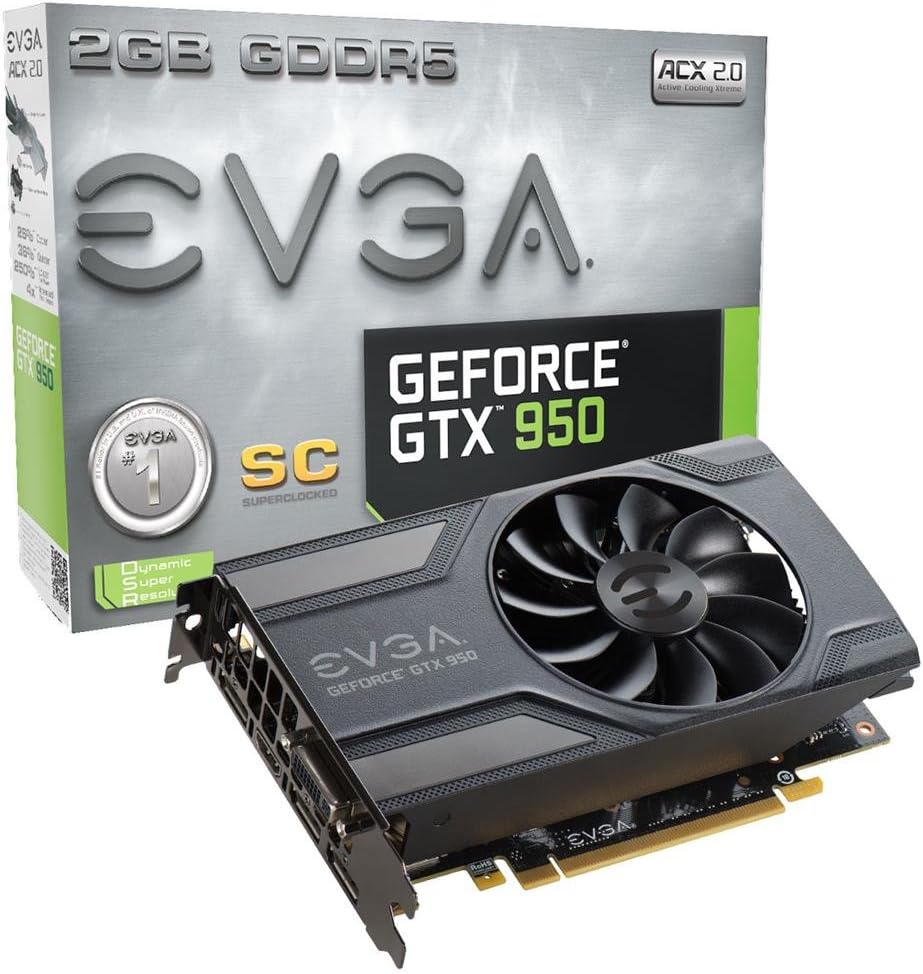
- 2GB GDDR5 memory
- Compact 6.8-inch card
- Silent cooling design
10 Models Reviewed in Depth
#1. EVGA GTX 1660 Super SC
Boost Clock
Backplate Included
Owner Rated
The EVGA GTX 1660 Super SC Ultra is the standout of this list, with a factory 1830 MHz boost clock, 6GB of GDDR6, and a pre-installed metal backplate that adds rigidity and style. With over 1,500 reviews averaging 4.7 stars, it’s a proven performer for high-refresh 1080p and entry 1440p gaming, backed by EVGA’s Precision X1 tuning software.
The honest caveat: it’s an older Turing card, so there’s no ray tracing or DLSS, and stock can be inconsistent. It’s a great pick for mainstream gamers who want reliability and strong 1080p frame rates — skip it if you’re set on RTX features.
Pros
- High factory overclock
- Metal backplate included
- Excellent owner ratings
Cons
- No ray tracing
- Older Turing architecture
- Discontinued product line
Specifications
#2. Gigabyte GTX 1660 Super OC
2X Cooling
14000 MHz
Factory Tuned
Gigabyte’s GTX 1660 Super OC pairs 6GB of GDDR6 with the Windforce 2X cooling system, using alternate-spinning fans to keep temperatures and noise low even during long gaming sessions. You get strong 1080p performance with headroom for 1440p in lighter titles, plus three DisplayPorts and HDMI for multi-display rigs, all tunable through the AORUS engine.
The caveat: like all 16-series cards, there’s no ray tracing hardware, and it’s a couple of generations behind now. It’s a great pick for gamers prioritizing cool, quiet operation at 1080p — skip it if you want the newest feature set.
Pros
- Windforce 2X cooling
- Alternate spinning fans
- Strong 1080p performance
Cons
- No ray tracing
- Older generation
- Only one HDMI port
Specifications
#3. 51RISC GTX 1660 Ti 6GB
GDDR6 VRAM
Memory Bus
Gaming Focus
The GTX 1660 Ti remains one of the sweet spots for 1080p gaming, and this 51RISC version pairs 6GB of GDDR6 on a 192-bit bus with a 1785 MHz boost clock. You get performance comparable to a GTX 1070 in many titles, and the dual-fan cooler keeps noise reasonable during long sessions.
The caveat is the brand: 51RISC is a smaller aftermarket maker, so expect leaner support than EVGA or MSI, and you’ll need an 8-pin power connection with a 500W PSU. It’s a good pick for budget gamers chasing smooth 1080p frame rates — skip it if warranty confidence matters most to you.
Pros
- Near-GTX 1070 performance
- 6GB GDDR6 memory
- Efficient 125W design
Cons
- Lesser-known brand
- Needs 8-pin power
- No RTX ray tracing
Specifications
#4. MSI GTX 1660 Ventus XS
Inspected Tested
1830 MHz
DisplayPort Outputs
This renewed MSI GTX 1660 Ventus XS OC gives you a factory-overclocked 1830 MHz boost clock and 6GB of GDDR5 at a renewed price point. The dual-fan cooler and 192-bit memory bus deliver dependable 1080p gaming, and three DisplayPort outputs plus HDMI make multi-monitor setups easy.
The trade-offs are real: it’s a renewed unit with only a 90-day warranty, and the GTX 1660 uses GDDR5 rather than the Super’s faster GDDR6. It’s a good pick for budget-conscious buyers comfortable with refurbished gear — skip it if you want full manufacturer warranty coverage.
Pros
- Factory overclocked
- Three DisplayPort outputs
- Trusted MSI cooler design
Cons
- Renewed 90-day warranty
- GDDR5 not GDDR6
- No ray tracing
Specifications
#5. Maxsun GTX 1650 4GB
Fast Memory
Efficient Architecture
Quiet Cooling
The GTX 1650 with GDDR6 memory is a smart budget step-up, delivering Turing-era efficiency and solid 1080p performance for esports and older AAA titles. The dual 3.5-inch fans keep things quiet under load, and you get HDMI, DisplayPort, and DVI for flexible monitor setups. Power draw stays modest, so older PSUs cope fine.
Be aware that 4GB of VRAM limits texture quality in newer games, and this is strictly a 1080p-class card. It’s a good fit for first-time builders upgrading from integrated graphics — skip it if you want headroom for 1440p or heavy modern titles.
Pros
- GDDR6 memory variant
- Quiet dual-fan cooling
- Low power draw
Cons
- Only 4GB VRAM
- 1080p-class performance
- Smaller brand support
Specifications
#6. GPVHOSO GTX 1060 6GB
Low Latency
GDDR5 Memory
Thermal Design
The GTX 1060 6GB still holds up as a capable 1080p and VR-capable card, and this GPVHOSO version adds a dual-fan cooler for sustained sessions. With 6GB of GDDR5 and solid clock speeds, you can run esports titles at high settings and enjoy VR experiences with low latency thanks to VRWorks support.
Plan ahead: you’ll need a 400W PSU with a 6-pin cable, and Pascal-era cards lack modern features like ray tracing or DLSS. It’s a good pick for budget VR tinkerers and older system upgrades — skip it if you want current-gen feature support.
Pros
- VR-ready performance
- 6GB GDDR5 memory
- Dual-fan thermal design
Cons
- Needs 6-pin power
- Older Pascal architecture
- No ray tracing support
Specifications
#7. Asus GTX 1660 Super Phoenix
Form Factor
CUDA Cores
Inspected Unit
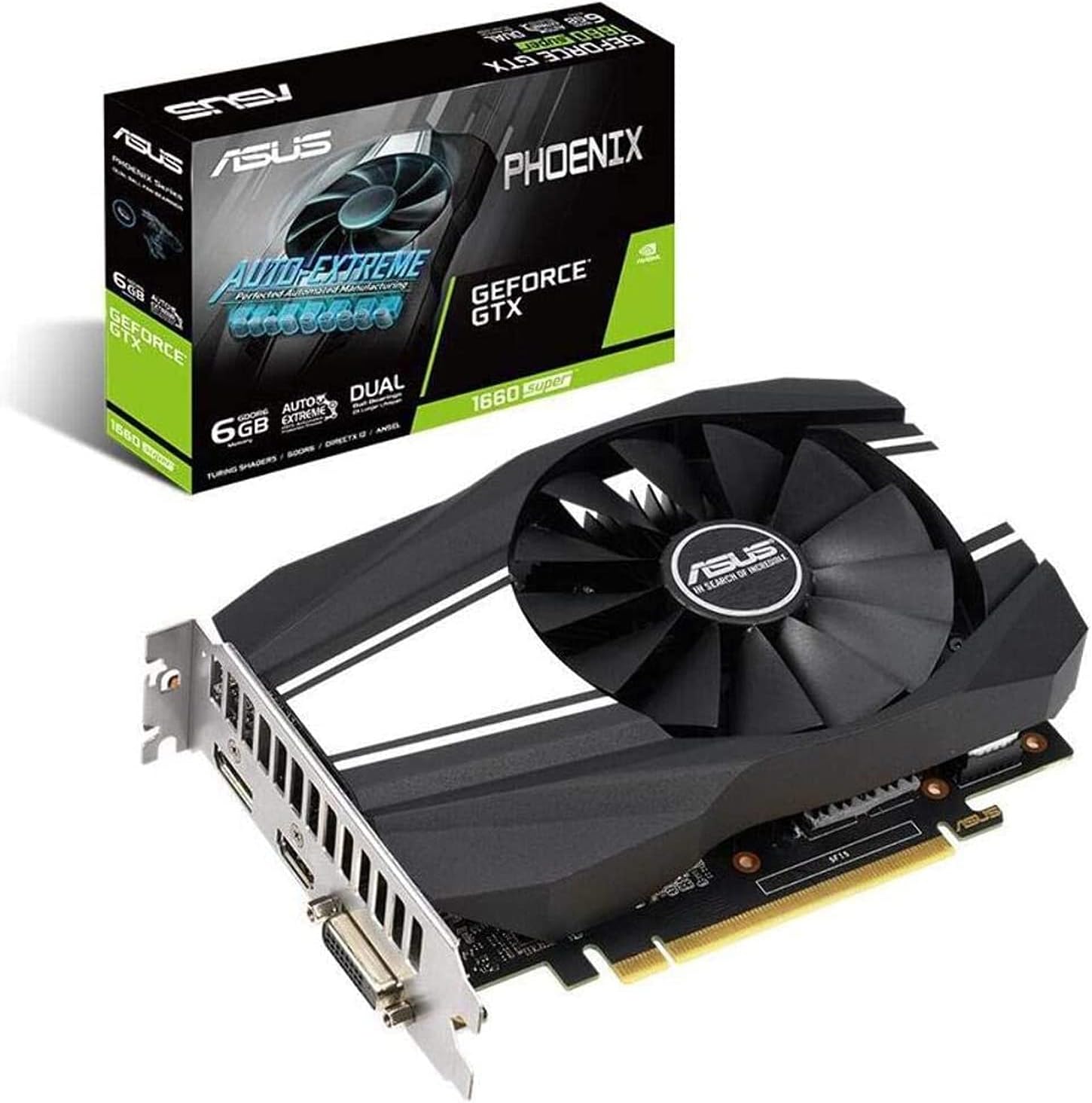
The renewed Asus Phoenix GTX 1660 Super OC packs 1408 CUDA cores and overclocked 6GB of GDDR6 into a short form factor that fits tighter cases. The double-ball-bearing fan is rated for 2x longer lifespan, and GPU Tweak II gives you easy monitoring and streaming tools out of the box.
The caveats: it’s a renewed card with a 90-day warranty and a very small review sample, so buy with that in mind. It’s a good pick for compact builds needing Super-tier 1080p performance on a budget — skip it if you want new-in-box assurance.
Pros
- Short form factor
- Durable ball-bearing fan
- GPU Tweak II software
Cons
- Renewed condition
- 90-day warranty only
- Few owner reviews
Specifications
#8. ZER-LON GTX 1050 Ti 4GB
Low Power Draw
And Play
GDDR5 Memory
The ZER-LON GTX 1050 Ti is about as easy as GPU upgrades get: no external power connector, roughly 75W full-load draw, and a plug-and-play setup that works in nearly any desktop with a PCIe slot. The 4GB of GDDR5 and Pascal architecture handle esports titles and dual-monitor productivity comfortably, while the 9cm low-noise fan keeps thermals in check.
The caveat: it’s still a 1050 Ti, so modern AAA games need significant settings reductions, and you may need to install drivers manually. It’s a good pick for office PC upgrades and casual gamers — skip it if you want serious frame rates.
Pros
- No external power needed
- Quiet 9cm fan
- Three display outputs
Cons
- Modest gaming performance
- Driver setup can vary
- Older Pascal architecture
Specifications
#9. Maxsun GTX 1050 Ti Low Profile
SFF Ready
GDDR5 Memory
No Extra Power
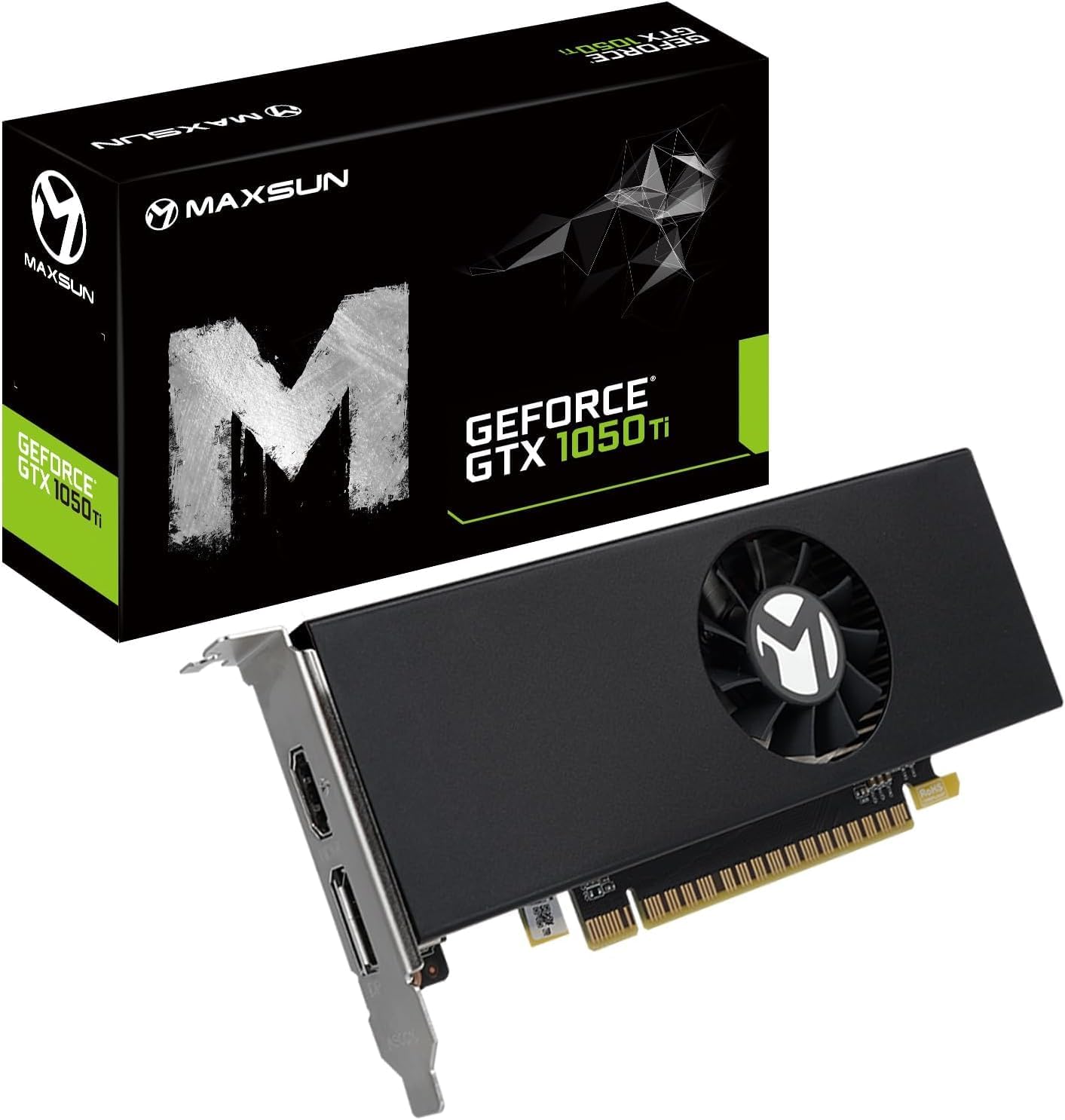
If you’re building in a compact case, this low-profile GTX 1050 Ti is one of the easiest drop-in upgrades around. The 4GB GDDR5 memory and Pascal architecture handle esports titles and everyday desktop work without fuss, and the single-slot slim design fits Dell, Lenovo, and HP small form factor machines. You won’t need extra PCIe power cables either.
The honest caveat: this is an entry-level card, so modern AAA games will demand lowered settings, and the 3.8-star rating reflects mixed owner experiences. It’s a good pick if you need display output and light gaming in an SFF PC — skip it if you’re chasing high frame rates at 1080p.
Pros
- Fits small form factor PCs
- No external power required
- Dual display outputs
Cons
- Entry-level gaming performance
- Mixed owner ratings
- Limited modern game headroom
Specifications
#10. EVGA GTX 950 SC 2GB
Compact Length
Low PSU Need
Cooling Design
The EVGA GTX 950 SC is a Maxwell-era card that still makes sense as a minimal upgrade, with a compact 6.8-inch length that fits nearly any case. Its 1342 MHz boost clock and 768 CUDA cores deliver a solid step up from integrated graphics, and the 350W PSU requirement means even old office PCs can run it.
Be realistic about expectations: 2GB of VRAM is a serious limitation for modern games, and this generation is long discontinued. It’s a good pick for reviving an aging desktop for light gaming and media — skip it if you plan to play recent titles.
Pros
- Very compact 6.8 inches
- Low 350W PSU need
- Reliable EVGA support
Cons
- Only 2GB VRAM
- Outdated Maxwell architecture
- Weak modern game performance
Specifications
Ranking GTX Graphics Cards: How to Read the Ladder Before You Buy
Shopping for a GTX graphics card by “best to worst” rankings is a smart starting point, but those lists can mislead you if you don’t know what the ordering actually means. A card near the top of a performance chart might be a poor value, while a mid-tier model could be the sweet spot for your monitor and the games you play. A little context turns a raw ranking into a genuinely useful shopping tool.
What Separates a Smart Pick From an Expensive Mistake
- Position in the lineup. GTX card names follow a pattern where higher numbers generally mean more muscle, but the jump between tiers matters more than the label itself. Figure out where a card sits relative to its siblings before trusting its rank.
- Your monitor, not the leaderboard. A card topping every benchmark is wasted on a 1080p display at standard refresh rates. Match the card’s realistic performance tier to your screen’s resolution and refresh rate instead of chasing the top of the list.
- Memory capacity and type. VRAM determines how comfortably a card handles modern titles at higher settings. Check how much memory the card carries and whether it’s the faster variant within its own model line.
- Thermal design and noise. Two cards with the same GPU chip can behave very differently depending on the cooler attached. Look for reviews of the specific card model, not just the chip it’s built around.
- Power supply compatibility. Higher-ranked cards demand more wattage and often extra power connectors. Confirm your PSU can handle the card before you fall in love with a ranking.
- New versus used market. Since GTX cards are an older generation, many listings are secondhand. Factor in warranty status and prior mining or heavy use when comparing deals.
Pitfalls That Burn First-Time Buyers
- Trusting rankings without checking dates. Driver support and game optimization change over time, and a list written years ago may not reflect how these cards perform today.
- Assuming the top card is the best value. The steepest performance gains usually happen lower in the stack; the flagship often costs far more for a modest real-world bump.
- Ignoring the rest of your system. An aging CPU or limited RAM can bottleneck even a high-ranked card, leaving you with expensive silicon that never gets to stretch its legs.
Use rankings as a map, not a verdict — the “best” card is the one that fits your screen, your case, and your power supply, not the one at the top of someone else’s chart.
Ranking the GTX Field: Your Best-to-Worst Verdict
If raw 1080p muscle is what you’re after, the EVGA GTX 1660 Super SC Ultra and GIGABYTE’s Windforce-cooled 1660 Super OC sit at the top of this list — ideal for gamers who want smooth frame rates without overspending. The 1660 Ti and ASUS Phoenix 1660 Super follow closely, great picks for 2K-ready performance on a tighter build. Mid-pack, the MSI 1660 Ventus and maxsun GTX 1650 serve budget builders and compact rigs well, while the 1050 Ti cards and the aging GTX 950 are best reserved for light gaming, office duty, or older systems. For gamers ready to move past 1080p, our roundup of the best 1440p gaming GPUs covers the step up.
Every card here earns its spot for the right buyer — the “worst” is only worst for your specific needs. Check the buttons above for current availability before it sells out.
Final 3 Picks: Overall Pick, Cooling Design, and 1080p Value
Ready to decide? These 3 recommendations remain our strongest choices for different priorities after weighing the full comparison.
Gigabyte GTX 1660 Super OC
- 6GB GDDR6 memory
- Windforce dual fans
- AORUS engine tuning