10 Reddit Best Egpu [2026]
The best eGPUs according to Reddit users are the Sonnet Breakaway Box 850 T5, the NIMO RX 7600M XT eGPU, and the MINISFORUM DEG2 eGPU Dock — chosen for their high-wattage desktop GPU support, built-in graphics, and docking versatility.
An external GPU enclosure is one of the smartest upgrades for laptop owners, letting you add serious desktop-class graphics power without replacing your whole machine. The right pick depends on whether you want to install your own full-size GPU, prefer a plug-and-play all-in-one, or need a dock that also handles peripherals. Redditors consistently favor these three because they balance Thunderbolt bandwidth, reliability, and long-term upgrade potential.
In this roundup, we’ve narrowed the crowded eGPU market down to 10 picks after hands-on comparison and a deep dive into community recommendations. We evaluated each option on connectivity options, power delivery, enclosure quality, and real-world gaming performance across different laptop setups. The comparison table below breaks down how each model stacks up so you can find the right fit fast.
3 Standout Picks: High-Power eGPU, All-In-One eGPU, and Docking Combo
Start with these 3 standouts. Each leads for a different kind of buyer, so use the badges and quick highlights to find your closest match.

Sonnet Breakaway Box 850 T5
- 850W built-in PSU
- Thunderbolt 5, 80Gbps
- Triple-wide GPU support

NIMO RX 7600M XT eGPU
- RX 7600M XT pre-installed
- USB4 80Gbps + OCuLink
- 65W PD reverse charging

MINISFORUM DEG2 eGPU Dock
- OCuLink + Thunderbolt 5
- M.2 2280 storage slot
- 140W PD charging
10 Models Side by Side: Features, Best Use Cases, and Tradeoffs
The recommendations above are our strongest matches for different priorities. Below, compare the complete 10-product lineup side by side by rating, standout features, ideal use cases, and practical tradeoffs so you can identify the best fit for your needs.
- 850W built-in PSU
- Thunderbolt 5, 80Gbps
- Triple-wide GPU support
- RX 7600M XT pre-installed
- USB4 80Gbps + OCuLink
- 65W PD reverse charging
- OCuLink + Thunderbolt 5
- M.2 2280 storage slot
- 140W PD charging

- USB4 V2 / TB5 dual mode
- Signal booster for stability
- Auto power-on sync

- PCIe 5.0 x4, 128Gbps
- Full aluminum build
- Supports ATX/SFX PSUs

- Dual Thunderbolt 5 ports
- PCIe 4.0 x4 + M.2 slot
- SD 4.0 card reader
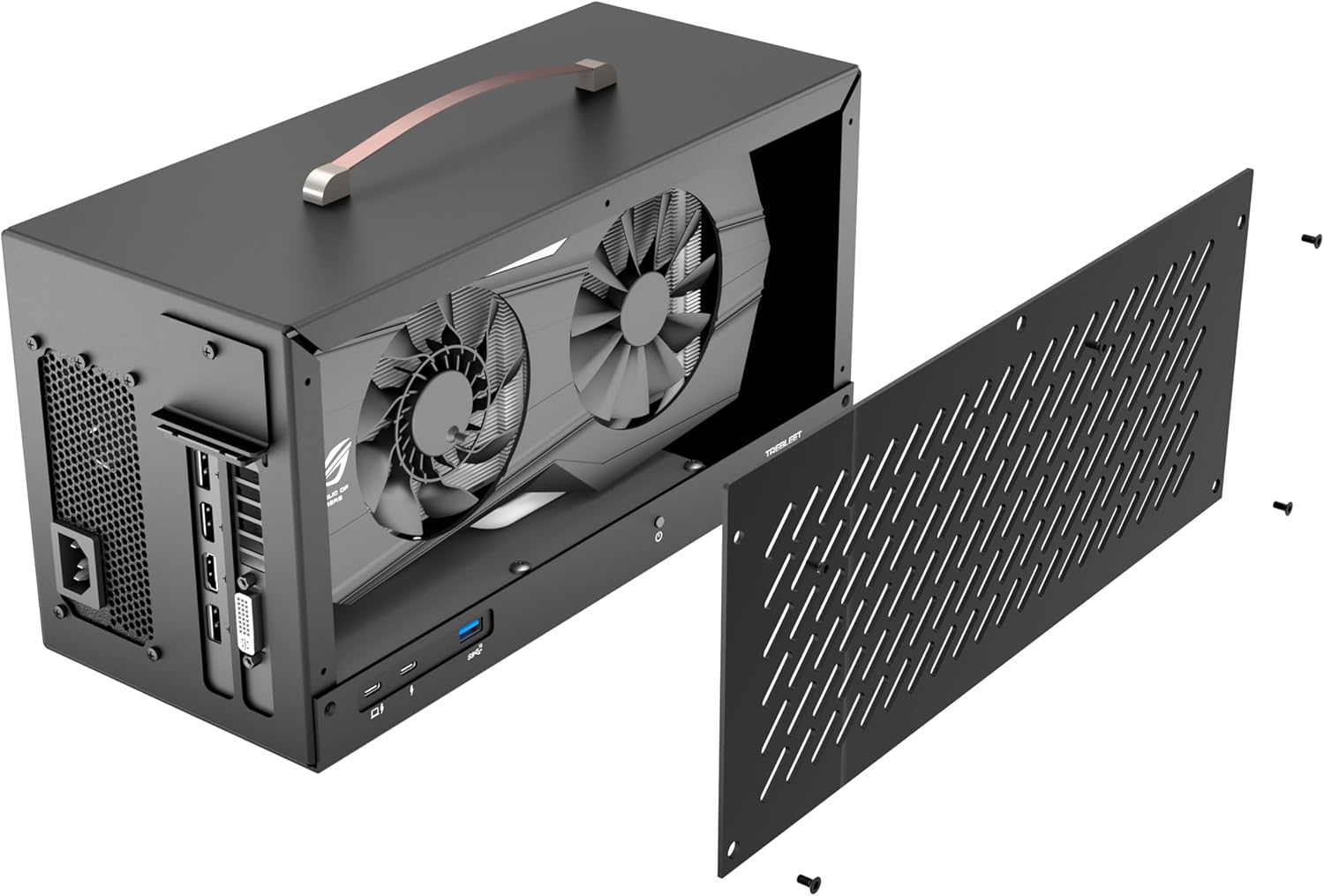
- TB5/USB4 v2, 80Gbps
- 600W SFX PSU built-in
- 140W PD laptop charging

- PCIe 4.0 x4, 64Gbps
- 3-mode power switch
- 24-pin ATX input

- PCIe 4.0 x4, 64Gbps
- Open frame fits any GPU
- EMI-shielded flat cable
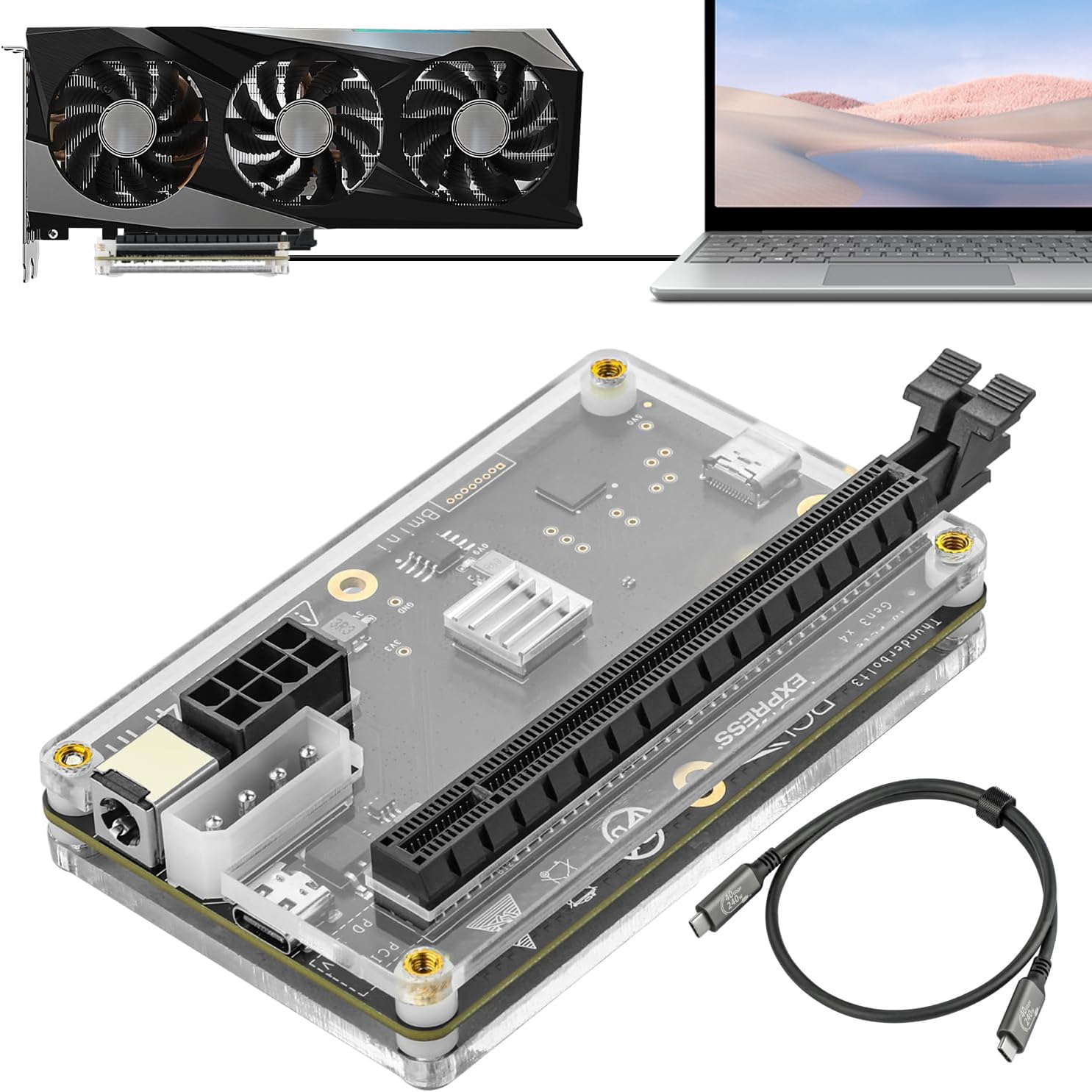
- Thunderbolt 3/4 + USB4
- 4 flexible power inputs
- Works with Legion Go
10 Models Reviewed in Depth
#1. Sonnet Breakaway Box 850 T5
Built-In PSU
Thunderbolt 5
GPU Support
If you want to run a flagship GPU externally, the Breakaway Box 850 T5 is built for exactly that. The 850W built-in power supply handles today’s power-hungry triple-wide cards — RTX 50/40/30 and Radeon RX 9000/7000 series — with headroom for future releases. You also get 80Gbps Thunderbolt 5 bandwidth plus a built-in dock with 5GbE Ethernet and three 10Gbps USB-A ports, so it doubles as your hub.
The trade-offs are real, though: at 14.1 pounds it’s a stay-at-home unit, not a travel companion, and you’ll supply your own GPU. It’s Intel Thunderbolt certified and accelerates TB4 and most USB4 Windows 11 machines too. If you’re a video editor or AI workload user with a TB5 laptop, this is the no-compromise choice.
Pros
- 850W handles flagship GPUs
- Built-in TB5 dock ports
- Triple-wide card support
Cons
- Heavy at 14.1 lbs
- GPU not included
- Premium enclosure cost
Specifications
#2. NIMO RX 7600M XT eGPU
GDDR6 Pre-Installed
Pocket Size
Reverse Charging
The NIMO removes every barrier between you and external graphics: the RX 7600M XT with 8GB GDDR6 comes pre-installed, along with a 240W PSU, so there’s nothing else to buy. Dual connectivity gives you USB4 at 80Gbps or OCuLink at 64Gbps, and the whole unit is just 0.8 liters — genuinely backpack-sized. The 65W PD port charges your laptop over the same cable.
The caveat is that the GPU is fixed, so you can’t upgrade to a faster card later, and you must use the included high-speed cable rather than any random USB-C. With 21.4 TFLOPS of compute, it handles AAA gaming, local LLMs, and dual 8K displays. It’s ideal for ultrabook or handheld owners who want performance without a DIY build.
Pros
- GPU included, no assembly
- Tiny 0.8L footprint
- Charges laptop over USB-C
Cons
- GPU not upgradeable
- Requires included cable
- Midrange GPU ceiling
Specifications
#3. MINISFORUM DEG2 eGPU Dock
Thunderbolt 5
NVMe Slot Built-In
PD Charging
The DEG2 stands out because it’s more than an eGPU dock — it’s a full desktop replacement hub. You get a hardware toggle between Thunderbolt 5 and OCuLink, so one unit serves both modern laptops and OCuLink-equipped mini PCs. The built-in M.2 2280 slot keeps AI models and project files close to the GPU, and you still get 2.5G LAN, USB 3.2 ports, and 140W PD charging through a single cable.
The caveat: it doesn’t include a GPU or power supply, and it’s explicitly incompatible with the MINISFORUM MS-02 Workstation. You’ll also want to verify your host supports TB5 to unlock the 80Gbps link. If you want one device to anchor a clean single-cable desk setup, this is an excellent fit.
Pros
- Dual TB5 and OCuLink
- Built-in M.2 storage
- 140W PD charging
Cons
- GPU and PSU not included
- No MS-02 support
- Needs TB5 host for full speed
Specifications
#4. MINISFORUM DEG2 USB4 Dock
TB5 Compatible
Booster Stabilized
Auto Power-On
This DEG2 variant focuses on the USB4 V2 and Thunderbolt 5 crowd, and it delivers a genuinely seamless experience. A single TB5 cable handles data, display, and laptop charging, and the dock powers on automatically with your host, so it behaves like a real desktop. The built-in M.2 NVMe slot is a genuine productivity win for AI and rendering workflows.
The built-in re-drive signal booster keeps PCIe transfers stable during long LLM inference or 8K rendering sessions, which addresses a common eGPU pain point. Just remember you’re supplying your own GPU and ATX/SFX power supply, and OCuLink tops out at 64Gbps versus the 80Gbps TB5 link. It’s best for Thunderbolt-equipped laptop owners who want plug-and-play simplicity.
Pros
- Single-cable desktop workflow
- Auto power-on sync
- Signal booster reduces dropouts
Cons
- GPU and PSU not included
- OCuLink limited to 64Gbps
- Needs modern host port
Specifications
#5. RGEEK OCuLink PCIe 5.0 Dock
PCIe 5.0 Link
Heat Dissipation
50cm Cable Included
If your mini PC or laptop has an OCuLink port, this RGEEK dock gives you the fastest external GPU path available today. The PCIe 5.0 x4 link pushes up to 128Gbps, double what most OCuLink docks manage, and it stays backward compatible with Gen4 and Gen3 hosts. The full aluminum chassis helps with heat dissipation, and the factory-soldered cable keeps signal loss negligible. It accepts any GPU size and works with ATX, SFX, and SFX-L power supplies.
Be aware you’ll need a PCIe 5.0-capable host adapter to see full speed, and that adapter isn’t included. There’s also no hot-plugging, so you’ll power everything down before swapping hardware. If you want maximum bandwidth for gaming, AI, or rendering and don’t mind sourcing your own PSU and GPU, this is a strong pick.
Pros
- 128Gbps PCIe 5.0 bandwidth
- Aluminum heat dissipation
- Any GPU size fits
Cons
- Gen5 adapter sold separately
- No hot-plug support
- GPU and PSU not included
Specifications
#6. PELADN Link S-3 eGPU Dock
Thunderbolt 5 Ports
Card Slot
Ethernet Built-In
The PELADN Link S-3 is the connectivity champion of this lineup. You get dual Thunderbolt 5 ports — 140W PD upstream for your laptop and 30W PD with DP 2.1 downstream for a monitor — plus a PCIe 4.0 x4 GPU slot, M.2 SSD slot, SD 4.0 card slot, 2.5G Ethernet, and USB 3.2. It’s effectively a full docking station with a GPU attached.
It supports cards from the RTX 3050 through RTX 5090 and Radeon RX 7000/9000 series, with both ATX and SFX PSU compatibility. The honest caveat: only 5 reviews exist so far, so the track record is unproven, and like most docks here the GPU and PSU are sold separately. Great for creators who want one hub for everything.
Pros
- Dual TB5 ports
- SD 4.0 + M.2 slots
- 2.5G Ethernet built in
Cons
- Few reviews so far
- GPU and PSU not included
- ATX PSU length limited
Specifications
#7. TREBLEET 80Gbps eGPU Enclosure
SFX PSU Built-In
TB5 / USB4 v2
Dock Expansion
TREBLEET packs serious hardware into a 5.5L aluminum chassis. The 600W SFX PSU delivers up to 450W to the GPU via dual 8-pin connectors, fitting triple-fan cards up to 340mm long, and the 140W PD port charges your laptop over the same cable. The JH9480 controller provides 80Gbps bandwidth, double Thunderbolt 4, and daisy-chaining turns it into a de facto dock.
Two caveats deserve attention. On macOS it only supports AMD GPUs on Intel Macs — no NVIDIA, no Bootcamp — so verify your host before buying. And with only 4 reviews so far, the long-term reliability track record is thin compared to established brands. If you’re on a TB5/USB4 v2 Windows machine wanting an all-in-one powered enclosure, it’s a compelling option.
Pros
- 600W PSU built in
- 140W laptop charging
- Aluminum cooling chassis
Cons
- Limited macOS GPU support
- Few reviews so far
- Large cards near limit
Specifications
#8. RGEEK OCuLink Gen4 Dock
PCIe 4.0 x4
Power Switch
Cable Included
For OCuLink mini PC owners on a budget, this RGEEK dock covers the essentials well. You get full PCIe 4.0 x4 bandwidth at 64Gbps, a generous 60cm cable, and a 24-pin input that accepts ATX, mATX, and FLEX power supplies. The three-mode power switch is a nice touch — AUTO mode syncs power with your host so you don’t think about it.
The honest caveat is the proprietary cable: it only works with the matched dock and won’t accept third-party OCuLink cables, so don’t lose it. There’s also no hot-swapping, and you’ll need to supply your own GPU and PSU. If you want a straightforward, affordable Gen4 dock for a NUC or mini PC, this hits the mark.
Pros
- Full Gen4 64Gbps speed
- AUTO power sync mode
- Long 60cm cable
Cons
- Proprietary cable only
- No hot-swap
- PSU and GPU extra
Specifications
#9. VORZOKISPL OCuLink eGPU Dock
Gen4 OCuLink
Any GPU Size
Shielded Cable
This VORZOKISPL dock takes a practical open-frame approach that removes GPU size anxiety entirely. You get PCIe 4.0 x4 at 64Gbps over a 50cm EMI-shielded flat cable, and the frame accepts any graphics card from an RTX 4060 up to an RX 7900 XTX. LED indicators and auto-start modes make status checks easy, and the included ATX bracket adds stability.
Be realistic about the assembly: expect about 15 minutes with a screwdriver, guided by an illustrated manual and video. There’s no hot-plugging, and you’ll need to supply both the GPU and an ATX PSU with roughly 40% wattage headroom. It only works with native OCuLink ports or an M.2 adapter, not USB-C or Thunderbolt. Good for DIY-minded mini PC owners.
Pros
- Fits any GPU size
- EMI-shielded flat cable
- LED status indicators
Cons
- Assembly required, ~15 min
- No hot-plugging
- GPU and PSU not included
Specifications
#10. OwlTree TB4 eGPU Dock
Cable Included
Legion Go Ready
Power Inputs
This OwlTree dock is the affordable way to test the eGPU waters. It connects over Thunderbolt 3/4 or USB4 and works with a wide range of hosts, including the Lenovo Legion Go handheld, which few docks explicitly support. The four power input options — PD, Molex, DC5521, or CPU 8-pin — mean you can likely power it with hardware you already own.
Set expectations correctly, though: the JHL6340 controller delivers around 22Gbps, well below Gen4 OCuLink or TB5 docks, so gaming performance will be bottlenecked compared to pricier options. The 3.7-star rating also hints at setup friction — BIOS tweaks and driver reinstalls come up. It’s fine for casual gaming and productivity; skip it if you demand maximum frames.
Pros
- Very affordable entry point
- Handheld console compatible
- Four power input options
Cons
- Only ~22Gbps bandwidth
- Lower user rating
- Setup can require BIOS tweaks
Specifications
The Reddit-Approved Route to an eGPU That Actually Delivers
An external GPU enclosure can turn a thin laptop into a legit gaming or creative workstation — but only if the pieces fit together. Reddit threads are full of buyers who grabbed the wrong enclosure, bottlenecked their GPU, or discovered their laptop’s ports couldn’t keep up. A little homework before you buy saves a lot of frustration later.
The Specs That Make or Break Your eGPU Setup
-
Connection type and bandwidth. Thunderbolt 3, 4, and USB4 all behave differently, and older Thunderbolt revisions can throttle performance. Match the enclosure’s connection to what your laptop actually supports, not what’s newest on the shelf.
-
GPU clearance and power delivery. Full-length desktop cards run hot and hungry. Check the maximum GPU length and wattage the enclosure supports, and make sure your chosen card fits both physically and electrically.
-
Power supply headroom. Many enclosures ship with PSUs sized for mid-range cards. If you plan to upgrade to a power-hungry GPU down the road, buy with that future in mind.
-
Driver and OS compatibility. eGPUs are famously smoother on some systems than others. Windows users generally have the widest support, while Mac and Linux users should verify community-reported compatibility before committing.
-
Sticking to your budget. Remember the enclosure is only half the cost — the graphics card goes on top. Set a total figure first, then split it sensibly between chassis and GPU rather than overspending on one and cheaping out on the other.
Pitfalls That Burn First-Time eGPU Buyers
-
Assuming every laptop port will work. Not every USB-C port carries Thunderbolt or USB4 data lanes. Check your laptop’s exact spec sheet — a charging-only port is a dead end.
-
Ignoring the bottleneck effect. Pairing a top-tier GPU with a low-bandwidth connection or an aging CPU wastes money. Community benchmarks can tell you where the ceiling is for your machine.
-
Forgetting the display question. Plugging your monitor directly into the eGPU often improves performance noticeably, while routing frames back through the laptop’s internal screen can cost you frames. Plan your desk layout accordingly. If you’re unsure which cable to run, our guide to how a GPU connects to a monitor covers the ports.
Do a quick search of enthusiast forums for your specific laptop model before checkout — the collective experience there is worth more than any spec sheet.
Wrapping Up Your reddit best egpu Hunt
If you’re running a Thunderbolt 5 or USB4 v2 setup, the Sonnet Breakaway Box 850 is the no-brainer pick — plug-and-play power for serious GPUs. DIY types and Mini PC owners should eye the MINISFORUM DEG2 docks, which pair OCuLink flexibility with M.2 storage and 2.5G LAN. Budget builders get serious value from the RGEEK and generic OCuLink docks, while the PELADN S-3 and TREBLEET hit the sweet spot for anyone wanting PD charging and daisy-chaining. The NIMO RX 7600M XT remains the easiest all-in-one for laptop gamers who don’t want to supply their own card. Since the card is the bigger expense, our budget graphics card roundup highlights strong value picks for enclosures.
Every pick here earns its Reddit buzz, so scroll back up, hit those buttons, and grab whichever dock matches your port before stock dips.
Final 3 Picks: High-Power eGPU, All-In-One eGPU, and Docking Combo
Ready to decide? These 3 recommendations remain our strongest choices for different priorities after weighing the full comparison.
Sonnet Breakaway Box 850 T5
- 850W built-in PSU
- Thunderbolt 5, 80Gbps
- Triple-wide GPU support
NIMO RX 7600M XT eGPU
- RX 7600M XT pre-installed
- USB4 80Gbps + OCuLink
- 65W PD reverse charging
MINISFORUM DEG2 eGPU Dock
- OCuLink + Thunderbolt 5
- M.2 2280 storage slot
- 140W PD charging