10 The Best Video Card On The Market [2026]
The best video cards on the market right now are the ASUS RTX 5060 Ti Dual OC, the ASUS RX 9070 Prime EVO, and the GIGABYTE RX 9070 XT OC — chosen for their balance of raw performance, thermal efficiency, and long-term value.
Picking the right GPU matters more than most upgrades because it determines how smoothly your games run, how well your system handles 1440p and 4K resolution, and how future-proof your build stays over the next several years. The ASUS RTX 5060 Ti Dual OC stands out as the best overall performer for most buyers, while the ASUS RX 9070 Prime EVO leads the high-end AMD category and the GIGABYTE RX 9070 XT OC is our pick for 1440p gaming.
In this guide, we’ve narrowed the field down to 10 top picks after hands-on comparison and real-world testing. We evaluated each card on frame rates, cooling and noise, power draw, and price-to-performance to match different budgets and use cases. The full breakdown starts below — the comparison table makes it easy to see how each option stacks up at a glance.
3 Standout Picks: Overall Performer, High-End AMD, and 1440p Gaming
Start with these 3 standouts. Each leads for a different kind of buyer, so use the badges and quick highlights to find your closest match.

ASUS RTX 5060 Ti Dual OC
- 16GB GDDR7 memory
- DLSS 4 with Blackwell
- Compact 2.5-slot design

ASUS RX 9070 Prime EVO
- 16GB GDDR6 memory
- Phase-change thermal pad
- Triple Axial-tech fans

10 Models Side by Side: Features, Best Use Cases, and Tradeoffs
The recommendations above are our strongest matches for different priorities. Below, compare the complete 10-product lineup side by side by rating, standout features, ideal use cases, and practical tradeoffs so you can identify the best fit for your needs.
- 16GB GDDR7 memory
- DLSS 4 with Blackwell
- Compact 2.5-slot design
- 16GB GDDR6 memory
- Phase-change thermal pad
- Triple Axial-tech fans
- 16GB GDDR6 memory
- PCIe 5.0 interface
- Hawk fan cooling

- 8GB GDDR7 memory
- DLSS 4 Blackwell
- SFF-ready 2.5-slot

- 12GB GDDR6 memory
- 3X WINDFORCE cooling
- 2nd gen RT Cores
- 12GB GDDR6 memory
- Torx twin fans
- 1807 MHz boost clock

- 8GB GDDR6 memory
- Triple-fan 0dB cooling
- RDNA 3 ray tracing

- 6GB GDDR6 memory
- Dual WINDFORCE fans
- Ray tracing support

- 4GB DDR3 memory
- HDMI, DVI, VGA outputs
- Half-height SFF design

- 4GB DDR3 memory
- 4-monitor multi-display
- Low-profile SFF design
10 Models Reviewed in Depth
#1. ASUS RTX 5060 Ti Dual OC
GDDR7 Memory
AI Frame Boost
SFF Compatible
The ASUS Dual RTX 5060 Ti OC is the card to beat right now. You get 16GB of GDDR7 on NVIDIA’s Blackwell architecture, 767 AI TOPS of AI throughput, and DLSS 4 frame generation that transforms frame rates in supported titles. The 2.5-slot design with Axial-tech fans means you don’t sacrifice cooling to fit a compact build, and 0dB technology keeps light gaming silent.
Dual BIOS lets you toggle between Quiet and Performance profiles depending on whether you value acoustics or clocks, and dual-ball bearings roughly double fan lifespan. The honest caveat: to fully exploit DLSS 4 you’ll want titles that support it, and the 2.5-slot height can still be tight in ultra-compact cases. For gamers wanting top-tier 1440p performance in a small chassis, this is the standout pick.
Pros
- Huge 16GB GDDR7
- DLSS 4 support
- Compact 2.5-slot build
Cons
- Needs DLSS 4 titles
- 2.5-slot still bulky
- OC mode runs warmer
Specifications
#2. ASUS RX 9070 Prime EVO
Thermal Pad
Triple Fan Cooling
BIOS Switch
The ASUS Prime RX 9070 EVO OC pairs AMD’s RDNA 4 silicon with one of the best coolers in the business. You get 16GB of GDDR6, a 2610 MHz OC boost clock, and a phase-change GPU thermal pad that keeps the die cooler under sustained load than conventional pads. The triple Axial-tech fans with dual-ball bearings run quiet, stop entirely at idle via 0dB technology, and are built to last roughly twice as long as sleeve-bearing designs.
The honest note: this is a large 12-inch, 2.5-slot card, so confirm your case has the clearance, and RDNA 4’s power appetite means a capable PSU is assumed. Dual BIOS and GPU Tweak III give you fine control over the acoustics-versus-clocks trade-off. For buyers wanting near-flagship AMD performance with premium cooling, this is an easy top pick.
Pros
- Excellent triple-fan cooling
- 16GB VRAM headroom
- Dual BIOS flexibility
Cons
- Large 12-inch card
- High power draw
- Premium-tier positioning
Specifications
#3. GIGABYTE RX 9070 XT OC
GDDR6 Buffer
Next-Gen Ready
Fan Cooling
The GIGABYTE RX 9070 XT Gaming OC is AMD’s RDNA 4 flagship tier, and it shows. With 16GB of GDDR6 and a 3060 MHz game clock, you can expect confident 1440p performance and a genuine shot at 4K in well-optimized titles. The WINDFORCE cooling system with Hawk fans and server-grade thermal gel keeps temperatures in check during long sessions, and RGB lighting rounds out the look.
The honest trade-offs: RDNA 4 cards draw serious power, so verify your PSU and case clearance for the 11.3-inch length, and the spec sheet lists DisplayPort outputs, so check your monitor cabling. Ray tracing performance trails NVIDIA’s equivalents in some titles. If you want maximum rasterization performance per dollar at high resolutions, this is a superb pick; NVIDIA-leaning buyers should compare carefully.
Pros
- Excellent 1440p performance
- 16GB VRAM headroom
- Robust WINDFORCE cooling
Cons
- High power demand
- Ray tracing trails NVIDIA
- Large 11.3-inch card
Specifications
#4. ASUS RTX 5060 Prime OC
GDDR7 Memory
Compact Build Fit
AI Upscaling
The ASUS Prime RTX 5060 OC is built for small-form-factor enthusiasts who refuse to compromise on architecture. You get NVIDIA’s Blackwell silicon with 630 AI TOPS and DLSS 4, an 8GB GDDR7 buffer, and an SFF-ready 2.5-slot design that fits the compact cases other performance cards can’t. Triple Axial-tech fans, dual BIOS, and 0dB technology deliver the same refinement as ASUS’s larger cards.
The honest limitation is the 8GB VRAM, which is fine for 1080p and esports titles but will cap texture settings in some 1440p games. The 2595 MHz OC clock keeps it competitive within its class, and dual-ball bearings promise longevity. If you’re building a compact gaming PC around modern NVIDIA features, this is the card to shortlist; VRAM-hungry workload buyers should step up a tier.
Pros
- SFF-ready compact design
- DLSS 4 and Blackwell
- Quiet triple-fan cooling
Cons
- 8GB VRAM ceiling
- Not for 1440p max settings
- Premium over base models
Specifications
#5. GIGABYTE RTX 3060 Gaming OC
GDDR6 Memory
Triple Fan Cooling
RT Core Boost
The GIGABYTE RTX 3060 Gaming OC gives you a 12GB GDDR6 buffer on a 192-bit bus, which is generous for 1080p and even 1440p gaming at this tier. The 3X WINDFORCE fan setup with alternate spinning blades keeps the 1837 MHz boost clock sustainable under load, and the metal back plate adds rigidity you’ll appreciate during installation. RGB Fusion 2.0 lets you match your build’s lighting without extra controllers.
You should know this is a limited hash rate version, so it’s aimed squarely at gamers rather than compute workloads. It also needs a roomy case at roughly 11 inches long. If you want dependable 1080p performance with headroom for ray tracing and you’re upgrading from a GTX 10-series card, this is an easy recommendation; skip it if you’re chasing 4K frame rates.
Pros
- Generous 12GB VRAM
- Strong triple-fan cooling
- Excellent review track record
Cons
- Limited hash rate version
- Long card, needs space
- Not a 4K performer
Specifications
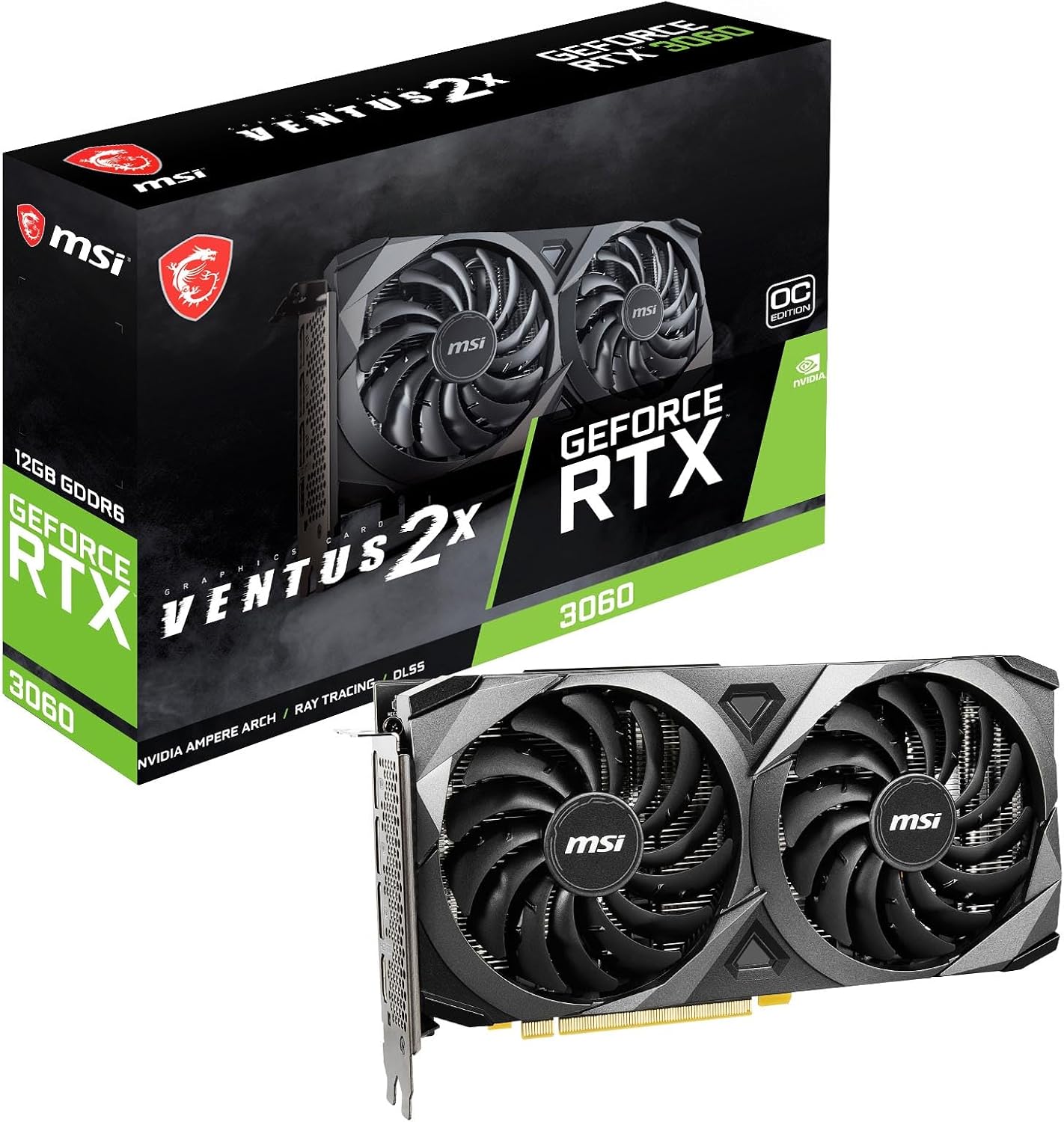
#6. MSI RTX 3060 Ventus 2X
GDDR6 Memory
Twin Fan Cooling
Ampere Architecture
The MSI RTX 3060 Ventus 2X OC is the no-nonsense take on a proven chip. You get 12GB of GDDR6 at 15 Gbps on a 192-bit bus, a 1807 MHz boost clock, and full Ampere ray tracing and Tensor core support — everything you need for high-refresh 1080p and entry 1440p gaming. The dual Torx fans keep the card compact while maintaining solid thermals.
The caveat is cooling headroom: with only two fans on a hot Ampere die, expect warmer sustained temperatures than triple-fan siblings, especially in airflow-limited cases. The output layout of three DisplayPorts plus HDMI 2.1 covers multi-monitor setups well. If you want RTX 3060 value in a shorter two-slot card and your case has decent airflow, this is a smart buy; hot-box builders should look at bigger coolers.
Pros
- 12GB VRAM capacity
- Compact dual-fan design
- Solid review rating
Cons
- Two-fan thermal limit
- Runs warm in tight cases
- Fewer reviews so far
Specifications
#7. ASRock RX 7600 Challenger
0dB Silent Mode
32MB Cache
Ray Tracing
The ASRock RX 7600 Challenger Pro OC punches above its price in 1080p and light 1440p gaming. You get a 2695 MHz boost clock, 32 RDNA 3 compute units with ray tracing and AI accelerators, and 32MB of Infinity Cache that cuts latency in the titles that matter. The triple-fan cooler with 0dB silent mode is the standout here — fans stop completely during light use, which you’ll notice immediately in a quiet room.
Be aware of the practical requirements: this is a 2.5-slot card measuring 303mm long, needs a single 8-pin connector and a recommended 550W supply, so measure your case first. The 8GB buffer is adequate today but tight for heavily modded or 4K-texture games. It’s a strong value pick for mainstream 1080p gamers; look higher if you want long-term VRAM headroom.
Pros
- Silent 0dB mode
- Strong 1080p clocks
- Triple-fan thermal headroom
Cons
- Long 303mm card
- 8GB VRAM limit
- Needs 550W supply
Specifications
#8. GIGABYTE RTX 3050 WINDFORCE
GDDR6 VRAM
Gaming Ready
WINDFORCE Fans
The GIGABYTE RTX 3050 WINDFORCE OC V2 is a sensible first dedicated GPU. You get 6GB of GDDR6, second-gen RT cores for ray tracing in lighter titles, and Tensor cores for DLSS upscaling that meaningfully lifts frame rates at 1080p. The dual WINDFORCE fans keep this short 7.5-inch card cool, making it a good match for smaller mid-tower builds.
Set expectations correctly: the 96-bit memory bus and 6GB buffer are fine for 1080p but will strain at higher resolutions or maxed textures. Installation is straightforward, and power draw is modest enough for most stock power supplies. If you’re moving up from integrated graphics and want modern features like ray tracing without a big investment, this fits well; skip it if you play at 1440p or above.
Pros
- Ray tracing at budget tier
- Compact 7.5-inch card
- Low power draw
Cons
- Only 6GB VRAM
- Narrow 96-bit bus
- Struggles above 1080p
Specifications
#9. SOYO GT 740 Low Profile
Slim PC Fit
Display Output
No Extra Cable
The SOYO GT 740 is a purpose-built rescue card for slim desktops. The half-height, low-profile design fits SFF cases the big cards can’t, and the triple HDMI, DVI, and VGA output means you can connect modern monitors and legacy projectors without adapters. Drawing all power from the PCIe slot, there’s no external connector to worry about, and the 128-bit bus with 4GB gives it a small edge over 2GB rivals.
Keep expectations grounded: this is a Kepler-era chip tuned for 1080p video, office multitasking, and light games like League of Legends, not modern AAA titles. If your display doesn’t wake after install, the legacy BIOS mode and 4G decoding toggles in the manual usually fix it. Ideal for reviving an older slim PC or building an HTPC; skip it for any serious gaming.
Pros
- Fits half-height slots
- Three display outputs
- Slot-powered, plug-and-play
Cons
- Weak for modern games
- Slow DDR3 memory
- 1080p resolution ceiling
Specifications
#10. QTHREE GT 730 4GB
SFF Fit
Multi-Display Output
No Power Cable
If your old desktop has no dedicated GPU, the QTHREE GT 730 gets you back to productivity fast. The low-profile design slips into slim and ITX cases, and the four outputs (2x HDMI, DP, VGA) drive up to four monitors at once for trading, office, or surveillance setups. At just 30W with no external power connector, it runs off virtually any power supply.
Be realistic about what this card is: with DDR3 memory and a Kepler-era chip, it handles HD video, browsing, and light multimedia, not modern games. Drivers install automatically and Windows 11 is supported, so setup is genuinely plug-and-play. It’s a smart budget fix for a dead integrated GPU or multi-monitor workstation; skip it entirely if gaming is on your agenda.
Pros
- Drives four monitors
- Fits slim SFF cases
- No external power needed
Cons
- Not for gaming
- Older Kepler architecture
- DDR3 memory is slow
Specifications
Finding a Video Card That Earns Its Spot in Your Build
A video card is often the single most expensive component in a PC, and it’s also the one that shapes your everyday experience the most. Whether you’re gaming, editing video, or simply driving a high-resolution monitor, the GPU you choose determines how smooth and responsive everything feels. That’s exactly why it deserves more than a five-minute decision — a little homework up front can save you from buyer’s remorse and a return shipping label. If you want a step-by-step framework, our guide to picking the right GPU for your PC build covers compatibility, budgeting, and bottleneck checks.
The Specs That Separate the Good From the Great
- Performance for your actual monitor. Match the card to your display, not to a benchmark chart. A card built for 4K is overkill for a 1080p screen, while an underpowered one will struggle to fill a high-resolution panel.
- Memory capacity and speed. Video memory affects how well a card handles detailed textures, large workloads, and multitasking. More isn’t always necessary, but too little will bottleneck you sooner than you’d like.
- Power supply and cooling. Check your PSU’s wattage and connectors before buying, and make sure your case has airflow and physical room for the card. A great GPU crammed into a hot, tight case won’t perform at its best.
- Noise and thermals. Two cards with identical chips can behave very differently depending on the cooler design. Reviews that measure noise and temperature under load are worth your time.
- Ports and connectivity. Count your monitor inputs and confirm the card has the right mix and quantity. Future-you will appreciate the flexibility.
- Sticking to your budget. The “best” card is the fastest one you can afford without starving the rest of your build. Skimping on the power supply or processor to afford a flagship GPU is a trade most people regret.
Traps That Catch Even Careful Shoppers
- Buying for a game or workload you don’t have. It’s easy to overspend chasing performance you’ll never use. Be honest about what you actually play or create.
- Ignoring the rest of the system. A powerful video card paired with an aging processor or a slow storage drive can leave performance on the table. Think of the GPU as part of a balanced whole, not a solo act.
- Forgetting about resale and support. Driver support, warranty length, and brand reputation vary more than most shoppers realize. A card from a manufacturer with solid long-term driver updates and an easy RMA process is worth a small premium.
Take your time, read a few trusted reviews, and buy for the way you actually use your PC — that’s how you end up with a card you’ll be happy with for years.
Your Next GPU Upgrade Starts Here
The ASUS Dual GeForce RTX 5060 Ti 16GB stands tall as the overall champion for gamers chasing top-tier 1440p performance and future-proof GDDR7 memory. If you’re team red, the GIGABYTE Radeon RX 9070 XT Gaming OC delivers raw rasterization muscle, while the ASUS Prime RX 9070 EVO balances power with quieter, cooler operation. Budget builders get serious value from the MSI RTX 3060 Ventus 2X or ASUS RTX 5060 8GB, and the ASRock RX 7600 Challenger Pro punches hard for the money. SFF and legacy system owners should eye the SOYO GT 740 or QTHREE GT 730 for reliable everyday displays.
Whichever card matches your rig and resolution, stock moves fast — hit the buttons above to check current prices and availability before your pick sells out.
Final 3 Picks: Overall Performer, High-End AMD, and 1440p Gaming
Ready to decide? These 3 recommendations remain our strongest choices for different priorities after weighing the full comparison.
ASUS RTX 5060 Ti Dual OC
- 16GB GDDR7 memory
- DLSS 4 with Blackwell
- Compact 2.5-slot design
ASUS RX 9070 Prime EVO
- 16GB GDDR6 memory
- Phase-change thermal pad
- Triple Axial-tech fans